Blame Wi-Fi Drivers (and mDNS) for Printer Discovery Problems
A technical investigation into why Wi-Fi printers and other mDNS-dependent devices randomly become undiscoverable, tracing the root cause to firmware and driver bugs in Intel, Qualcomm, MediaTek, and Ubiquiti hardware affecting multicast packet handling.
Your printer may work without problems most of the time, but when you urgently need it, the OS can't find it. If this sounds familiar, you're not alone — and the root cause is likely not the printer itself, but your Wi-Fi driver.
This article examines reliability issues with Wi-Fi device discovery using mDNS (Multicast DNS) and DNS-SD, documenting four major driver and firmware problems affecting auto-discovery across multiple platforms.
What Is mDNS and DNS-SD?
mDNS (Multicast DNS), also known as Bonjour, handles zero-configuration networking. It's used for:
- Network printer discovery
- Apple AirPlay and HomeKit
- Google Chromecast
- Sonos speakers
- Home Assistant
- IoT sensors and smart home devices
Key characteristics of mDNS:
- Uses multicast UDP packets (address 224.0.0.251 / ff02::fb, port 5353)
- Requires no centralized server
- Handles the .local zone for name queries
- Auto-resolves name conflicts through device renaming
DNS-SD (DNS Service Discovery) extends mDNS by assigning standardized names to service types. For example, _ipp._tcp.local identifies IPP printers, _airplay._tcp.local identifies AirPlay devices.
Problem #1: Intel Wi-Fi Modules
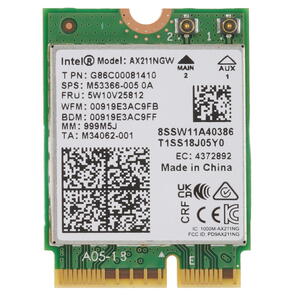
Intel modules including the AX201, AX210, AX211, and older AC8260 have a Windows driver bug that prevents mDNS from functioning after sleep/wake cycles. The issue has persisted since at least 2020 and remains unfixed as of late 2025.
The reproduction is straightforward: suspend and resume the device, then attempt DNS name resolution via PowerShell. After sleep cycles, no mDNS queries work at all. The issue sometimes resolves after toggling airplane mode, but this is unreliable.
Affected driver versions include AX211 (23.110.0.5, 22.240.0.6) and AX201 (22.40.0.7). Intel has not acknowledged the bug publicly.
Problem #2: Qualcomm QCA6174
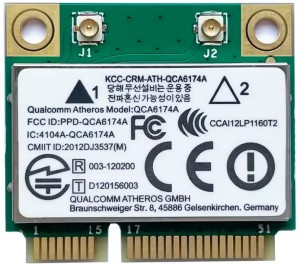
Microsoft Surface Go (1st generation) tablets with the QCA6174 module exhibit similar mDNS failures, but with less predictable patterns than Intel. The module lacks direct manufacturer driver support, making resolution unlikely. Driver version 12.0.0.1159 remains unsupported and unpatched.

Problem #3: MediaTek MT6572M
This legacy mobile SoC (circa 2009, used in devices like the Orange Pi 3G-IoT-A) incorrectly handles pure WPA2 encryption (AES/CCMP) for multicast traffic. The device receives unicast packets fine, but multicast packets — the foundation of mDNS — are silently dropped.
The fix is counterintuitive: switching from the "more secure" pure WPA2 mode to WPA/WPA2 mixed mode. This forces the router to use TKIP for multicast/broadcast traffic instead of AES, which the MediaTek chip handles correctly.

Problem #4: Ubiquiti Access Points
A user named sharhalakis spent 1.5 years diagnosing multicast failures on Ubiquiti access points. The root cause: the APs sometimes transmitted broadcast frames using an incorrect GTK (Group Temporal Key) index. When the receiving device tried to decrypt the frame with the key at the indicated index, decryption failed silently. This was fixed in firmware version 5.43.34.12682.
Why mDNS Is Uniquely Vulnerable
To understand why these bugs specifically affect mDNS while everything else seems to work, you need to understand how Wi-Fi encryption handles different traffic types.
Wi-Fi uses two types of encryption keys:
- PTK (Pairwise Temporal Key): A unique key for each client, used for unicast traffic and for client-to-AP multicast sends
- GTK (Group Temporal Key): A shared key for all clients, used by the AP when broadcasting or multicasting to clients
Here's the critical asymmetry: most network protocols send multicast packets only from clients (using PTK, which works reliably). But mDNS responds with multicast packets, meaning the AP must relay those responses to all clients using GTK. Since GTK handles far fewer traffic types than PTK, driver bugs in GTK processing go undetected — everything works except mDNS and similar multicast-response protocols.
GTK also rotates periodically (typically hourly to daily), which compounds the problem. A bug that only manifests after key rotation might not appear for hours after connecting to the network.
Multicast Group Membership
Devices must explicitly join multicast groups (like 224.0.0.251 for mDNS) via IGMP (Internet Group Management Protocol). Wi-Fi drivers may drop packets from groups the OS hasn't explicitly joined, citing power-saving concerns.
Membership reports have timeouts requiring periodic resending. If a driver's IGMP implementation is faulty, membership can silently expire, causing the device to stop receiving mDNS traffic without any error indication.
VPN and Multi-Interface Problems
Applications sending mDNS packets only through the default-route interface fail when VPN tunnels are active, routing packets through the VPN tunnel instead of the local network. Examples include KDE Connect and improperly configured VPN clients that lack split-tunnel exceptions for multicast traffic.
Recommended Solutions
If your devices show mDNS availability issues on fixed schedules (hourly or daily pattern), try these fixes in order:
- Router configuration: Disable IGMP filtering and IGMP Snooping options. These features are designed to optimize multicast traffic but often break it instead.
- Wi-Fi security mode: Switch to WPA/WPA2 Mixed mode to force TKIP for group keys. This is less secure but more compatible.
- GTK rotation: Completely disable GTK key rotation in your router settings. This reduces security slightly but eliminates a major source of intermittent failures.
- Network isolation: Create a separate (but non-isolated) Wi-Fi network dedicated to printers and IoT devices. This limits the blast radius of driver bugs.
Conclusion
The root cause of most printer discovery problems isn't the printer, the operating system, or the network protocol — it's buggy Wi-Fi drivers and firmware that fail to correctly handle multicast traffic. Until hardware vendors treat GTK and multicast handling with the same rigor as unicast traffic, these problems will continue to plague users who just want their printer to show up when they need it.
FAQ
What is this article about in one sentence?
This article explains the core idea in practical terms and focuses on what you can apply in real work.
Who is this article for?
It is written for engineers, technical leaders, and curious readers who want a clear, implementation-focused explanation.
What should I read next?
Use the related articles below to continue with closely connected topics and concrete examples.





