How DNS works in Linux. Part 3: Understanding resolv.conf, systemd-resolved, NetworkManager and others
We discussed the theoretical basis of DNS caching in Linux in first part , where they talked about the work of the name resolution process - from calling getaddrinfo() to obtaining an IP address. Second part was devoted to the various levels of caches of the system itself, applic
Editor's Context
This article is an English adaptation with additional editorial framing for an international audience.
- Terminology and structure were localized for clarity.
- Examples were rewritten for practical readability.
- Technical claims were preserved with source attribution.
Source: original publication
Series Navigation
- How DNS Works in Linux. Part 2: All Levels of DNS Caching
- How DNS works in Linux. Part 3: Understanding resolv.conf, systemd-resolved, NetworkManager and others (Current)
- How DNS works in Linux. Part 4: DNS in containers
We discussed the theoretical basis of DNS caching in Linux in first part, where they talked about the work of the name resolution process - from calling getaddrinfo() to obtaining an IP address. Second part was devoted to the various levels of caches of the system itself, applications and programming languages, containers, proxies - as well as their monitoring and resetting. Now is the time to move on to practice.
If you've ever run ping, curl, dig in a row and ended up with different IP addresses, you're not alone. DNS behavior in Linux is not just a challenge getaddrinfo(). This is the interaction of many layers: from glibc and NSS to NetworkManager, systemd-resolved, dnsmasq and cloud configurations. In this part we will look at the practical aspects of DNS:
why the same requests give different IPs
how name resolution is actually controlled: what calls whom and why
how to perform diagnostics: strace, resolvectl, tcpdump
Utilities and their paths to DNS
On Linux systems, resolving domain names to IP addresses is a fundamental process, but not all utilities do it the same way. There are competing mechanisms under the hood: the classic glibc/NSS stack (with its rules from /etc/nsswitch.conf, the local /etc/hosts file and caching services such as systemd-resolved), direct DNS queries (which ignore system settings) and alternative libraries (such as c-ares). These differences are often the source of unobvious discrepancies in tool performance, especially when diagnosing network problems.
A typical example is the difference in the output of getent hosts and dig for one domain:
$ getent hosts google.com
142.250.179.206 google.com
$ dig +short google.com
142.250.179.238
Here, getent relies on the systemd-resolved cache (via NSS), and dig bypasses system mechanisms by querying the DNS server directly.
To systematize these nuances, below is a summary of the behavior of popular utilities.
Utility | What causes | Uses NSS | Bypasses glibc | Peculiarities |
ping | getaddrinfo() | yes (via nsswitch.conf) | No | Completely dependent on libc. Doesn't work if NSS is broken. |
curl | getaddrinfo() or c-ares | yes (if without c-ares) | yes (if with c-ares) | Check: curl --version | grep c-ares. Without c-ares - depends on NSS. |
wget | getaddrinfo() | Yes | No | Similar to ping, but you can force IPv4/IPv6 (-4/-6). |
dig | Direct DNS query (UDP/TCP) | No | Yes | Always bypasses glibc/NSS, i.e. does not use /etc/hosts. |
nslookup | Direct DNS query | No | Yes | Historically considered obsolete. Similarly, dig bypasses glibc/NSS. |
getent hosts | gethostbyname() (NSS) | Yes | No | Reads sources specified in nsswitch.conf |
Python | gethostbyname() (libc) getaddrinfo() (libc) Direct request (if pycares) | yes (standard functions) no (pycares) | no (standard functions) yes (pycares) | Standard functions (gethostbyname, getaddrinfo) depend on NSS/libc. Pycares always bypasses system settings. The behavior of reverse DNS (getnameinfo) is similar to the forward functions. |
host | Direct DNS query | No | Yes | An analogue of nslookup with laconic output. Reads /etc/resolv.conf, ignores /etc/hosts |
resolvectl | D-Bus → systemd-resolved | No | Yes | Shows systemd-resolved settings, cache management (for example, flush-caches). Does not make DNS queries - communicates with the daemon via D-Bus |
In this way, you can divide utilities into “system” and “direct”:
NSS dependent: ping, wget, getent, curl (without c-ares) - reflect the system state (cache, /etc/hosts, nsswitch.conf settings).
NSS bypasses: dig, nslookup, curl (with c-ares) - ignore local rules, accessing DNS directly.
Practical tips:
If ping and curl return different IPs, the reason is usually the NSS cache or /etc/hosts settings.
When working with curl/wget, be aware of their dependency on libc: discrepancies may indicate problems in NSS (for example, incorrect nsswitch.conf).
To check system permission (including /etc/hosts) use getent, host or ping.
To validate the operation of the DNS server, use dig/nslookup - they do not look into local files.
Bottom line: Understanding the internal mechanisms of name resolution is critical when debugging network problems. Always refer to the table above to ensure you choose the right tool: checking local settings requires NSS-dependent utilities, while DNS diagnostics require "direct" queries to bypass the system.
Who actually controls resolv.conf?
Once upon a time, in a distant Galaxy, DNS was configured by simply editing /etc/resolv.conf:
nameserver 8.8.8.8
nameserver 1.1.1.1
search example.com
Now the file with the contents nameserver 127.0.0.53 and warning “DO NOT EDIT” may shock. The reason for this change is the evolution of the DNS infrastructure:
Previously: applications → resolv.conf → DNS server
Now: applications → local DNS proxy → upstream servers
In modern distributions, /etc/resolv.conf is most often not a manual configuration, but an automatically generated config created and maintained by system components: systemd-resolved, NetworkManager, resolvconf or their analogues like openresolv. This automation brings flexibility (different DNS for different networks, DNSSEC, LLMNR/mDNS), but also some potential problems:
Settings may disappear after a network reboot or package update.
VPN connection conflicts that try to rewrite DNS.
Difficulties using local domains or specific DNS servers.
Difficulty debugging: where do requests actually go?
So who's in charge? systemd-resolved? NetworkManager? How to take back control?
Let's understand this maze: what tools claim to manage /etc/resolv.conf, how they interact, and what controls we have to make DNS work the way we want it to.
dhclient
This is a standard DHCP client on Linux systems and is included in the ISC DHCP package. Its main task is to automatically obtain network settings (IP address, netmask, gateway, DNS server) from the DHCP server and apply them locally.
By default, the DHCP client (the /sbin/dhclient program) does not modify /etc/resolv.conf directly. Instead, the helper script /sbin/dhclient-script is called, which receives parameters (including DNS servers) from the DHCP server.
Inside the dhclient-script there is a function called make_resolv_conf(), which generates the contents of the /etc/resolv.conf file and writes the new DNS settings.
In addition, so-called hooks (scripts) are used, which are located in the /etc/dhcp/dhclient-exit-hooks.d/ or /etc/dhcp/dhclient-enter-hooks.d/ directories. They allow you to change the logic of forming or rewriting /etc/resolv.conf by overriding functions or adding your own parameters.
Diagnostics:
# Проверить конфигурацию DHCP-клиента
cat /etc/dhcp/dhclient.conf
# Запустить dhclient в debug-режиме
dhclient -v -d <интерфейс>  # выведет подробный лог, включая обработку DNS).
# Проверить lease-файл DHCP**
cat /var/lib/dhcp/dhclient.leases # там хранятся полученные параметры, включая DNS-серверы
resolvconf
This is an outdated but sometimes used utility tool for centrally managing the contents of the /etc/resolv.conf file on UNIX-like systems. It saves and updates /etc/resolv.conf, collecting DNS settings from various sources: DHCP clients, VPN clients, network interfaces, NetworkManager, allows several programs and services to enter their DNS servers, dynamically generating the final config for the system. Runs as a daemon or as a set of hook scripts that are called when the network configuration changes, accepts incoming DNS settings through a program or script calls, updates the cache and generates the final /etc/resolv.conf.
resolvconf uses templates to generate the resulting DNS file:
- /etc/resolvconf/resolv.conf.d/head — inserted at the beginning of the result.
- /etc/resolvconf/resolv.conf.d/base — database of domains and servers.
- /etc/resolvconf/resolv.conf.d/tail - added to the end.
resolvconf can be used by other services (eg NetworkManager, dhclient, openvpn) to centrally update the DNS config.
Often replaced or disabled in modern distributions in favor of systemd-resolved or other solutions, but maintained for backwards compatibility.
Diagnostics:
# Вывод актуальной информации
resolvconf -l
# Обновить /etc/resolv.conf
resolvconf -u
systemd-resolved
This is a local caching DNS server (systemd-networkd)
The systemd-resolved process is listening 127.0.0.53:53, and nameserver in resolv.conf points to 127.0.0.53 respectively.
The /etc/resolv.conf file is usually a symlink to /run/systemd/resolve/stub-resolv.conf
In turn, /run/systemd/resolve/stub-resolv.conf contains 127.0.0.53, and a direct list of upstream DNS can be found in the file /run/systemd/resolve/resolv.conf.
Diagnostics:
# Основная информация о состоянии
resolvectl status
# Статистика запросов
resolvectl statistics
# Информация по конкретному интерфейсу
resolvectl status eth0
dnsmasq
This is a simple DHCP/DNS server that often works as a local cache at 127.0.0.1:53.
Usually dnsmasq does not write to resolv.conf on its own, but reads upstream from resolv.conf and uses the directive --server= at startup, or the servers are registered in the configuration file /etc/dnsmasq.conf.
Diagnostics:
# Перезагрузка конфигурации
sudo kill -USR1 $(pidof dnsmasq)
# Проверка параметров запуска
ps aux | grep dnsmasq
NetworkManager
This is a tool for automatic network configuration in most modern desktop and server Linux distributions. It was developed by Red Hat in 2004 to simplify modern networking tasks. Interacting with it “simplifies” working with the network so much that many system administrators disable it immediately.
Typically, NetworkManager receives settings from DHCP (via an internal DHCP plugin or an external dhclient), accepting DNS servers from the DHCP response (option domain-name-servers), and passes them to the system DNS management service.
The behavior of DHCP DNS processing can be controlled through the ipv4.ignore-auto-dns parameter:
ipv4.ignore-auto-dns=no(default) - NM uses DNS servers obtained from DHCPipv4.ignore-auto-dns=yes- ignore DNS from DHCP and use only statically defined servers
NetworkManager itself does not process DNS queries or listen on port 53, but depending on the settings, starts dnsmasq (which listens on 127.0.0.1:53) or interacts with systemd-resolved (usually listens on 127.0.0.53:53).
What is launched depends on the dns parameter in /etc/NetworkManager/NetworkManager.conf:
dns=systemd-resolved - only systemd-resolved is used.
dns=dnsmasq - dnsmasq is launched via NetworkManager.
dns=none — NetworkManager does not take over the functions of managing DNS resolution
dns=default — NetworkManager decides what to do.
When interacting with systemd-resolved, NetworkManager acts as a configuration manager, passing DNS parameters through the systemd-resolved D-Bus API, but not directly participating in the processing of DNS queries.
Then we will see the following picture:
resolvectl status       # отображает текущие DNS-серверы, которые systemd-resolved получил от NetworkManager
nmcli dev show | grep DNS # показывает DNS-серверы, которые NetworkManager передал в systemd-resolved
When working with dnsmasq, NetworkManager starts its own instance of dnsmasq.
In this case, dnsmasq will take the basic settings, such as the list of upstream servers, from the generated '/run/NetworkManager/dnsmasq.conf', as well as in additional files from the directory '/etc/NetworkManager/dnsmasq.d/. Management of /etc/resolv.conf depends on the rc-manager option. NM independently rewrites /etc/resolv.conf (rc-manager=file) with nameserver 127.0.0.1 in it, or creates a symlink (default value, rc-manager=symlink) to its service file /run/NetworkManager/resolv.conf so that all applications access dnsmasq.
In the default setting, NetworkManager usually decides what to select in the following way:
If systemd-resolved is active (systemctl is-active systemd-resolved), NM will use dns=systemd-resolved.
If systemd-resolved is not active, and the NM assembly contains dnsmasq, then it launches its own instance of dnsmasq (analogous to dns=dnsmasq).
There is neither systemd-resolved nor dnsmasq - NM itself writes resolv.conf with DNS from DHCP/static.

Diagnostics:
# Информация о DNS по интерфейсам
nmcli dev show
# Проверка конфигурации NetworkManager
cat /etc/NetworkManager/NetworkManager.conf
unbound
This is a recursive and caching DNS server.
The unbound process listens on port 53 by default on local interface 127.0.0.1:53. Settings are changed in the /etc/unbound/unbound.conf configuration file.
Diagnostics:
sudo unbound-control status       # Проверка состояния
sudo unbound-control stats_noreset # Статистика запросов
journalctl -u unbound -f          # Логи в реальном времени
BIND
Berkeley Internet Name Domain is a full-fledged DNS server.
BIND was the first software to implement the DNS standard (RFC 1034/1035) and is still the most widely used DNS server on the Internet. Also often used in corporate networks.
Its named system process listens on port 53 on all interfaces (0.0.0.0:53) by default. The behavior can be configured in the /etc/named.conf configuration file. Zone configurations are typically stored in /var/named.
Diagnostics:
sudo rndc status              # Проверка работы
sudo named-checkconf   # Проверка синтаксиса конфига
sudo rndc querylog on    # Включение логгирования (по умолчанию выключено)
tail -f /var/log/named/queries.log  # Просмотр запросов в реальном времени
journalctl -u named -f    # Системные логи (если используется systemd)
cloud-init
This is a standard tool for initializing cloud instances (AWS, Azure, GCP, OpenStack, etc.). Performs initial network setup at the initial boot stage of the virtual machine, including installation of DNS servers (obtained through cloud provider metadata or from the configuration), modification of /etc/resolv.conf, integration with other services (systemd-resolved, NetworkManager). Once initialized, it typically hands over DNS control to other services (eg NetworkManager).
Diagnostics:
# Проверить, активен ли cloud-init
sudo systemctl status cloud-init
# Просмотреть логи инициализации
sudo cat /var/log/cloud-init.log | grep "DNS"
# ключевые параметры в /etc/cloud/cloud.cfg:
manage_resolv_conf: true  # Разрешает cloud-init менять resolv.conf
resolv_conf:
  nameservers: ["8.8.1.1"]  # Статические DNS (если не получены от облака)
  search_domains: ["example.com"]
netplan
This is a standard network configuration tool in Ubuntu distributions (since 17.10). Works as an abstract layer between YAML configs and low-level backends (systemd-networkd or NetworkManager).
Depending on the network.renderer option (networkd/NetworkManager):
Netplan generates a config for systemd-networkd, which passes the DNS settings to systemd-resolved, which in turn creates:
/run/systemd/resolve/stub-resolv.conf→ contains nameserver 127.0.0.53 (symbolic link to /etc/resolv.conf)/run/systemd/resolve/resolv.conf→ real upstream servers (read-only)
or
Netplan generates a config in /run/NetworkManager/conf.d/netplan.conf, and NetworkManager applies the settings:
dns=systemd-resolved- creates /run/NetworkManager/resolv.conf → link to stub-resolv.confdns=dnsmasq- points to /etc/resolv.conf → nameserver 127.0.0.1
Diagnostics:
# Проверить актуальный бэкенд
sudo netplan info
grep "renderer" /etc/netplan/*.yaml
The Independent Arbiter: Tracing as an Instrument of Truth
When static analysis of configurations (resolv.conf, resolvectl, NetworkManager) and service states do not give an unambiguous picture or their data contradicts real behavior, tracing comes to the rescue. It shows the operation of the system in dynamics, bypassing layers of abstraction and potential configuration inconsistencies.
This is the final arbiter for testing hypotheses about who actually handles the DNS request. Used to detect hidden problems such as ignoring resolv.conf entries, incorrect choice of upstream, auditing and documenting where requests actually go in a complex environment.
For tracing we use two powerful tools:
strace- shows the interaction of the application with the kernel.tcpdump- shows real network traffic.
1. System calls with strace. Let's see what the application is trying to do.
# Отслеживание сетевой активности приложения:
strace -f -e trace=network curl -s http://example.com > /dev/null

# Поиск обращения к конфигурации DNS:
strace -e openat,read,open myapp 2>&1 | grep -i resolv.conf
Key points to analyze:
socket(AF_INET, SOCK_DGRAM, ...)– creating a UDP socket (the main DNS protocol).
connect()orsendto()to port 53 – an attempt to send a DNS request to a specific address:port.
Reading /etc/resolv.conf
(openat, read)– the application uses the classic mechanism, relying on this file. Servers from it can be used (but not a fact, see tcpdump!).
Not reading /etc/resolv.conf is a strong indicator that the application is using an alternative name resolution mechanism (for example, directly through the systemd-resolved API), explaining the operation of nameserver 127.0.0.53 without explicitly reading the file.
2. Network traffic with tcpdump. Where do requests actually go?
# Общий мониторинг DNS (UDP/TCP порт 53):
sudo tcpdump -ni any port 53
# Мониторинг конкретного интерфейса:
sudo tcpdump -ni tun0 port 53
# Для чистоты эксперимента: одна консоль - tcpdump, другая - `dig example.com`
Interpretation:
Public DNS queries (8.8.8.8:53, 1.1.1.1:53): The application or proxy accesses external servers directly.
Important: if /etc/resolv.conf specifies 127.0.0.53 (or another local address), but requests go directly outside, this is a problem (the application/proxy ignores the settings).
Requests only to 127.0.0.53:53 are a classic sign of working through systemd-resolved.
Requests to 127.0.0.1:53 (or other localhost) – points to another local DNS proxy (dnsmasq, unbound, etc.).
No requests during repeated calls - most likely, the cache (local in the application, in systemd-resolved or another proxy) has worked.
Requests to unexpected addresses - possible influence of VPN (if its DNS is visible) or malware.
3. Analysis of upstream servers. Where does the local proxy look?
If you are running a local proxy (systemd-resolved, dnsmasq), it is important to check which actual servers it is sending requests to.
# Фильтрация локального трафика между приложением и прокси:
sudo tcpdump -n port 53 and not \(host 127.0.0.53 or host 127.0.0.1\)
What does it give:
Shows only queries that the proxy sends to external (upstream) DNS servers.
Allows you to check whether the proxy is using the specified servers.
Critical to detecting DNS leaks, especially when using a VPN: if you see queries to your ISP or public DNS servers rather than the VPN server when the tunnel is active, it's a leak.
As a result, the trace removes all layers of abstraction and shows the actual route of the DNS request.
Comparing the results of strace/tcpdump with the static configuration gives a complete understanding of who controls name resolution on your system and how.
Practice
Now that we have examined the main components and diagnostic methods, let's move on to practical application. Below I tried to compile the information into a short step-by-step algorithm that will help you determine which service controls DNS and where to look for possible configuration problems.
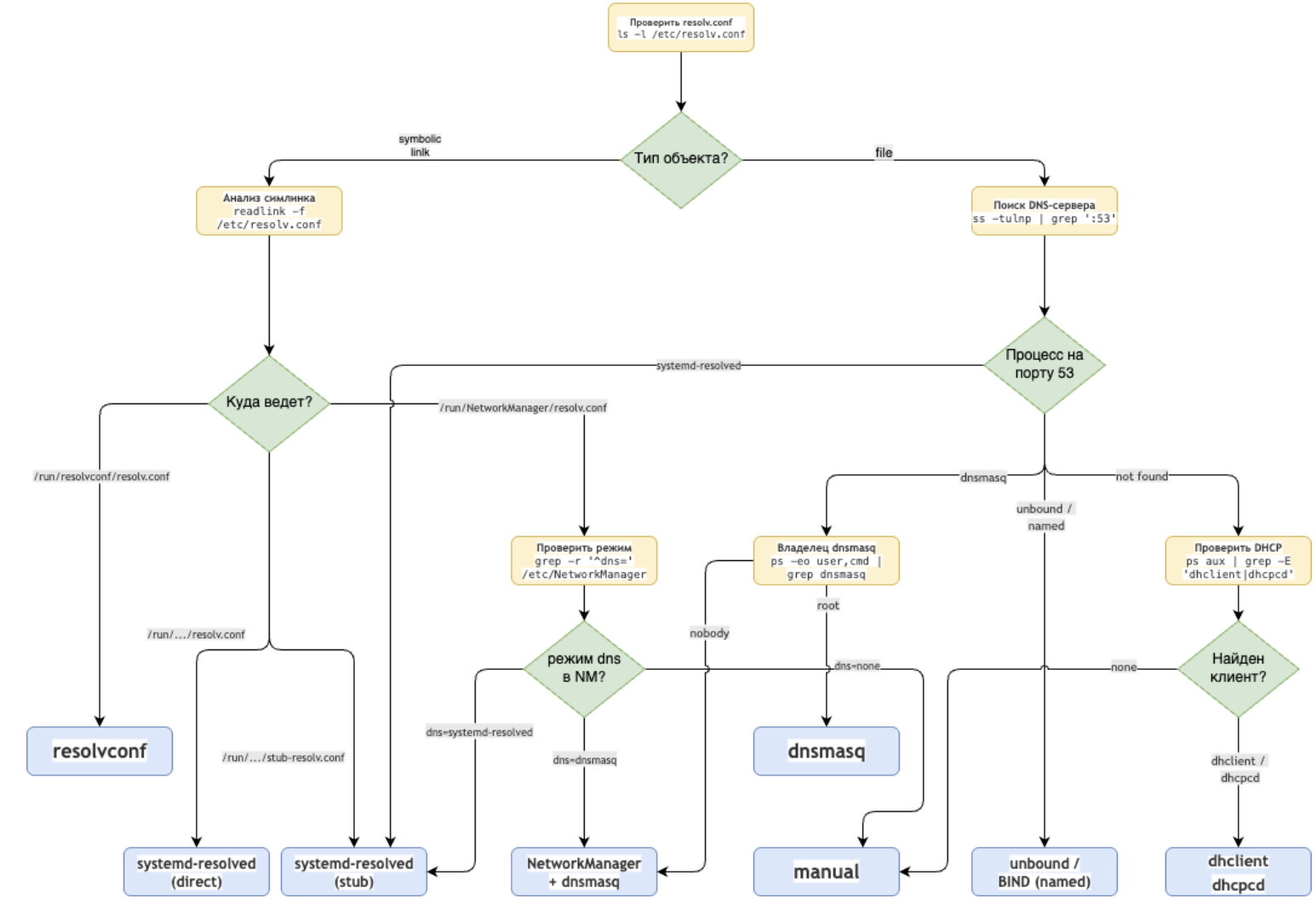
Reboot or not reboot? Mechanisms for reading resolv.conf and the need to restart applications
As we have already learned, the /etc/resolv.conf file is a key component of the DNS resolution system in Linux. Not only is it managed differently, but the way it is handled by different applications and runtimes differs significantly, which has important consequences when changing the DNS configuration.
There are three main approaches to how applications work with the resolv.conf file:
1. Direct reading on every request (glibc, standard utilities)
The getaddrinfo() system call is used, checking the mtime of the file before each read. Example implementation in glibc:
if (stat("/etc/resolv.conf", &statb) == 0 &&
    statb.st_mtime != _res.res_conf_mtime) {
    __res_vinit(&_res, 1); // Перечитывание файла
}
Advantages: Instant response to changes
Disadvantages: Additional system calls for each DNS request
2. Caching at startup (Java, Go <1.21)
The configuration is loaded once during initialization and is stored in static variables. Example in Go (before version 1.21):
var dnsConf struct {
    sync.Once
    conf *dnsConfig
}

func initDNS() {
    dnsConf.Do(func() {
        // Чтение происходит только один раз
        dnsConf.conf = dnsReadConfig("/etc/resolv.conf")
    })
}
Advantages: High performance, no unnecessary I/O operations
Disadvantages: Requires application restart when DNS changes
3. Hybrid approach (browsers, modern languages)
Initial reading at startup with periodic checking for changes via:
- inotify (Linux)
- kqueue (BSD)
- D-Bus (system events)
// Пример в Node.js
const fs = require('fs');
const { Resolver } = require('dns');
const resolver = new Resolver();

// Функция для обновления DNS-серверов
function updateDNS() {
  try {
    const data = fs.readFileSync('/etc/resolv.conf', 'utf8');
    const servers = data.split('\n')
      .filter(line => line.startsWith('nameserver'))
      .map(line => line.split(/\s+/)[1]);

    resolver.setServers(servers);
    console.log('DNS серверы обновлены:', servers);
  } catch (err) {
    console.error('Ошибка чтения resolv.conf:', err);
  }
}

// Инициализация при запуске
updateDNS();

// Отслеживание изменений
fs.watch('/etc/resolv.conf', () => {
  console.log('Обнаружено изменение resolv.conf!');
  updateDNS();
});
In summary, the need to restart the application when there is a change in the resolv.conf file is determined by the following factors:
A. Level of integration with the system
- Applications using glibc directly (C, Python via ctypes) do not require a restart
- Languages with their own runtime (JVM, Go before 1.21) often cache the configuration
B. Resolver Architecture
- Static implementations (traditional proxy servers) require a restart
- Dynamic systems (Envoy, modern browsers) can be updated on the fly
Thus, a basic set of practical conclusions can be formulated as follows.
The following work without restarting:
- Standard Linux utilities (ping, curl, dig)
- Python/Ruby scripts with native bindings
- Applications with explicit support for dynamic updates (Chrome, Firefox)
- Go programs version 1.21 and higher (with the GODEBUG=netdns=go flag)
Requires restart:
- JVM applications (due to static initialization and caching in InetAddress)
- Go programs up to version 1.21
- Traditional proxy servers (nginx without resolver directive)
- Long-lived demons without a configuration reload mechanism
Conclusion
DNS in Linux is a multi-layered system, where /etc/resolv.conf is just the tip of the iceberg. Settings can be dictated by systemd-resolved, NetworkManager, dhclient, cloud-init and other components, and utility behavior can depend on caching, nsswitch.conf, and even when and how the application reads the configuration.
We saw that the same DNS queries can give different results depending on the utility used, that resolv.conf is often generated dynamically by several sources at once, and effective diagnostics require not only analyzing configurations, but also monitoring real behavior - through strace, tcpdump and proxy server logs.
To effectively resolve DNS issues:
- Unambiguously determine who and how creates /etc/resolv.conf on your system.
- Use the right tools for the right purpose (“systemic” or “direct”).
- Keep in mind that not all applications automatically notice DNS changes - sometimes a restart is necessary.
- If in doubt, tracing will always show the true routes of requests.
Understanding these mechanisms will not only save hours of debugging, but will also allow you to design infrastructure where domains resolve predictably—including in dynamically changing networks and complex routing rules.
IN next part We'll dive into how DNS works in container environments: Docker, Podman, Kubernetes, and how to avoid losing control of resolution in isolated namespaces and virtual networks.
Why This Matters In Practice
Beyond the original publication, How DNS works in Linux. Part 3: Understanding resolv.conf, systemd-resolved, NetworkManager and others matters because teams need reusable decision patterns, not one-off anecdotes. We discussed the theoretical basis of DNS caching in Linux in first part , where they talked about the work of the name resolution process -...
Operational Takeaways
- Separate core principles from context-specific details before implementation.
- Define measurable success criteria before adopting the approach.
- Validate assumptions on a small scope, then scale based on evidence.
Quick Applicability Checklist
- Can this be reproduced with your current team and constraints?
- Do you have observable signals to confirm improvement?
- What trade-off (speed, cost, complexity, risk) are you accepting?



