How I Hacked GitHub Again
A security researcher chains five low-severity OAuth vulnerabilities together to gain full access to any GitHub user's private repositories, earning a $4,000 bug bounty.
This is the story of how I chained 5 low-severity bugs into one big bug that could be used to read and write to private repos on GitHub (again).
A few days ago, GitHub launched a bug bounty program. Within 4 hours, I crafted a URL that, once visited, would give me access to your GitHub account and repositories. Want to know how?
I started by examining GitHub OAuth.
Bug 1. Bypassing redirect_uri Validation with /../
This one is simple — you could send /path1/../path2 to overwrite the previous path (path traversal).
Bug 2. No redirect_uri Validation When Obtaining a Token
The first bug alone is worthless. OAuth2 has a built-in protection where each issued code has a corresponding redirect_uri, and when exchanging the code for a token, you must provide the same URI that was used initially. In simple terms, if a code was returned to site/callback, then to obtain the token you also need to send site/callback.
Surprisingly, GitHub's implementation of this check was incorrect. You could issue a code for /path1/../path2 and then use it with /path1. This means that codes leaked through referrers remained valid even for the legitimate callback. Using these two bugs together, you could leak codes through referrers on sites that offer "Login with GitHub" functionality. A similar bug existed on vk.com.
Bug 3. Images on Gist
I started examining GitHub's official clients — Education, Pages, Speakerdeck, Gist. The first two didn't really use OAuth, the third wasn't part of the bounty program, but Gist was a perfect fit. It was a "pre-approved" client, meaning it was installed by default for all users.
However, you couldn't just insert  because GitHub's Camo proxy would replace it with a local URL, and the referrer wouldn't leak to your server. To bypass this protection, I used a fairly new trick:
///host.com is parsed as a path by all server-side libraries including Ruby, but browsers parse it as a host and load host.com instead of github.com///host.com.

Our exploit URL now looks like this:
github.com/login/oauth/authorize?client_id=7e0a3cd836d3e544dbd9&redirect_uri=https%3A%2F%2Fgist.github.com%2Fauth%2Fgithub%2Fcallback/../../../homakov/8820324&response_type=codeAs soon as a user loads this address, GitHub automatically redirects to my gist containing an image hosted on my server:
Location: gist.github.com/auth/github/callback/../../../homakov/8820324?code=CODEThe browser loads gist.github.com/homakov/8820324?code=CODE
And when requesting our image, it leaks the referrer.

Once we obtain the victim's CODE, we can open gist.github.com/auth/github/callback?code=CODE — voila. We're logged in as the victim on Gist and have access to their private gists.
Bug 4. Token Stored in Cookies
This is an OAuth antipattern — it's strongly discouraged to store or expose the token to the browser. However, Gist stores it in the Rails session, which, as we know, is simply a base64-encoded and signed cookie.

There it is — github_token. Now we can make requests directly, bypassing the Gist website. But the token has scope = gists, and besides gists I can't read anything. Although...
Bug 5. Automatic Approval of Any Scope for Official Clients
The final touch. Since Gist is an official GitHub client, you don't see the "Approve these scopes" dialog — GitHub approves them for you automatically. This means I can simply send:
github.com/login/oauth/authorize?client_id=7e0a3cd836d3e544dbd9&redirect_uri=https%3A%2F%2Fgist.github.com%2Fauth%2Fgithub%2Fcallback/../../../homakov/8820324&response_type=code&scope=repo,gists,user,delete_repo,notifications
Then use the leaked CODE to log into the victim's account, read the cookie, extract the github_token, and from there I can make API calls completely unnoticed by the user — because the token belongs to Gist! Stealth mode, essentially — a crime without a trace.
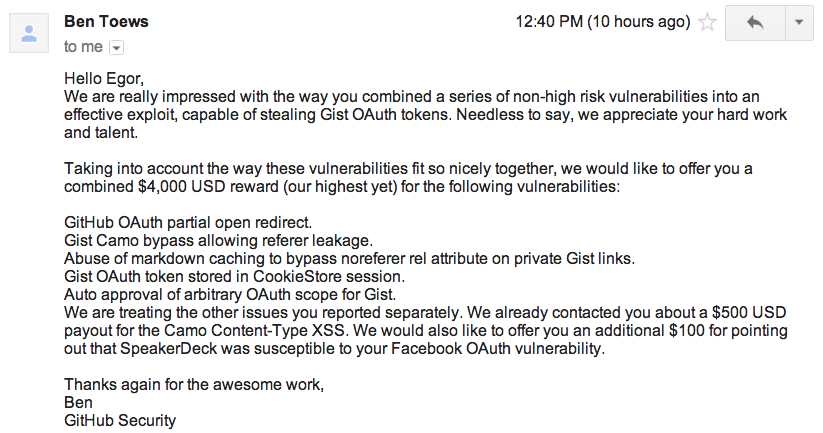
The bounty was $4,000.
And by the way, I'm available for hire.



