How to increase the speed of python scripts: C extensions and Python/C API
During software development, we are faced with a choice between the convenience of a language and its performance. Python has gained popularity due to its simplicity and elegance, but when it comes to low-level activities or shenanigans that require performance and speed, C comes
Editor's Context
This article is an English adaptation with additional editorial framing for an international audience.
- Terminology and structure were localized for clarity.
- Examples were rewritten for practical readability.
- Technical claims were preserved with source attribution.
Source: original publication
During software development, we are faced with a choice between the convenience of a language and its performance. Python has gained popularity due to its simplicity and elegance, but when it comes to low-level activities or shenanigans that require performance and speed, C comes to the rescue.
We will study specifically the integration of extensions at build time, and not just loading libraries through ctypes.
In this article I want to talk about how to integrate C extensions using the Python.h library. I will also tell you how to create your own python library with C extensions. We'll also explore how Python is structured - for example, remember that everything is an object. I will use poetry as my desktop environment manager.
Everything will be created using the example of my small library for various algorithms and calculations. At the end, I will analyze pure-python algorithms, our library and pure-c algorithms: execution speed, dissemination, pros and cons, amount of code.
I won't delay, let's get started!
So, let's say you want to implement some functionality in your project. But you realize that pure python is too slow or too high-level to solve your problem. Therefore, you can create C extensions that implement speed-critical code.
C extensions are only available for cpython, the python reference implementation.
Python also allows you to create C extensions that perform operations without GIL - Global Interpreter Lock.
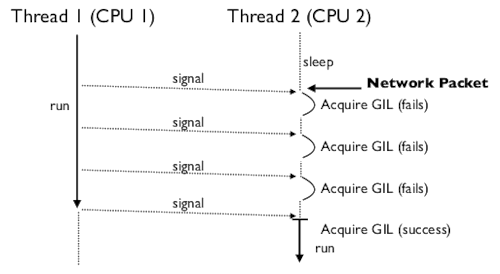
The GIL imposes some restrictions on threads, namely that multiple processors cannot be used simultaneously. It is a mutex that blocks access to the Python interpreter object in multi-threaded environments, allowing only one instruction to be executed at a time. This mechanism, although it takes care of data integrity, can slow down the program.
But you can also transfer other tasks to C extensions, such as:
Compute-intensive: algorithms that require a large number of heavy mathematical operations. For example, the fast Fourier transform (which we will look at in this article) or complex matrix operations.
Low-level programming: direct memory access, system calls, low-level work with sockets and input/output devices.
Implementation of functionality that is often used and is a bottleneck.
Direct work with C libraries.
Data compression and decompression algorithms.
It is important to understand that sometimes it is not worth writing everything in C, sometimes you can get by with ordinary optimizations and profiling.
Setting up the environment
So how do you usually start creating python projects? It’s trivial to create a virtual environment
python3 -m venv venv
source venv/bin/activate
But for this project I decided to move away from this method and use the Poetry project management system instead. Poetry is a tool for managing dependencies and building packages in Python. Poetry also makes it very easy to publish your library on PyPi!
Poetry provides the complete set of tools you need for deterministic project management in Python. Including building packages, supporting different versions of the language, testing and deploying projects.
You can install poetry via pipx: pipx install poetry and via pip: pip install poetry --break-system-requirements. This will install poetry globally across the entire system.
Let's initialize the project in the home directory:
poetry init
But in order for us to write extensions in C, we will need to access Python's C API (the python.h header file). To do this you need to install the package python-dev or python3-dev.
To activate the virtual environment poetry shell or poetry env activate (or eval $(poetry env activate)
But that's not all. Since we are using extensions in the compiled language C, we will need to create a build script (build.py):
"""Build script."""

from setuptools import Extension
from setuptools.command.build_ext import build_ext

extensions = [
	Extension("libnumerixpy.base", sources=["ext/src/lnpy_base.c"]),
	Extension("libnumerixpy.math.basemath", sources=['ext/src/libbasemath.c', "ext/src/lnpy_basemath.c"], include_dirs=['ext/src']),
]

class BuildFailed(Exception):
	pass

class ExtBuilder(build_ext):
	def run(self):
		try:
			build_ext.run(self)
		except Exception as ex:
			print(f'[run] Error: {ex}')

	def build_extension(self, ext):
		try:
			build_ext.build_extension(self, ext)
		except Exception as ex:
			print(f'[build] Error: {ex}')

def build(setup_kwargs):
	setup_kwargs.update(
		{"ext_modules": extensions, "cmdclass": {"build_ext": ExtBuilder}}
	)
My project is called libnumerixpy, I will implement some functions for mathematical calculations. Let's look at the code:
extensions = [
	Extension("libnumerixpy.base", sources=["ext/src/lnpy_base.c"]),
	Extension("libnumerixpy.math.basemath", sources=['ext/src/libbasemath.c', "ext/src/lnpy_basemath.c"], include_dirs=['ext/src']),
]
This is a list of extensions, module names and paths to source code files, as well as directories to include (it needs to see libbasemath.h, which we will write in the future).
ext
└── src
    ├── libbasemath.c
    ├── libbasemath.h
    ├── lnpy_base.c
    └── lnpy_basemath.c
We'll look at them later. But before we explore the Python C API, let's include our build script in pyproject.toml:
[build-system]
requires = ["poetry-core", 'setuptools']
build-backend = "poetry.core.masonry.api"
pyproject.toml is our project file where meta information, dependencies and build rules are located. It is automatically created if you use poetry.
Python C-API
So, in order to write extensions in Python, we need to learn the Python/C API.
The Python/C API is a Python application programming interface that provides developers with access to a Python interpreter.
To write C code for Python there is PEP7.
Here are its main provisions:
C standard version is C11 (python >=3.11, and python 3.6-3.10 uses C89/C99)
Do not use compiler-specific extensions.
All function declarations and definitions must use full prototypes (that is, specify the types of all arguments).
No warnings during the compilation process (major compilers).
Use 4 spaces indentation (no tabs). In my opinion, this part is rarely followed.
No line should be longer than 79 characters.
Function definition style (function type in the first line, name and arguments in the second, parentheses in the third, empty line after declaring local variables):
static PyObject
*calculate_discriminant(PyObject *self, PyObject *args) {
	double a, b, c;

	if (!PyArg_ParseTuple(args, "ddd", &a, &b, &c)) {
		return NULL;
	}

	double discriminant = b * b - 4 * a * c;

	return Py_BuildValue("d", discriminant);
}
And the code example itself looks like this:
#define PY_SSIZE_T_CLEAN
// #define Py_GIL_DISABLED // Подключать только если включена экспериментальная функция отключения GIL в Python 3.13
#include <Python.h>

/**
 * @brief      Execute a shell command
 *
 * @param      self  The object
 * @param      args  The arguments
 *
 * @return     status code
 */
static PyObject
*lnpy_exec_system(PyObject *self, PyObject *args)
{
	const char *command;
	int sts;

	if (!PyArg_ParseTuple(args, "s", &command)) {
		return NULL;
	}
	sts = system(command);

	return PyLong_FromLong(sts);
}

static PyMethodDef LNPYMethods[] = { { "exec_shell_command", lnpy_exec_system, METH_VARARGS,
									   "Execute a shell command." },
									 { NULL, NULL, 0, NULL } };

static struct PyModuleDef lnpy_base = { PyModuleDef_HEAD_INIT, "base", NULL, -1, LNPYMethods };

PyMODINIT_FUNC PyInit_base(void) { return PyModule_Create(&lnpy_base); }
Macros
The Python/C API has several useful macros. Let's look at a few of them:
PyMODINIT_FUNC
It is needed to set the module initialization function (PyInit). The function must return a PyObject.
The initialization function must have a name in the format PyInit_name, where name is the name of the module, and the function must be the only non-static element.
Examples of use:
static struct PyModuleDef lnpy_base = { PyModuleDef_HEAD_INIT, "base", NULL, -1, LNPYMethods };

PyMODINIT_FUNC PyInit_base(void) { return PyModule_Create(&lnpy_base); }
From official documentation:
static struct PyModuleDef spam_module = {
    PyModuleDef_HEAD_INIT,
    .m_name = "spam",
    ...
};

PyMODINIT_FUNC
PyInit_spam(void)
{
    return PyModule_Create(&spam_module);
}
Py_ABS(x) - Returns the absolute value of x.
Py_MAX(x, y) is the maximum value among x and y.
Py_MIN(x, y) - minimum value among x and y
Py_STRINGIFY(x) - turns x into a string (Py_STRINGIFY(123) > "123")
PyDoc_STRVAR(name, str) - Creates a variable called name, which can be used in docstrings.
PyDoc_STRVAR(pop_doc, "Remove and return the rightmost element.");

static PyMethodDef deque_methods[] = {
    // ...
    {"pop", (PyCFunction)deque_pop, METH_NOARGS, pop_doc},
    // ...
}
PyDoc_STR(str) - Creates a docstring.
static PyMethodDef pysqlite_row_methods[] = {
    {"keys", (PyCFunction)pysqlite_row_keys, METH_NOARGS,
        PyDoc_STR("Returns the keys of the row.")},
    {NULL, NULL}
};
Exceptions
A Python programmer only has to deal with exceptions when special error handling is required; unhandled exceptions are automatically passed to the caller, then to the caller's caller, and so on, until they reach the top-level interpreter, where they are reported to the user along with a stack trace.
However, for C programmers, error checking should always be explicit. All functions in the Python/C API can throw exceptions unless the function's documentation explicitly states otherwise. In general, if a function encounters an error, it throws an exception, discards all references to objects it owns, and returns an error indicator. Unless otherwise specified, this indicator may be NULL or -1, depending on the function's return type. Several functions return a Boolean result of true/false, with false indicating an error. Very few functions do not return an explicit error indicator or have an ambiguous return value and require explicit testing for errors using PyErr_Occurred(). These exceptions are always explicitly documented.
Example:
def incr_item(dict, key):
    try:
        item = dict[key]
    except KeyError:
        item = 0
    dict[key] = item + 1
int
incr_item(PyObject *dict, PyObject *key)
{
    PyObject *item = NULL, *const_one = NULL, *incremented_item = NULL;
    int rv = -1;

    item = PyObject_GetItem(dict, key);
    if (item == NULL) {
        /* Обработка KeyError */
        if (!PyErr_ExceptionMatches(PyExc_KeyError))
            goto error;

        /* Очистка ошибки и использование нуля: */
        PyErr_Clear();
        item = PyLong_FromLong(0L);
        if (item == NULL)
            goto error;
    }
    const_one = PyLong_FromLong(1L);
    if (const_one == NULL)
        goto error;

    incremented_item = PyNumber_Add(item, const_one);
    if (incremented_item == NULL)
        goto error;

    if (PyObject_SetItem(dict, key, incremented_item) < 0)
        goto error;
    rv = 0; /* Успех */
    /* Конец и очистка кода */

 error:
    /* Код очистки */

    /* Используйте Py_XDECREF(), чтобы игнорировать ссылки NULL. */
    Py_XDECREF(item);
    Py_XDECREF(const_one);
    Py_XDECREF(incremented_item);

    return rv;
Python exceptions are very different from C/C++ exceptions. If you want to throw Python exceptions from your C extension module, you can use the Python API to do so. Here are some functions provided by the Python API for raising exceptions:
PyErr_SetString(PyObject *type, const char *message)- takes two arguments: a PyObject type argument indicating the type of exception, and a custom message to display to the user.PyErr_Format(PyObject *type, const char *format)- takes two arguments: a PyObject type argument indicating the type of exception, and a formatted custom message to display to the userPyErr_SetObject(PyObject *type, PyObject *value)- takes two arguments, both of PyObject type: the first specifies the type of the exception, and the second sets an arbitrary Python object as the value of the exception.
While you can't throw exceptions in C, the Python API will allow you to throw exceptions from your Python C extension module. Let's test this functionality by adding PyErr_SetString():
static PyObject *method_fputs(PyObject *self, PyObject *args) {
    char *str, *filename = NULL;
    int bytes_copied = -1;

    /* Parse arguments */
    if(!PyArg_ParseTuple(args, "ss", &str, &fd))
        return NULL;

    if (strlen(str) < 10) {
        PyErr_SetString(PyExc_ValueError, "String length must be greater than 10");
        return NULL;
    }

    fp = fopen(filename, "w");
    bytes_copied = fputs(str, fp);
    fclose(fp);

    return PyLong_FromLong(bytes_copied);
}
This code will throw an exception if we try to write a string less than 10 characters long to the file.
Custom exceptions
You can also throw custom exceptions in your Python extension module:
static PyObject *StringTooShortError = NULL;

PyMODINIT_FUNC PyInit_fputs(void) {
    /* Assign module value */
    PyObject *module = PyModule_Create(&fputsmodule);

    /* Initialize new exception object */
    StringTooShortError = PyErr_NewException("fputs.StringTooShortError", NULL, NULL);

    /* Add exception object to your module */
    PyModule_AddObject(module, "StringTooShortError", StringTooShortError);

    return module;
}
As before, you start by creating a module object. Then you create a new exception object using PyErr_NewException. This takes a string like module.classname as the name of the exception class you want to create. Choose something descriptive to make it easier for the user to interpret what actually went wrong.
You then add this to your module object using PyModule_AddObject. It takes your module object, the name of the new object being added, and the custom exception object itself as arguments. Finally, you return your module object.
Now that you have defined a custom exception for your module, you need to update method_fputs() so that it throws the appropriate exception:
static PyObject *method_fputs(PyObject *self, PyObject *args) {
    char *str, *filename = NULL;
    int bytes_copied = -1;

    /* Parse arguments */
    if(!PyArg_ParseTuple(args, "ss", &str, &fd))
        return NULL;

    if (strlen(str) < 10) {
        /* Кастомное исключение */
        PyErr_SetString(StringTooShortError, "String length must be greater than 10");
        return NULL;
    }

    fp = fopen(filename, "w");
    bytes_copied = fputs(str, fp);
    fclose(fp);

    return PyLong_FromLong(bytes_copied);
}
Definition of constants
You can set the constants you need directly in C code. For integer constants you can use PyModule_AddIntConstant:
PyMODINIT_FUNC PyInit_module(void) {
    PyObject *module = PyModule_Create(<ваш модуль>);

    /* Добавляем целочисленную константу */
    PyModule_AddIntConstant(module, "INT_PI", 3);

    #define INT_PI 256

    PyModule_AddIntMacro(module, INT_PI);

    return module;
}
This Python API function takes the following arguments:
An instance of your module.
Name of the constant.
Constant value.
Why is everything an object in Python?
The code has already mentioned a certain universal PyObject more than once. All object types are extensions of this type. This is a type that contains the information Python needs to treat a pointer to an object as an object.
In Python, almost everything is an object, be it a number, a function, or a module. Python uses a pure object model, where classes are instances of the type metaclass. The terms “type” and “class” are synonymous, and type is the only class that is an instance of itself.
PyObject is an object structure that you use to define object types for Python. All Python objects have a small number of fields defined using the PyObject structure. All other object types are extensions of this type.
PyObject tells the Python interpreter to treat a pointer to an object as an object. For example, setting the return type of the above function to PyObject defines the common fields that are required by the Python interpreter to recognize it as a valid Python type.
Implementation of functions and methods
To create functions and methods in the C/Python API, the PyCFunction type is used. A type of function used to implement most callable Python objects in C. Functions of this type take two PyObject * parameters and return one such value.
PyObject *PyCFunction(PyObject *self,
                      PyObject *args);
There are also the following macro calls:
METH_VARARGS
This is a typical calling convention where methods are of type PyCFunction. The function expects two PyObject* values. The first is the self object for methods; for module functions, this is the module object. The second parameter (often called args) is a tuple object representing all the arguments. This parameter is usually handled using PyArg_ParseTuple() or PyArg_UnpackTuple().METH_KEYWORDS
Can only be used in certain combinations with other flags: METH_VARARGS | METH_KEYWORDS , METH_FASTCALL | METH_KEYWORDS And METH_METHOD | METH_FASTCALL | METH_KEYWORDS.
More information can be found in official documentation.
Case Study
Let's create a few functions to understand the Python/C API with an example.
At the top of the article there is a guide to setting up the environment.
First, let's create a small pure-c file libbasemath.c in the ext/src directory:
double calculate_discriminant(double a, double b, double c) {
	double discriminant = b * b - 4 * a * c;

	return discriminant;
}

unsigned long factorial(long n) {
	if (n == 0)
		return 1;

	return (unsigned)n * factorial(n-1);
}

unsigned long cfactorial_sum(char num_chars[]) {
	unsigned long fact_num;
	unsigned long sum = 0;

	for (int i = 0; num_chars[i]; i++) {
		int ith_num = num_chars[i] - '0';
		fact_num = factorial(ith_num);
		sum = sum + fact_num;
	}
	return sum;
}

unsigned long ifactorial_sum(long nums[], int size) {
	unsigned long fact_num;
	unsigned long sum = 0;
	for (int i = 0; i < size; i++) {
		fact_num = factorial(nums[i]);
		sum += fact_num;
	}
	return sum;
}
In it you can notice the calculation of the discriminant of a quadratic equation and the calculation of the factorial.
Let’s also create a header file libbasemath.h:
#ifndef LIBBASEMATH_H
#define LIBBASEMATH_H

double calculate_discriminant(double a, double b, double c);
unsigned long cfactorial_sum(char num_chars[]);
unsigned long ifactorial_sum(long nums[], int size);
unsigned long factorial(long n);

#endif // LIBBASEMATH_H
Let's look at the code:
function
calculate_discriminantcalculates the discriminant of a quadratic equation using the formula D = b^2 * 4ac.function
cfactorial_sumcalculate the factorial of the sum by reading from the line.function
ifactorial_sumcalculates the factorial of a sum by reading from a list.function
factorialcalculates the factorial (auxiliary function).
Now let's take a look at the file lnpy_basemath.c, which will contain Python/C wrappers for the functions:
#define PY_SSIZE_T_CLEAN
#include <Python.h>
#include <stdio.h>
#include <libbasemath.h>

/**
 * @brief      Calculates the discriminant.
 *
 * @param      self  The object
 * @param      args  The arguments
 *
 * @return     The discriminant.
 */
static PyObject
*Py_calculate_discriminant(PyObject *self, PyObject *args) {
	double a, b, c;

	if (!PyArg_ParseTuple(args, "ddd", &a, &b, &c)) {
		return NULL;
	}

	double discriminant = calculate_discriminant(a, b, c);

	return Py_BuildValue("d", discriminant);
}

static PyObject
*cFactorial_sum(PyObject *self, PyObject *args) {
	char *char_nums;
	if (!PyArg_ParseTuple(args, "s", &char_nums)) {
		return NULL;
	}

	unsigned long fact_sum;
	fact_sum = cfactorial_sum(char_nums);

	return Py_BuildValue("i", fact_sum);
}

static PyObject
*iFactorial_sum(PyObject *self, PyObject *args) {
	PyObject *lst;
	if (!PyArg_ParseTuple(args, "O", &lst)) {
		return NULL;
	}

	int n = PyObject_Length(lst);
	if (n < 0) {
		return NULL;
	}

	long nums[n];
	for (int i = 0; i < n; i++) {
		PyObject *item = PyList_GetItem(lst, i);
		long num = PyLong_AsLong(item);
		nums[i] = num;
	}

	unsigned long fact_sum;
	fact_sum = ifactorial_sum(nums, n);

	return Py_BuildValue("i", fact_sum);
}

static PyMethodDef LNPYMethods[] = { { "calculate_discriminant", Py_calculate_discriminant, METH_VARARGS,
									   "Calculate the discriminant by formula: D = b^2 * 4ac" },
									 { "ifactorial_sum", iFactorial_sum, METH_VARARGS,
									   "Calculate the iFactorial sum (from list of ints)" },
									 { "cfactorial_sum", cFactorial_sum, METH_VARARGS,
									   "Calculate the cFactorial sum (from digits in string of numbers)" },
									 { NULL, NULL, 0, NULL } };

static struct PyModuleDef lnpy_basemath = { PyModuleDef_HEAD_INIT, "math", "Libnumerixpy - BaseMath", -1, LNPYMethods };

PyMODINIT_FUNC PyInit_basemath(void) { return PyModule_Create(&lnpy_basemath); }
In the first lines we set macros and include the necessary header files:
#define PY_SSIZE_T_CLEAN
#include <Python.h>
#include <stdio.h>
#include <libbasemath.h>
We also create static wrapper functions that return PyObject: Py_calculate_discriminant, cFactorial_sum, iFactorial_sum.
Let's consider a few interesting points:
PyBuildValue allows you to create a value from a string:
Py_BuildValue("s", "A") // "А"
Py_BuildValue("i", 10) // 10
Py_BuildValue("(iii)", 1, 2, 3) //	(1, 2, 3)
Py_BuildValue("{si,si}", "a", 4, "b", 9) //	{"а": 4, "б": 9}
Py_BuildValue("") // None
PyObject_Length is needed to get the size of the array.
PyList_GetItem - allows you to get an array element by its index.
PyLong_AsLong - needed to convert the Python representation of long to the generic C long data type.
At the very end, we are already working on the module: through the PyMethodDef data type, we create an array with n+1 elements, where n is the number of functions.
static PyMethodDef LNPYMethods[] = { { "calculate_discriminant", Py_calculate_discriminant, METH_VARARGS,
									   "Calculate the discriminant by formula: D = b^2 * 4ac" },
									 { "ifactorial_sum", iFactorial_sum, METH_VARARGS,
									   "Calculate the iFactorial sum (from list of ints)" },
									 { "cfactorial_sum", cFactorial_sum, METH_VARARGS,
									   "Calculate the cFactorial sum (from digits in string of numbers)" },
									 { NULL, NULL, 0, NULL } };
To call methods defined in your module, you need to first tell the Python interpreter about them. You can use PyMethodDef for this. This is a struct with 4 members representing one method in your module.
Ideally, your Python C extension module should have several methods that you want to call from the Python interpreter. This is why you need to define an array of PyMethodDef structures.
METH_VARARGS is a flag that tells the interpreter that the function will take two arguments of type PyObject.
Using calculate_discriminant as an example:
"calculate_discriminant"is the name of the function that will be used in Python.Py_calculate_discriminant is the function itself.
We discussed METH_VARARGS above.
"Calculate the discriminant by formula: D = b^2 * 4ac" is a docstring.
The last lines are the initialization of the module:
static struct PyModuleDef lnpy_basemath = { PyModuleDef_HEAD_INIT, "math", "Libnumerixpy - BaseMath", -1, LNPYMethods };

PyMODINIT_FUNC PyInit_basemath(void) { return PyModule_Create(&lnpy_basemath); }
Just as PyMethodDef contains information about the methods in your Python extension module, the PyModuleDef structure contains information about the module itself. It is not an array of structures, but a single structure that is used to define a module.
These lines will allow us to use the construction from libnumerixpy.math.basemath import calculate_discriminant, cfactorial_sum, ifactorial_sum.
The first line is a structure of the PyModuleDef type where we set the name, docstring and list of methods. And the latter is responsible for the final creation and initialization of the module.
Let's look at another example, simpler:
#define PY_SSIZE_T_CLEAN
#include <Python.h>

/**
 * @brief      Execute a shell command
 *
 * @param      self  The object
 * @param      args  The arguments
 *
 * @return     status code
 */
static PyObject
*lnpy_exec_system(PyObject *self, PyObject *args)
{
	const char *command;
	int sts;

	if (!PyArg_ParseTuple(args, "s", &command)) {
		return NULL;
	}
	sts = system(command);

	return PyLong_FromLong(sts);
}

static PyMethodDef LNPYMethods[] = { { "lnpy_exec_system", lnpy_exec_system, METH_VARARGS,
									   "Execute a shell command." },
									 { NULL, NULL, 0, NULL } };

static struct PyModuleDef lnpy_base = { PyModuleDef_HEAD_INIT, "base", NULL, -1, LNPYMethods };

PyMODINIT_FUNC PyInit_base(void) { return PyModule_Create(&lnpy_base); }
It’s absolutely the same here, but there is only one function - to execute a system command (import construct from libnumerixpy.base import lnpy_exec_system).
You may have noticed functions from the Python/C API such as PyLong_FromLong, PyArg_ParseTuple and others. Now I will look at them in more detail.
PyArg_ParseTuple() parses the arguments you receive from your Python program into local variables:
	const char *command;

	if (!PyArg_ParseTuple(args, "s", &command)) {
		return NULL;
	}
It takes as input an array of arguments, data types, and a pointer to variables. The data types themselves are displayed in the same way as in printf. Format specifications you can look in the official documentation.
Let's move on to PyLong_FromLong:
PyLong_FromLong() returns PyLongObject, which represents an integer object in Python. You can find it at the very end of your C code:
return PyLong_FromLong(sts);
Benchmark
Let's compare the execution speed of pure-python functions and C extensions.
Let's write our functions for the sum of the factorial from a list and a string, as well as finding the discriminant in pure Python:
def pure_calculate_discriminant(a: int, b: int, c: int) -> float:
    d = b * b - 4 * a * c

    return d

def fac(n):
    if n == 1:
        return 1
    return fac(n - 1) * n

def pure_cfactorial_sum(array: list):
    fac_sum = 0

    for n in array:
        n = int(n)

        fac_sum += fac(n)

    return fac_sum

def pure_ifactorial_sum(array: str):
    fac_sum = 0

    for n in list(array):
        n = int(n)

        fac_sum += fac(n)

    return fac_sum
And now let's create the benchmarking code:
from purepython import pure_calculate_discriminant, pure_cfactorial_sum, pure_ifactorial_sum
from libnumerixpy.math import calculate_discriminant, cfactorial_sum, ifactorial_sum
import timeit
from functools import wraps

def timing(f):
    @wraps(f)
    def wrapper(*args, **kwargs):
        start_time = timeit.default_timer()
        result = f(*args, **kwargs)
        ellapsed_time = timeit.default_timer() - start_time
        return result, ellapsed_time
    return wrapper

@timing
def pure_python():
    d = pure_calculate_discriminant(1.0, -3.0, 1.0)
    assert d == 5.0
    assert pure_cfactorial_sum("12345") == 153
    assert pure_ifactorial_sum([1,2,3,4,5]) == 153

@timing
def c_extension():
    d = calculate_discriminant(1.0, -3.0, 1.0)
    assert d == 5.0
    assert cfactorial_sum("12345") == 153
    assert ifactorial_sum([1,2,3,4,5]) == 153

def ppure_python():
    d = pure_calculate_discriminant(1.0, -3.0, 1.0)
    assert d == 5.0
    assert pure_cfactorial_sum("12345") == 153
    assert pure_ifactorial_sum([1,2,3,4,5]) == 153

def pc_extension():
    d = calculate_discriminant(1.0, -3.0, 1.0)
    assert d == 5.0
    assert cfactorial_sum("12345") == 153
    assert ifactorial_sum([1,2,3,4,5]) == 153

_, ellapsed_time = pure_python()
_, ellapsed_time2 = c_extension()

print(f'[PURE PYTHON] Elapsed time: {ellapsed_time}')
print(f'[C EXTENSION] Elapsed time: {ellapsed_time2}')

execution_time = timeit.timeit(ppure_python, number=1000)  # указывается количество запусков функции
print("Среднее время выполнения функции pure_python:", execution_time)

execution_time2 = timeit.timeit(pc_extension, number=1000)  # указывается количество запусков функции
print("Среднее время выполнения функции c_extension:", execution_time2)
I got this output:
[PURE PYTHON] Elapsed time: 0.0001080130004993407
[C EXTENSION] Elapsed time: 2.0455998310353607e-05
Среднее время выполнения функции pure_python: 0.027656054000544827
Среднее время выполнения функции c_extension: 0.0061371510000753915
Translated from exponential calculation, the speed of the function using C-extensions is 0.000020455998310353607 seconds. 0.00002045599831035 is 5 times less than 0.00010801300049934. Speed increase 5 times!
And in the second case also: 0.00613715100007539 is less than 0.02765605400054482 by 5 times.
We get a final increase of 5 times! Incredible!
If you increase the number of function runs to 100,000, then:
Среднее время выполнения функции pure_python: 2.7358566370003246
Среднее время выполнения функции c_extension: 0.5545017490003374
What about a million?
Среднее время выполнения функции pure_python: 39.040380934000495
Среднее время выполнения функции c_extension: 5.6175804949998565
There is already a 7-fold increase!
For the purity of the experiment, let's calculate the average time if we run the code 100 times, 10 thousand times each:
sum_1 = []
sum_2 = []

average_1 = 0
average_2 = 0

for i in range(100):
    execution_time = timeit.timeit(ppure_python, number=10000)  # указывается количество запусков функции
    print("Среднее время выполнения функции pure_python:", execution_time)

    sum_1.append(execution_time)

    execution_time2 = timeit.timeit(pc_extension, number=10000)  # указывается количество запусков функции
    print("Среднее время выполнения функции c_extension:", execution_time2)

    sum_2.append(execution_time2)

average_1 = sum(sum_1) / len(sum_1)
average_2 = sum(sum_2) / len(sum_2)

print(f'Среднее pure_python: {average_1}')
print(f'Среднее c_extension: {average_2}')
 >>> Среднее pure_python: 0.32199167845032206
 >>> Среднее c_extension: 0.06911946617015928
The increase is also 5 times.
Conclusion
C extensions are a useful thing. Let's say you need to perform a series of complex calculations, be it a crypto-algorithm, machine learning, or processing large amounts of data. C extensions can take on some of the Python load and speed up your application.
Decided to create a low-level interface or work directly with memory from Python? C extensions are at your service, given that you know how to use raw pointers.
Looking to improve an existing but poorly performing Python application, but don't want (or can't) rewrite it in another language? There is a way out - expansion of S.
Or maybe you are just a staunch supporter of optimization who strives to speed up the execution of your code as much as possible, without giving up high-level abstractions for networking, GUI, etc.
In this article, we looked at the Python/C API and wrote several of our own extensions. If you think that I made a mistake somewhere or expressed myself incorrectly, write in the comments.
We clearly understood how much the speed of a program can be increased at the expense of readability.
GitHub repository with all source code and tests is available follow the link.
You can install my library via pip:
pip3 install libnumerixpy
I will be glad if you join my little telegram blog. Announcements of articles, news from the IT world and useful materials for studying programming and related fields.
Sources
Implementing an integer type in CPython
Implementing a string type in CPython
News, product reviews and competitions from the Timeweb.Cloud team - in our Telegram channel ↩

Go ↩
Why This Matters In Practice
Beyond the original publication, How to increase the speed of python scripts: C extensions and Python/C API matters because teams need reusable decision patterns, not one-off anecdotes. During software development, we are faced with a choice between the convenience of a language and its performance. Python has gained popular...
Operational Takeaways
- Separate core principles from context-specific details before implementation.
- Define measurable success criteria before adopting the approach.
- Validate assumptions on a small scope, then scale based on evidence.
Quick Applicability Checklist
- Can this be reproduced with your current team and constraints?
- Do you have observable signals to confirm improvement?
- What trade-off (speed, cost, complexity, risk) are you accepting?



