It's complicated about simple things. How the Internet works. Part 3. What is Routing, Proxy ARP and Super VLAN
Greetings, colleagues! My name is @ProstoKirReal . I would like to discuss with you how the Internet works from twisted pair cables connecting simple local networks to submarine communication cables connecting continents and major operator networks. IN previous article I covered
Editor's Context
This article is an English adaptation with additional editorial framing for an international audience.
- Terminology and structure were localized for clarity.
- Examples were rewritten for practical readability.
- Technical claims were preserved with source attribution.
Source: original publication
Series Navigation
- It's complicated about simple things. How the Internet works. Part 1. What is a switch, router and examples of how simple networks work
- It's complicated about simple things. How the Internet works. Part 2. What is a network, subnet mask, network segmentation using VLAN and mask
- It's complicated about simple things. How the Internet works. Part 3. What is Routing, Proxy ARP and Super VLAN (Current)
- It's complicated about simple things. How the Internet works. Part 4. What are LAN, MAN, WAN, Clos networks and operator hierarchy
- It's complicated about simple things. How the Internet works. Part 5. The future (is it?) of networks: IPv6, SDN and Overlay networks
Greetings, colleagues! My name is @ProstoKirReal. I would like to discuss with you how the Internet works from twisted pair cables connecting simple local networks to submarine communication cables connecting continents and major operator networks.
IN previous article I covered the basics of local area networks, using switches, and network segmentation using VLANs and masks. Now it's time to talk about routing - a key process that allows data to be transferred between different networks and makes it possible for the Internet to work as we know it.
In this series of articles, I will not teach you how to configure equipment and design networks. I will talk about the basic (and not only) principles of building a network, as well as the functioning of the network and network protocols in the stack TCP/IP.
I will often refer to previous articles where I have already described network protocols. This will allow me to shorten the lengthy text.
I recommend that you read the previous articles before reading:
It's complicated about simple things. How the Internet works. Part 1. What is a switch, router and examples of how simple networks work;
It's complicated about simple things. How the Internet works Part 2. What is a network, subnet mask, network segmentation using VLAN and mask.
❯ Why is this article needed?
We need this article in order to understand the basic knowledge and understand:
what is static and dynamic routing;
what is routing, including between VLANs;
what is Proxy ARP;
what is Super VLAN;
examples of network operation with routing.
❯ What is routing?
Routing is the process of selecting the optimal path for transmitting data packets between network nodes. While VLANs and masks help segment a network, routing allows these segments to exchange data, allowing communication between different network segments and even wide area networks.
There are two main types of routing:
static — the administrator manually sets routes in the routing table, indicating where to send traffic;
dynamic — routes are added automatically using special routing protocols that allow network devices to adapt to network changes without administrator participation.
❯ Static routing
Static routing involves the administrator manually specifying data transmission paths. It is used in small networks where complex dynamic routing is not necessary and routes rarely change.
Example of setting up a static route:
ip route 192.168.2.0 255.255.255.0 192.168.1.1
This command tells the router that to transmit data to the 192.168.2.0/24 subnet it must use the next hop 192.168.1.1.
Benefits of static routing:
ease of setup and diagnostics;
high reliability, since routes do not change without administrator intervention;
Full control over routes, which can be useful in networks with strict security requirements.
Flaws:
low scalability: if the network expands, the administrator is forced to manually register new routes;
If one of the routes fails, it must be changed manually, which can lead to network downtime.
❯ Dynamic routing
In dynamic routing, routers automatically exchange information about available paths. This allows the network to adapt to changes in topology, for example, if one of the routes becomes unavailable, routers automatically find an alternative path.
Dynamic routing protocols can be divided into:
distance vector routing protocols (for example, RIP), which work on the basis of the number of transitions (hops);
link state protocols (for example, OSPF), which build a map of the network and calculate the best route;
hybrid protocols (for example, EIGRP), combining the advantages of both approaches.
Benefits of dynamic routing:
automatic updating of routes when the network topology changes;
optimization of data transmission due to automatic selection of the best path;
support for complex network structures.
Flaws:
a large load on the equipment, as analysis and processing of routes is required.
complexity of setup and diagnostics.
I talked more about the dynamic routing protocols OSPF and BGP in this article.
Let's look at examples of how routing works.
❯ An example of a simple network using a router
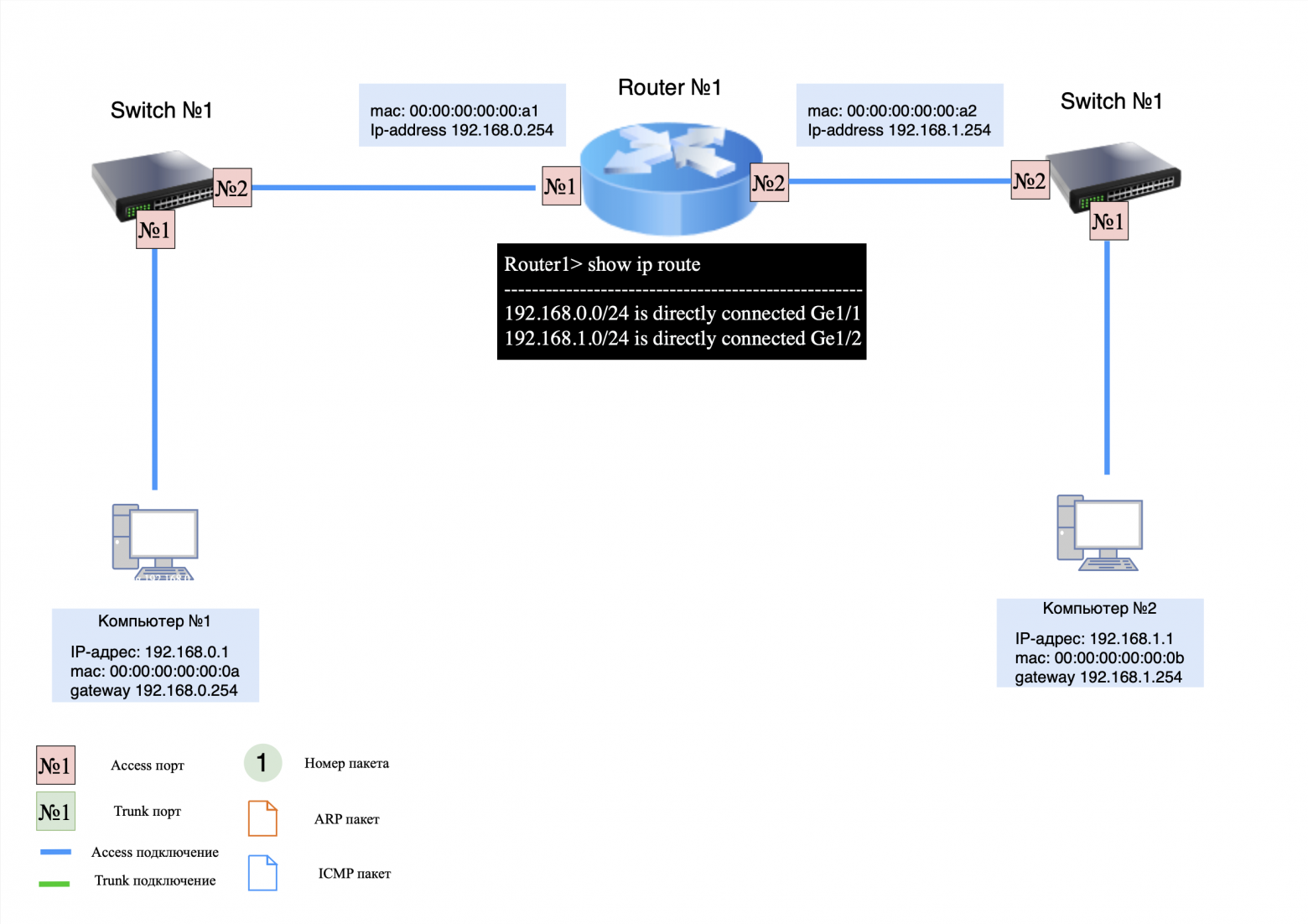
For clarity, let’s look at how routing works in a network with several devices and two switches.
Devices on the network:
computer #1: IP address 192.168.0.1, default gateway 192.168.0.254;
computer #2: IP address 192.168.1.1, default gateway 192.168.1.254;
switches No. 1 and No. 2: connect computers and a router;
router #1: has no routing entries, only assigned IP addresses on two interfaces (for directly connected networks).
Important Note:
when transmitting packets within the same local network, the MAC addresses of the sender and recipient (src and dst) do not change;
When routing packets between different networks, the MAC addresses of the sender and recipient always change;
When routing packets between multiple local networks, the IP addresses (src and dst) do not change unless NAT is used.
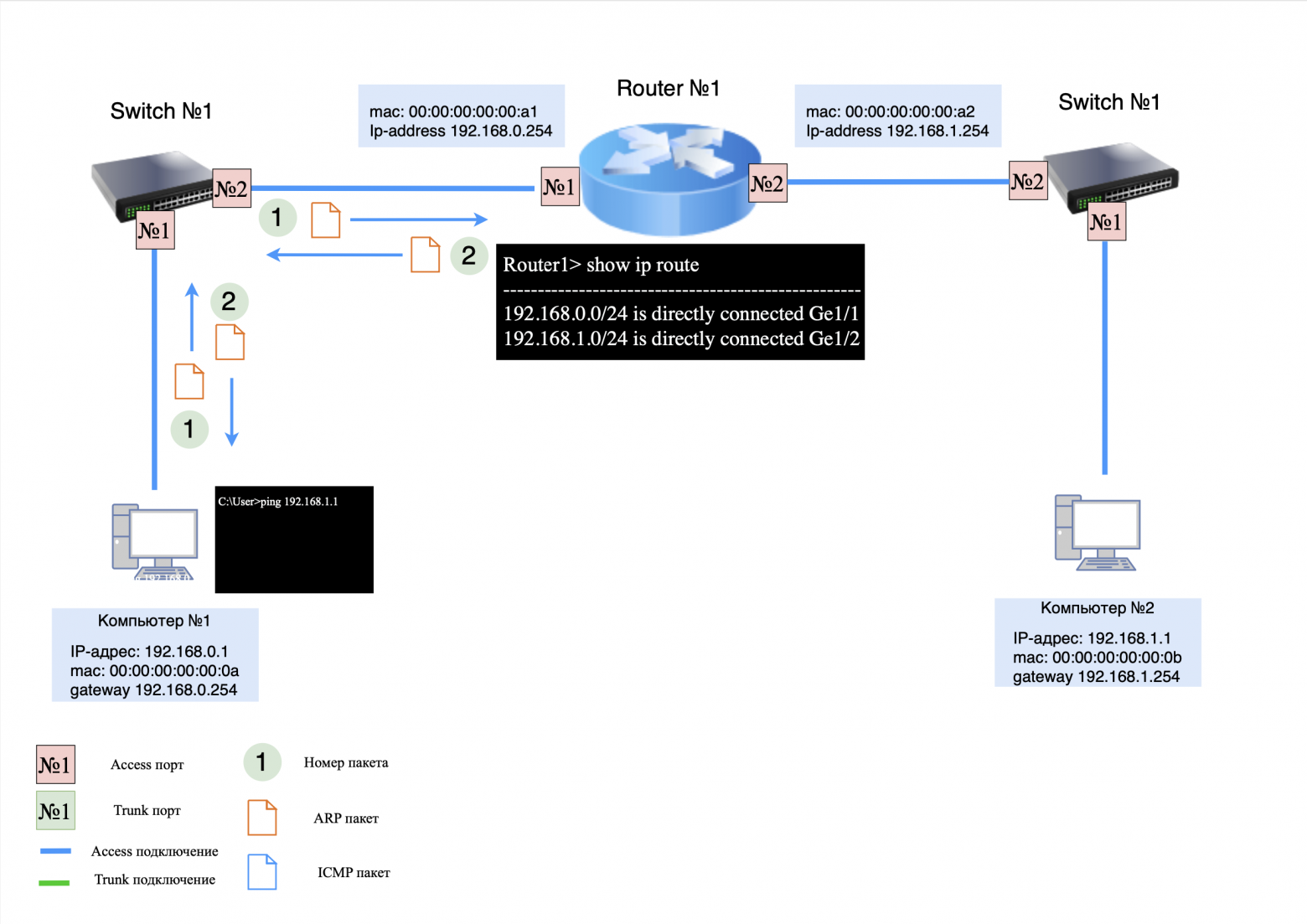
Step 1: ARP Request/Response
When computer #1 sends a "ping" command to computer #2, it first generates an ARP request to obtain the destination MAC address. Since the recipient is on a different subnet, computer #1 will look for the MAC address of its default gateway.
ARP request transmission process:
on the computer side No. 1: ARP request is sent to the side switch #1;
on the switch side #1: The ARP request is sent to router #1;
on the side of router No. 1: The ARP response is sent back to computer No. 1.
Step 2: ICMP request
Now that computer #1 received the MAC address of the gateway, it generates an ICMP request and sends it to computer #2.
Process of sending an ICMP request:
on the computer side No. 1: ICMP request is sent to the side switch #1;
on the switch side #1: ICMP request is sent to router #1;
on the side of router No. 1: Router has no record of computer No. 2 in its MAC table, so the request is "rejected". Instead, the router generates an ARP request to obtain the MAC address computer No. 2.
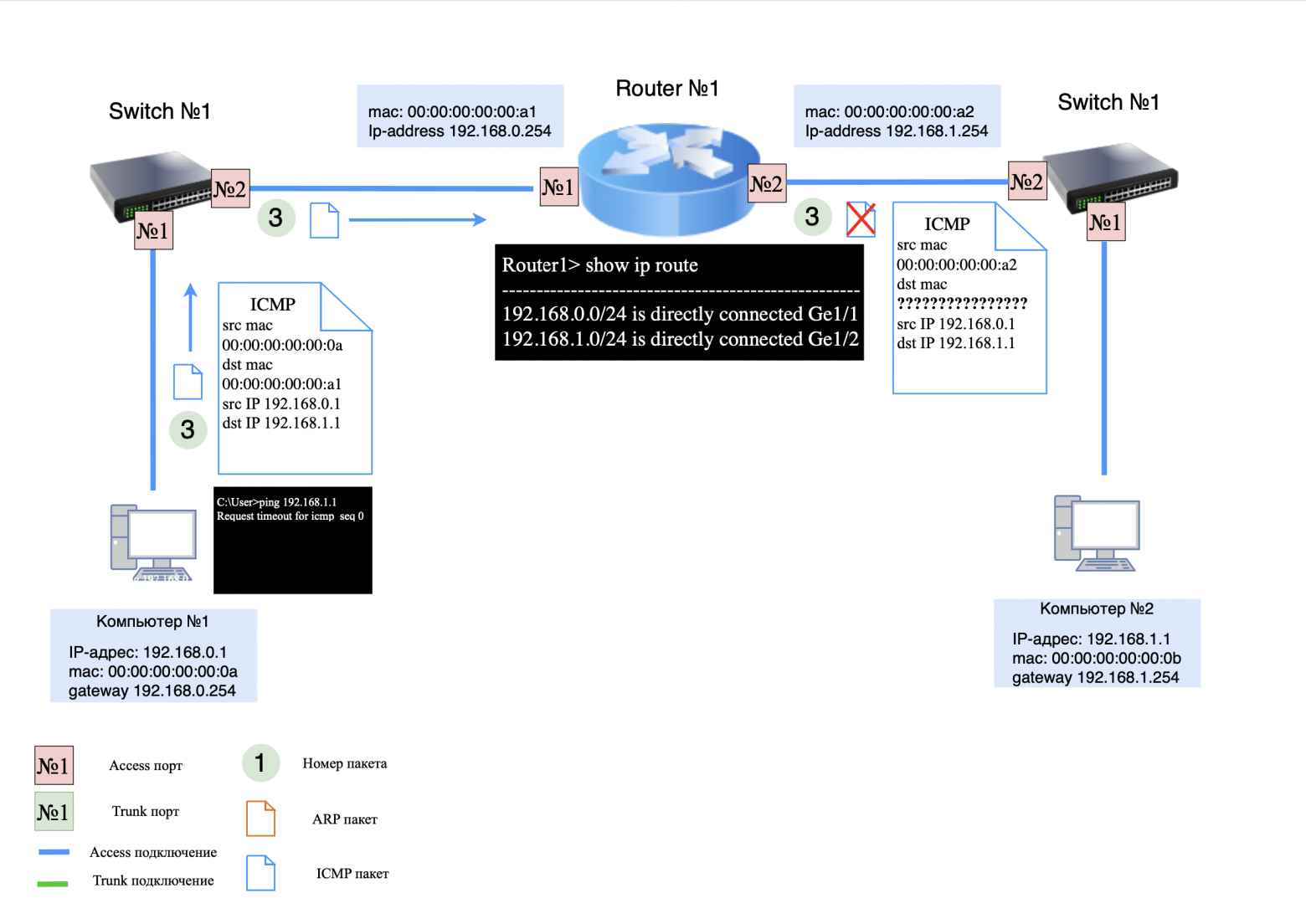
Typically, if a modern router is used, the first ICMP request is not lost, but buffered. But if the buffer is full or the router does not support buffering, the first packet is lost. There is also ICMP rate limiting, due to which packets can also be lost. This is why when we run "Ping" we see several lost packets (usually 2).
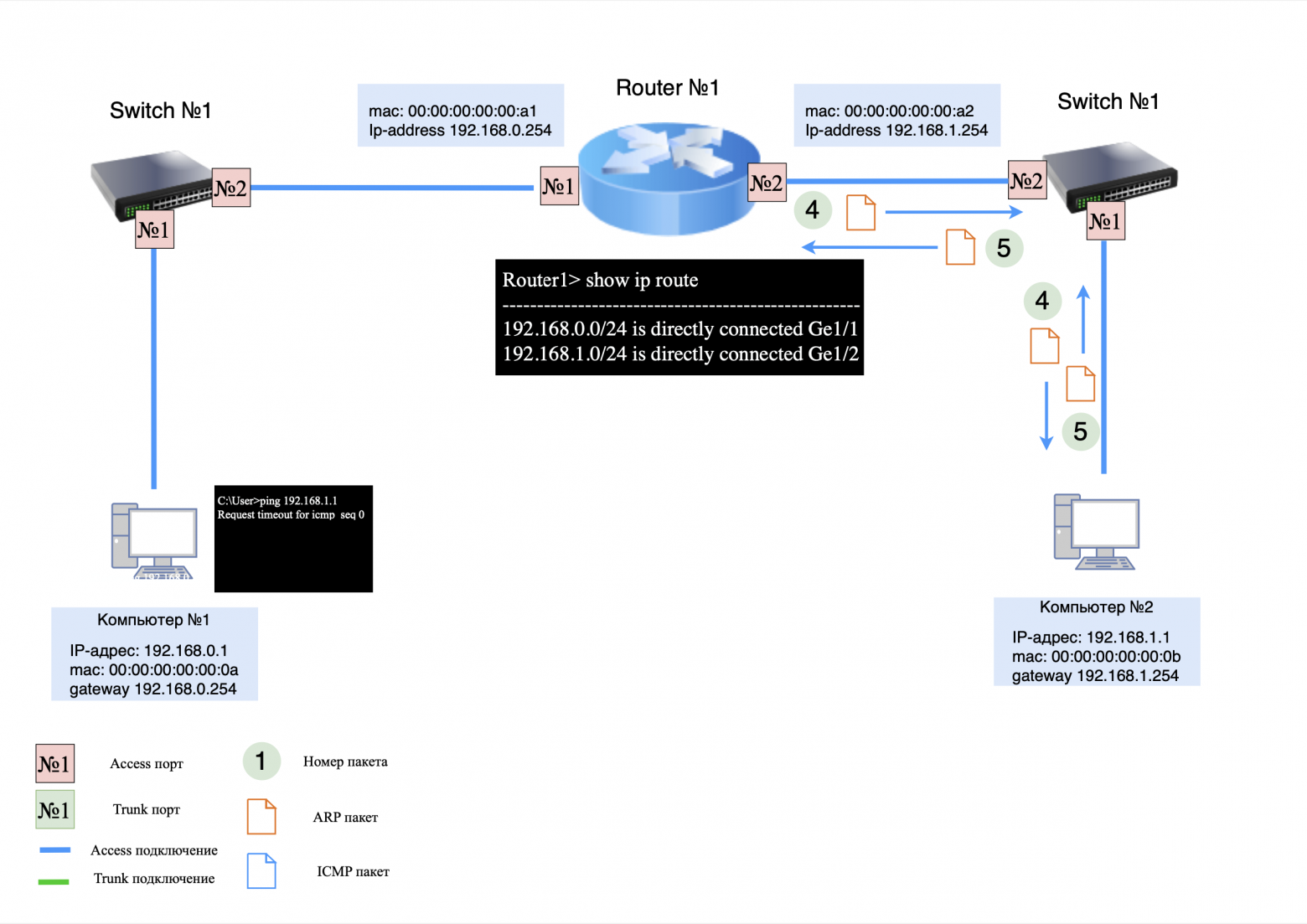
Step 3: ARP Request/Response
ARP request transmission process:
on the side of router No. 1: An ARP request is sent to switch #1;
on the switch side #1: The ARP request is sent to computer No. 2;
on the computer side No. 2: The ARP response is sent to router #1.
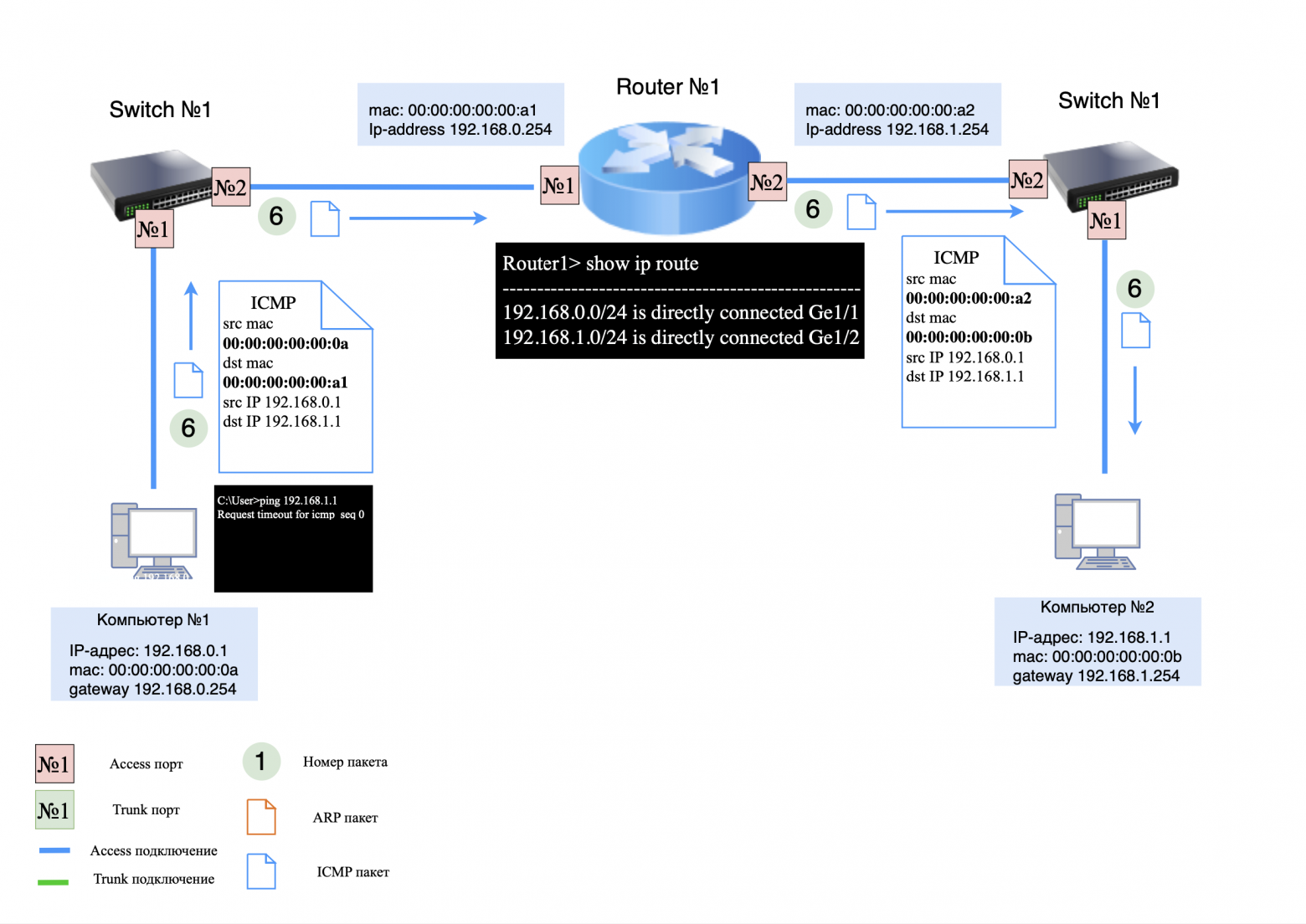
Step 4: ICMP Request
Now that router #1 knows the MAC address computer No. 2, it can continue to transfer packets between computers.
Because the first ICMP request was rejected by the router, computer #1 creates a new request and sends it to the network.
Process of sending an ICMP request:
on the computer side No. 1: ICMP request is sent to the side switch #1;
on the switch side #1: ICMP request is sent to router #1;
on the side of router No. 1: The ICMP request changes the source and destination MAC addresses to the appropriate ones and sends the request to switch #2;
on the switch side #2: ICMP request is sent to computer No. 2.
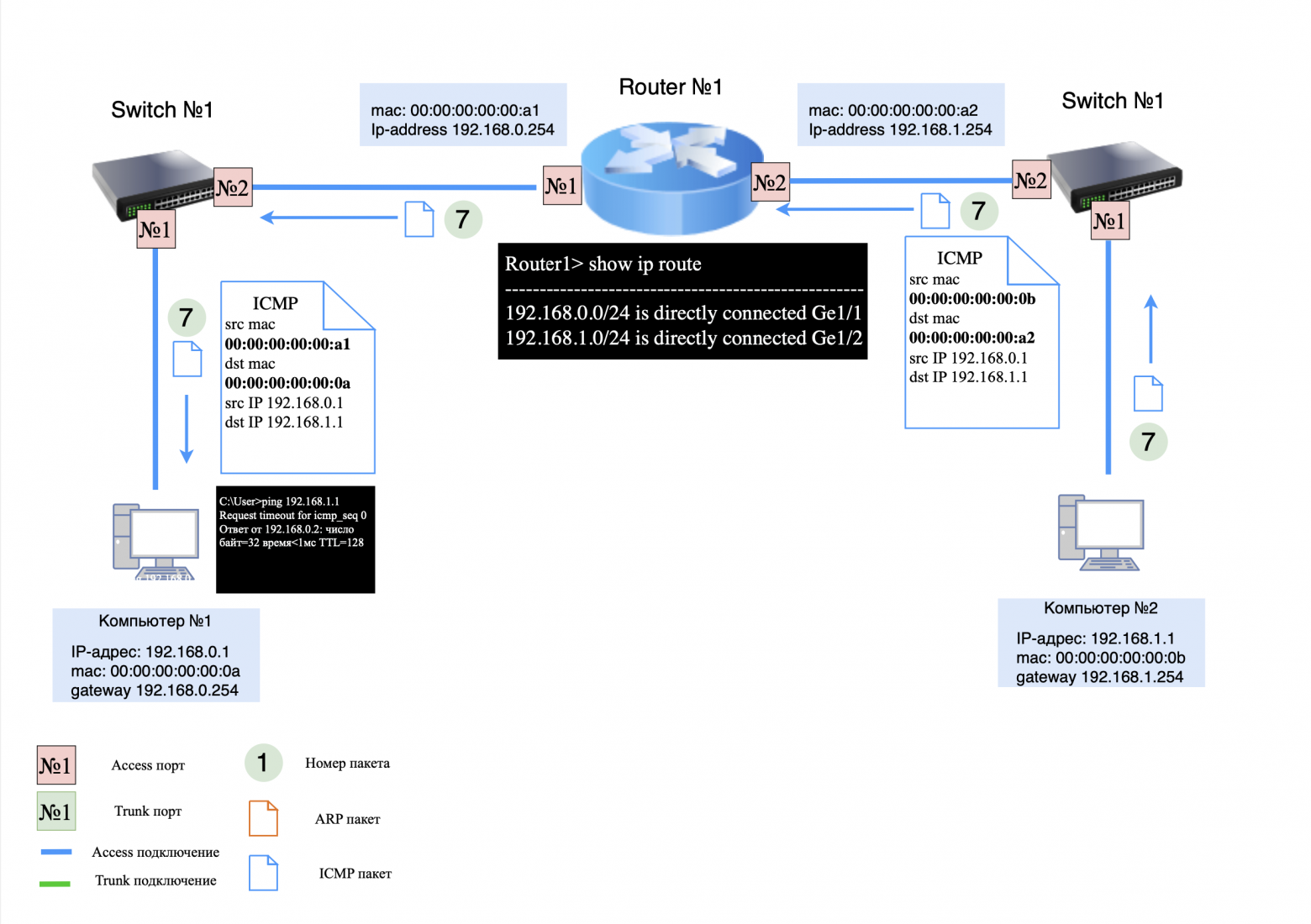
Step 5: ICMP response
ICMP response transmission process:
on the computer side No. 2: ICMP response is sent to switch #2;
on the switch side #2: The ICMP response is sent to router #1;
on the side of router No. 1: The ICMP response changes the source and destination MAC addresses to the appropriate ones, and the response is forwarded to switch #1;
On the switch side #1: The ICMP response is sent to computer No. 1.
❯ An example of a simple network using stick routing
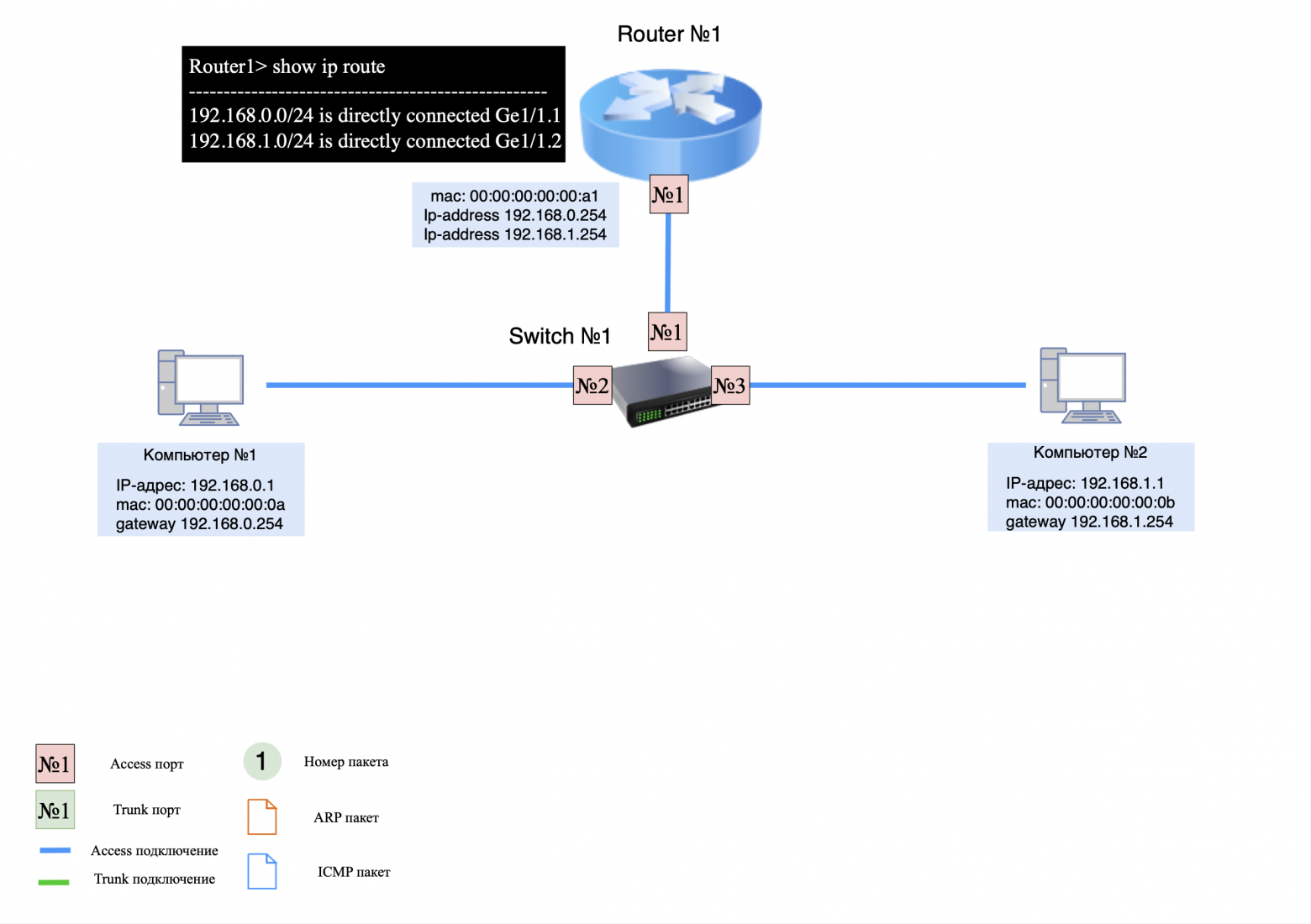
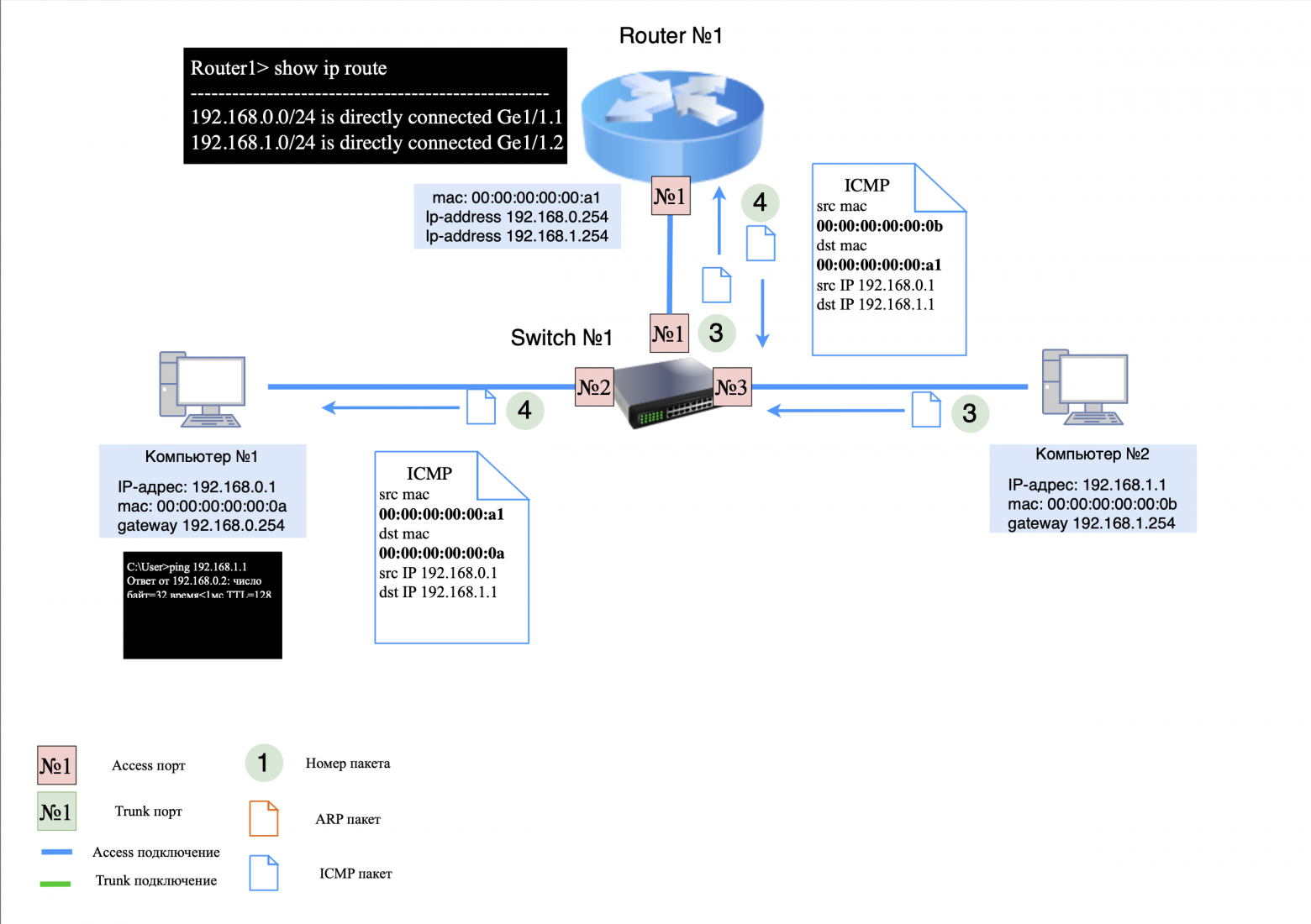
In the previous example, we looked at a network diagram in which routing occurs between interfaces on a router. However, when the number of interfaces on a router is limited, you can use one physical interface and create multiple logical interfaces. These logical interfaces are called sub-interfaces.
Sub interface (from English subinterface) is an additional interface within the main physical interface used to split traffic, allowing one physical interface to be effectively shared with multiple virtual interfaces.
This routing scheme is called routing on a stick (Router-on-a-Stick). Let's look at how routing works using sub-interfaces.
Devices on the network:
computer #1: IP address 192.168.0.1, default gateway 192.168.0.254;
computer #2: IP address 192.168.1.1, default gateway 192.168.1.254;
switch #1: connects computers and a router;
car router No. 1: has no routing entries, only IP addresses are assigned on two sub-interfaces (for directly connected networks).
Important Note
When configuring multiple sub-interfaces on one physical interface, one MAC address is used for multiple IP addresses. In the examples above, we looked at the process of ARP exchange between devices on a network and their default gateways. In further examples, we will conditionally assume that the ARP exchange between all network nodes has already been completed in order to save time.
Step 1: ARP Request/Response
When computer #1 sends a "ping" command to computer #2, it first generates an ARP request to determine the destination MAC address. Since the recipient is on a different subnet and computer #1 already knows the MAC address of its default gateway, it immediately generates an ICMP request.
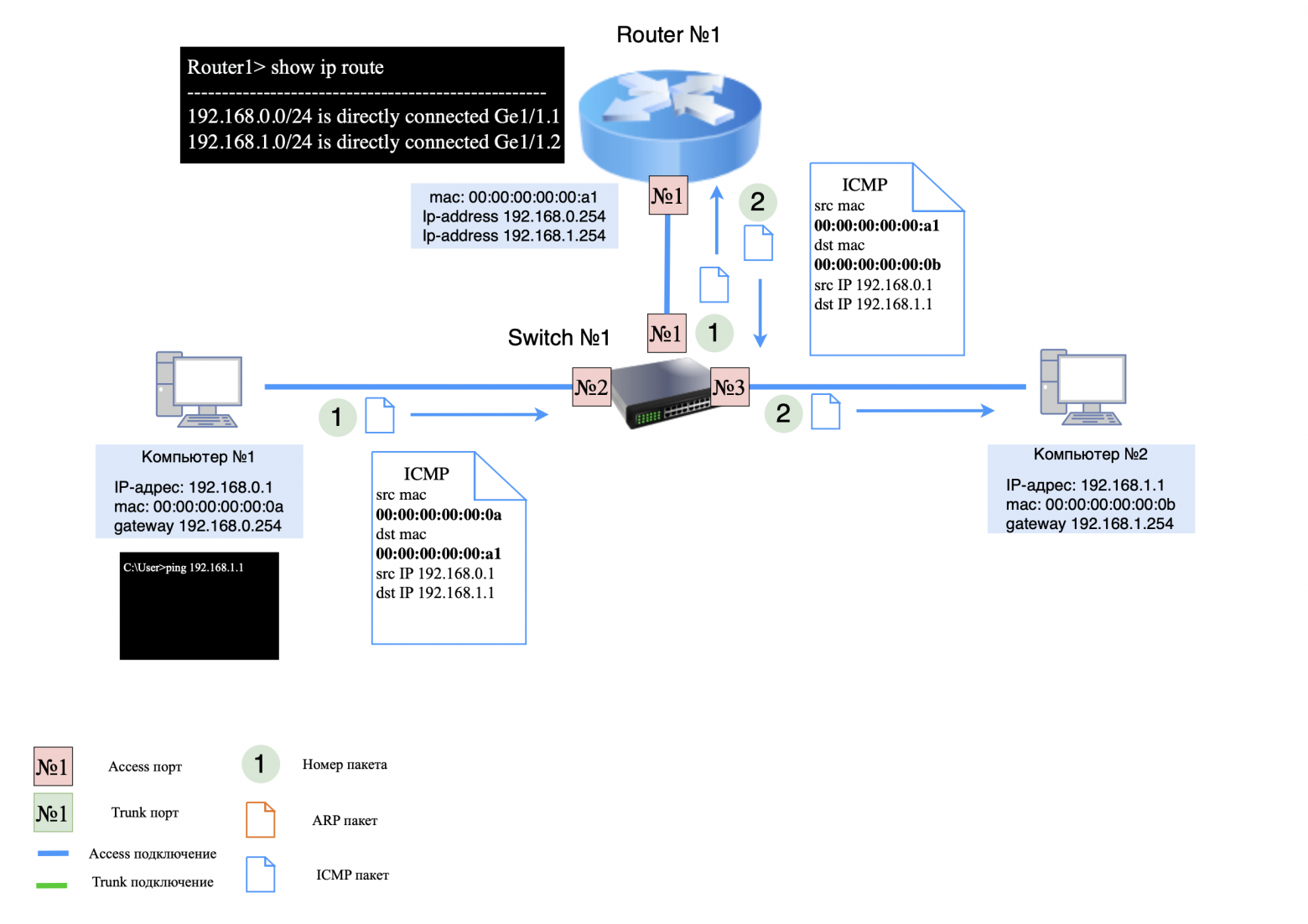
Step 2: ICMP request
Process of sending an ICMP request:
on the computer side No. 1: ICMP request is sent to the side switch #1;
on the switch side #1: ICMP request is sent to router #1;
on the side of router No. 1: The ICMP request changes the source (src) and destination (dst) MAC addresses to the appropriate ones, and the request is routed back to switch #1;
On the switch side #1: ICMP request is sent to computer No. 2.
Step 3: ICMP response
ICMP response transmission process:
on the computer side No. 2: ICMP response is sent to switch #1;
on the switch side #1: The ICMP response is sent to router #1;
on the side of router No. 1: The ICMP response changes the source (src) and destination (dst) MAC addresses to the appropriate ones, and the response is sent back to switch #1;
on the switch side #1: The ICMP response is sent to computer No. 1.
❯ An example of a simple network using “inter-vlan” routing
In the previous example, we looked at a scheme where routing is carried out on the router. Typically, a router is responsible for transmitting packets between the local network and the Internet. However, in local networks it is often used "inter-vlan" routing on L3 switches.
Why are L3 switches used for routing in local networks?
Benefits of using an L3 switch for routing:
high performance due to fast traffic switching at layer 2 (transmission channel);
support for a large number of ports to connect many devices;
the ability to split traffic between different subnets;
flexibility in setting up routing and security.
For clarity, let's look at the work "inter-vlan" routing.
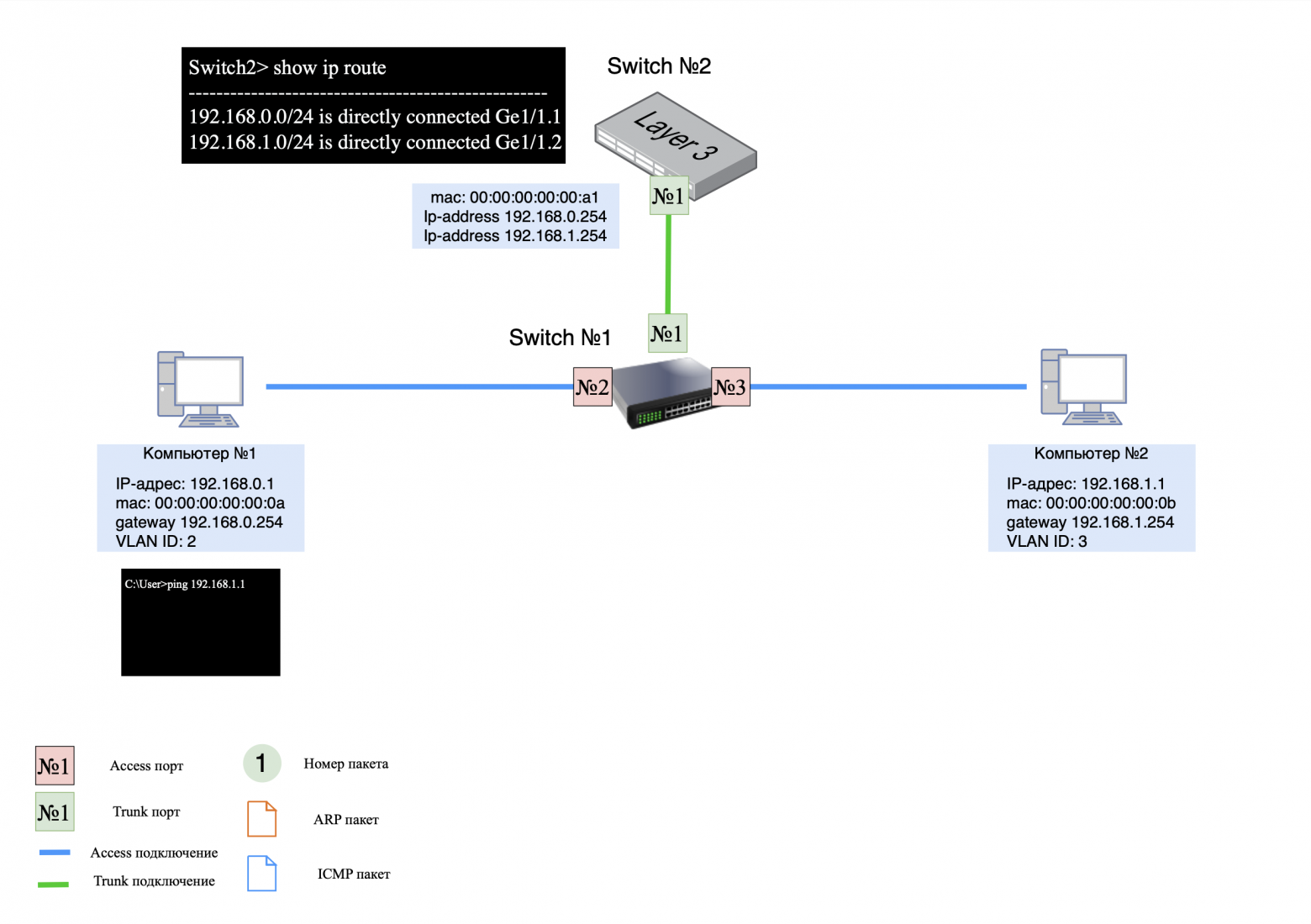
Devices on the network:
computer #1: IP address 192.168.0.1, default gateway 192.168.0.254, VLAN ID No. 2;
computer #2: IP address 192.168.1.1, default gateway 192.168.1.254, VLAN ID No. 3;
switch #1: connects computers and switch #2 (L3);
switch No. 2 (L3): has no routing entries, assigned IP addresses on two sub-interfaces (for directly connected networks) and corresponding VLAN ID;
trunk ports are configured between the ports of the switches to transmit tagged traffic among themselves.
Important Note
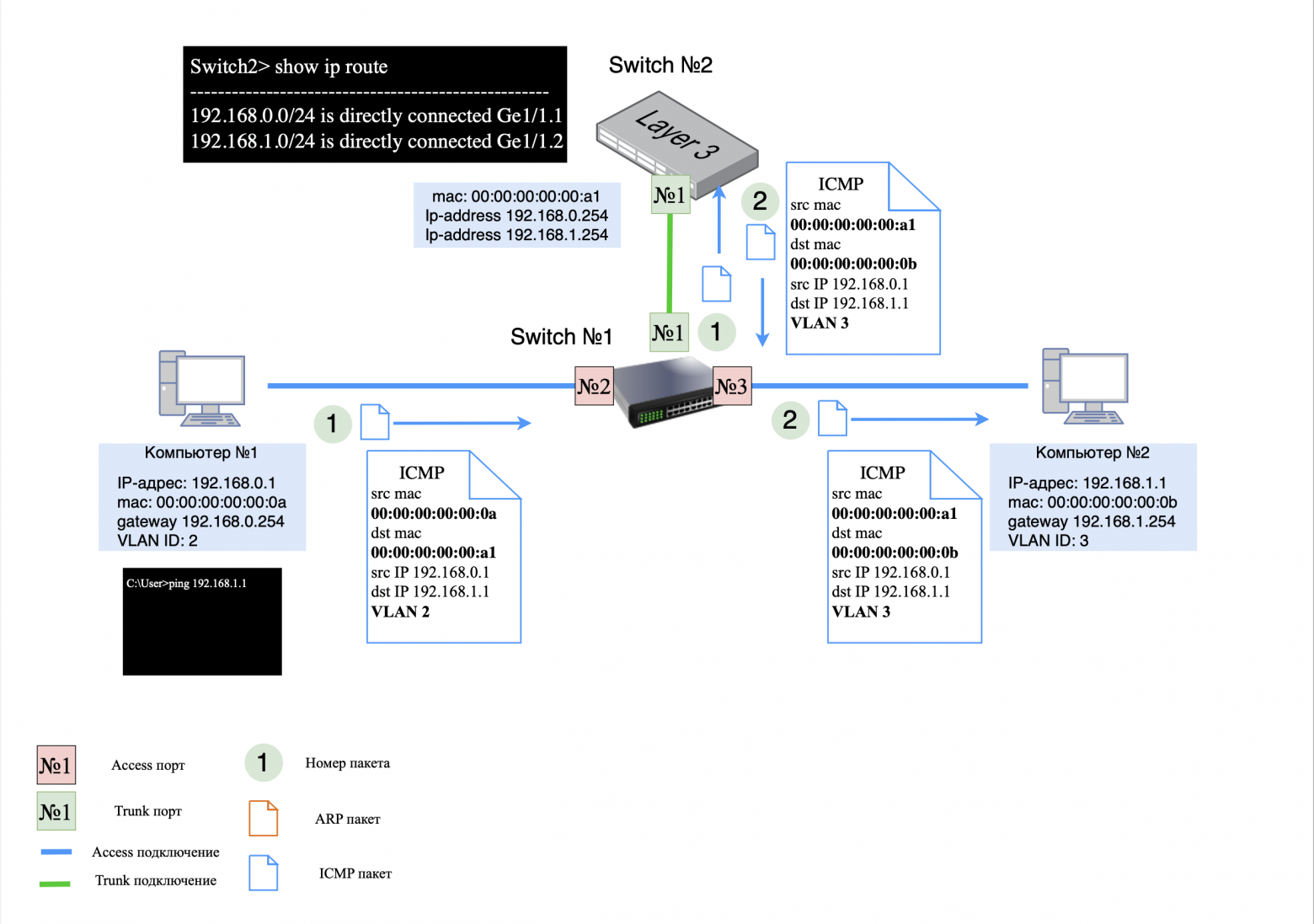
In the examples below (in the pictures), the VLAN IDs in the packet are indicated conditionally. Tagging and removal of a tag occurs on the L2 switch.
Step 1: ICMP request
Process of sending an ICMP request:
on the computer side No. 1: ICMP request is sent to L2 switch;
on the L2 switch side: The ICMP request is tagged with VLAN ID #2 and sent to L3 switch;
on the L3 side of switch No. 1: in the ICMP request, the MAC addresses of the sender (src) and recipient (dst) are changed to the corresponding ones, the VLAN ID is changed to No. 3. The request is sent back to L2 switch;
on the L2 switch side: The VLAN ID tag is removed and the request is sent to computer No. 2.
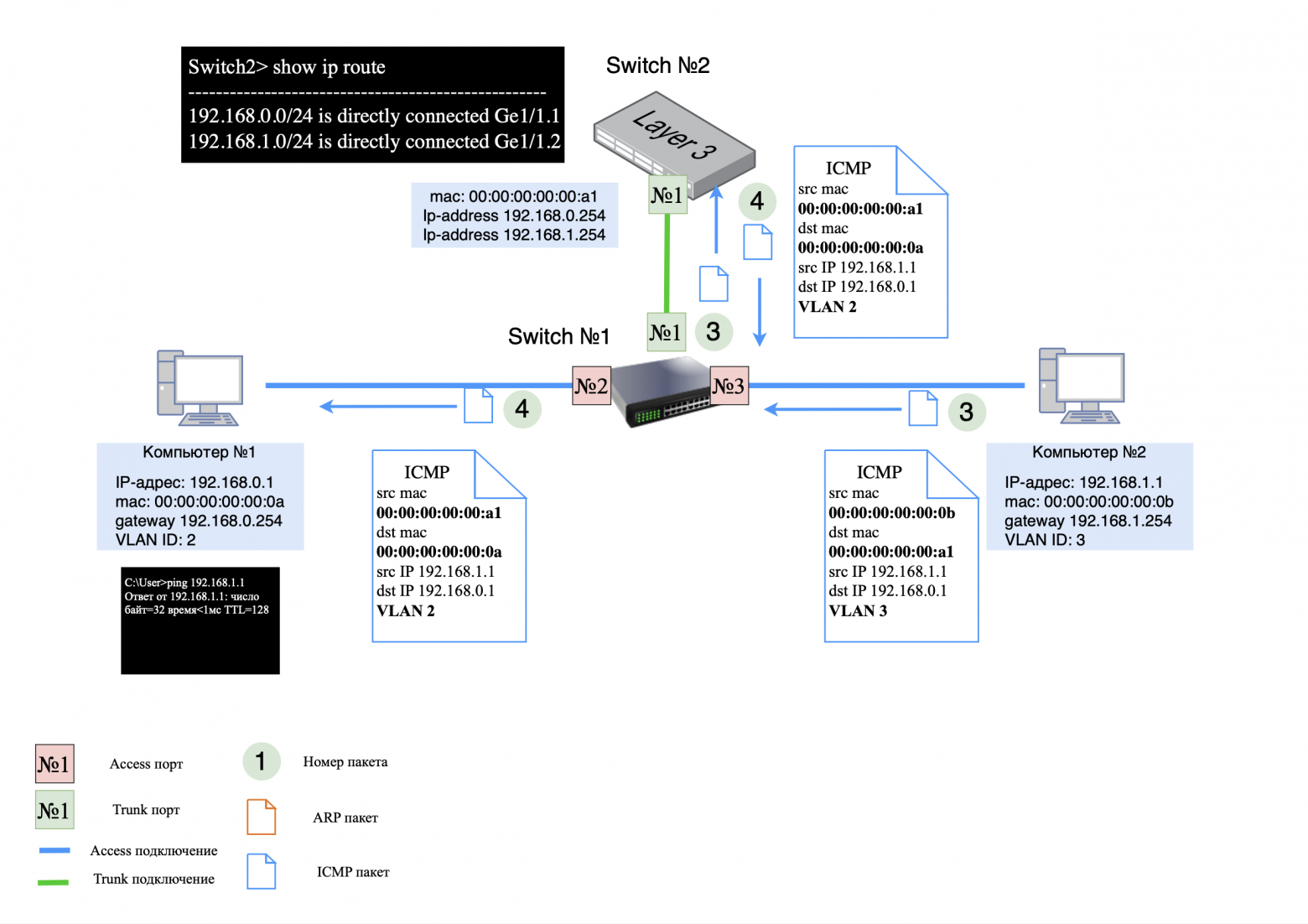
Step 2: ICMP response
ICMP response transmission process:
on the computer side No. 2: ICMP response is sent to L2 switch;
on the L2 switch side: The ICMP response is tagged with VLAN ID #3 and sent to L3 switch;
on the L3 side of the switch: in the ICMP response, the MAC addresses of the sender (src) and recipient (dst) are changed to the corresponding ones, the VLAN ID is changed to No. 2. The answer is sent back to L2 switch;
on the L2 switch side: The VLAN ID tag is removed and the response is sent to computer No. 1.
❯ Why use a router if the L3 switch does the routing?
If a router and an L3 switch can do routing in a similar way, the question arises: why pay extra for a router and use it on the network if you can get by with just L3 switches?
In simple local networks, L3 switches are often used exclusively, and routers are installed only at the border with the operator. L3 switches provide faster and more efficient intranet routing than routers. However, routers offer wider functionality, including support for various protocols, traffic filtering, VPN and other functions.
Today, the difference between these devices is becoming less clear, since many L3 switches have router functions on board. It all depends on your specific network design requirements. This topic will be discussed in the next article, devoted to the construction of networks and data centers.
❯ Proxy ARP: technical explanation and working example
❯ What is Proxy ARP?
Proxy ARP is a mechanism that allows a device that has no routing information (no default gateway specified) to communicate with hosts on other networks as if they were on the same network. This is achieved due to the fact that a router with the Proxy ARP function enabled responds to ARP requests on behalf of the remote host, “masking” the presence of routing.
How does this work
Let's look at a typical situation in which Proxy ARP can come in handy. Let's say a computer with an IP address of 192.168.0.1/24 wants to exchange data with node 192.168.0.66/26. Both addresses belong to the 192.168.0.0/24 network, but are located in different subnets:
192.168.0.1/24 — belongs to the range 192.168.0.0 – 192.168.0.255;
192.168.0.66/26 — belongs to the range 192.168.0.64 – 192.168.0.127.
When the computer is 192.168.0.1/24 will try to send data to node 192.168.0.66/26, it will send an ARP request to the network, waiting for a response from 192.168.0.66. However, no response will be received because host 192.168.0.66 is on a different subnet and does not see the request directly.
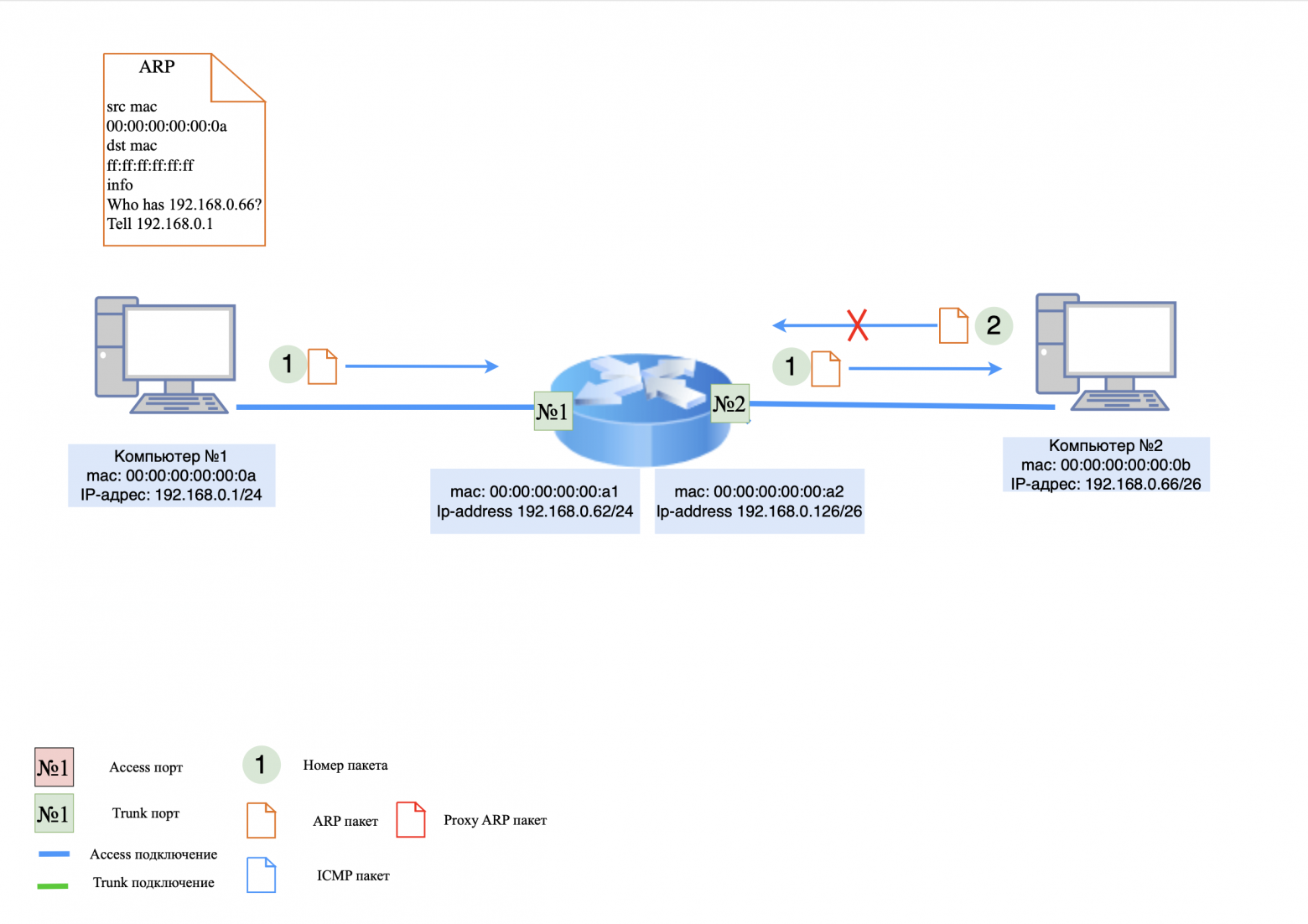
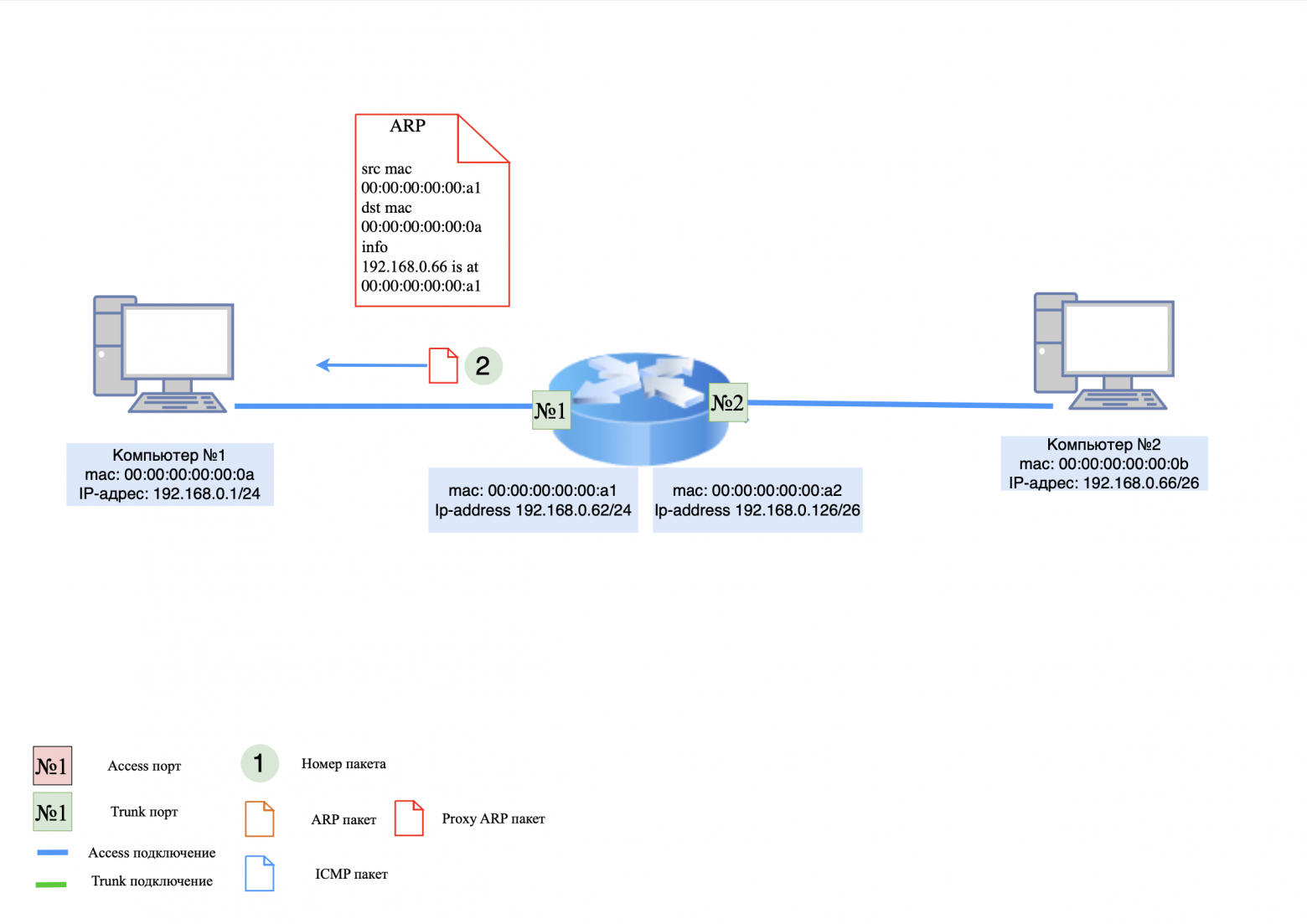
If there is a router on the network with Proxy ARP enabled, it will see the ARP request and respond as 192.168.0.66 with its MAC address. The result is computer 192.168.0.1/24 will send the data to the router's MAC address, which will then forward it to the correct subnet to 192.168.0.66/26. To the sender, it will appear as if it is communicating directly with 192.168.0.66, when in fact the traffic is going through the router.
❯ Let's look at a practical example
Devices on the network:
computer #1: IP address 192.168.0.1/24, there is NO default gateway;
computer #2: IP address 192.168.0.66/26, there is NO default gateway;
router: Has IP addresses, but is not a default gateway. Proxy ARP feature is enabled.
Step 1: ARP Request/Proxy Response
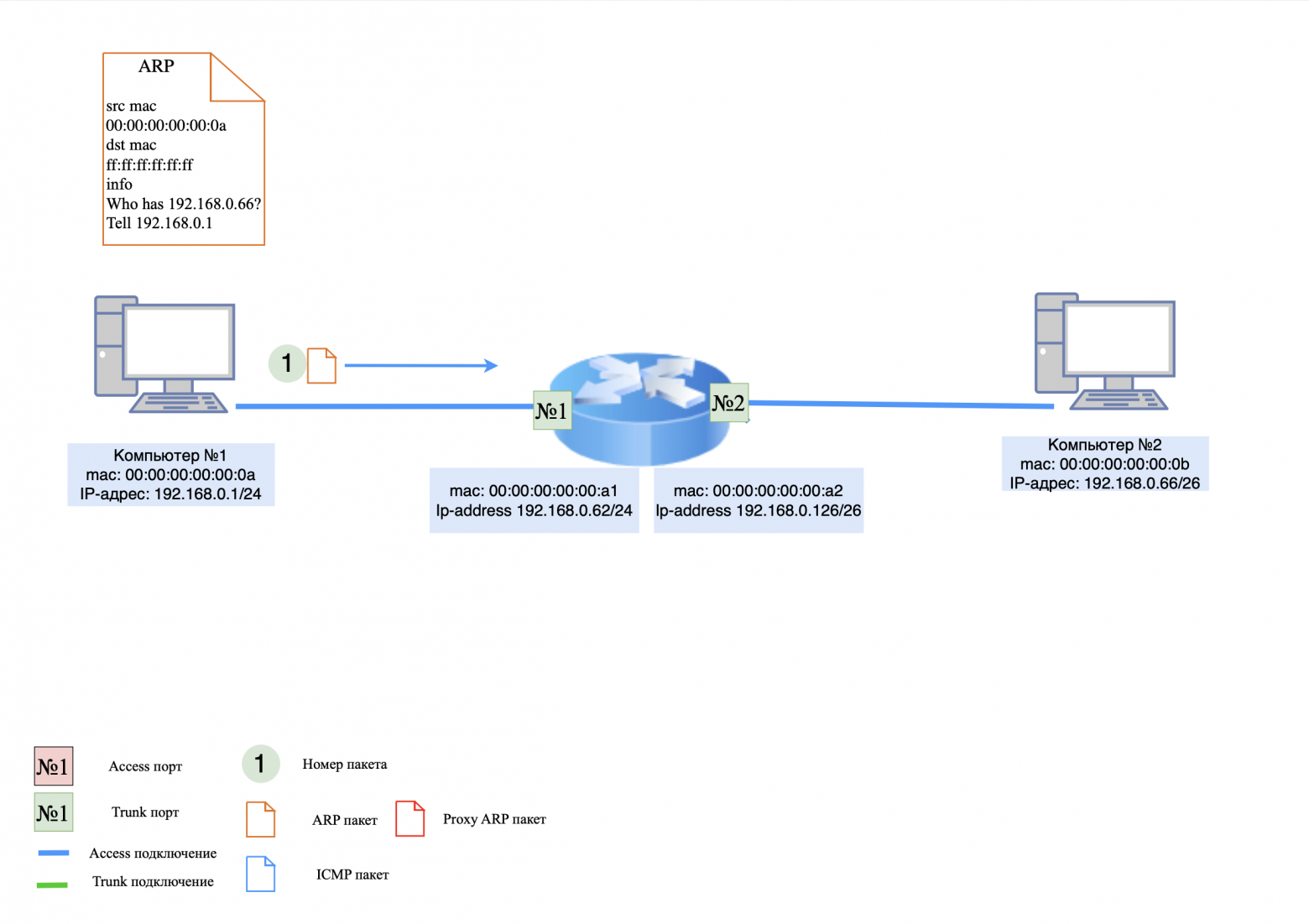
When computer #1 pings computer #2, it first issues an ARP request to determine the recipient's MAC address. Since computer #1 doesn't know that the recipient is on a different subnet, it sends an ARP request directly to 192.168.0.66.
on the computer side No. 1: The ARP request is sent to router;
on the router side: The router processes the ARP request and responds to computer #1 that the IP address 192.168.0.66 is its MAC address.
Step 2: ICMP request
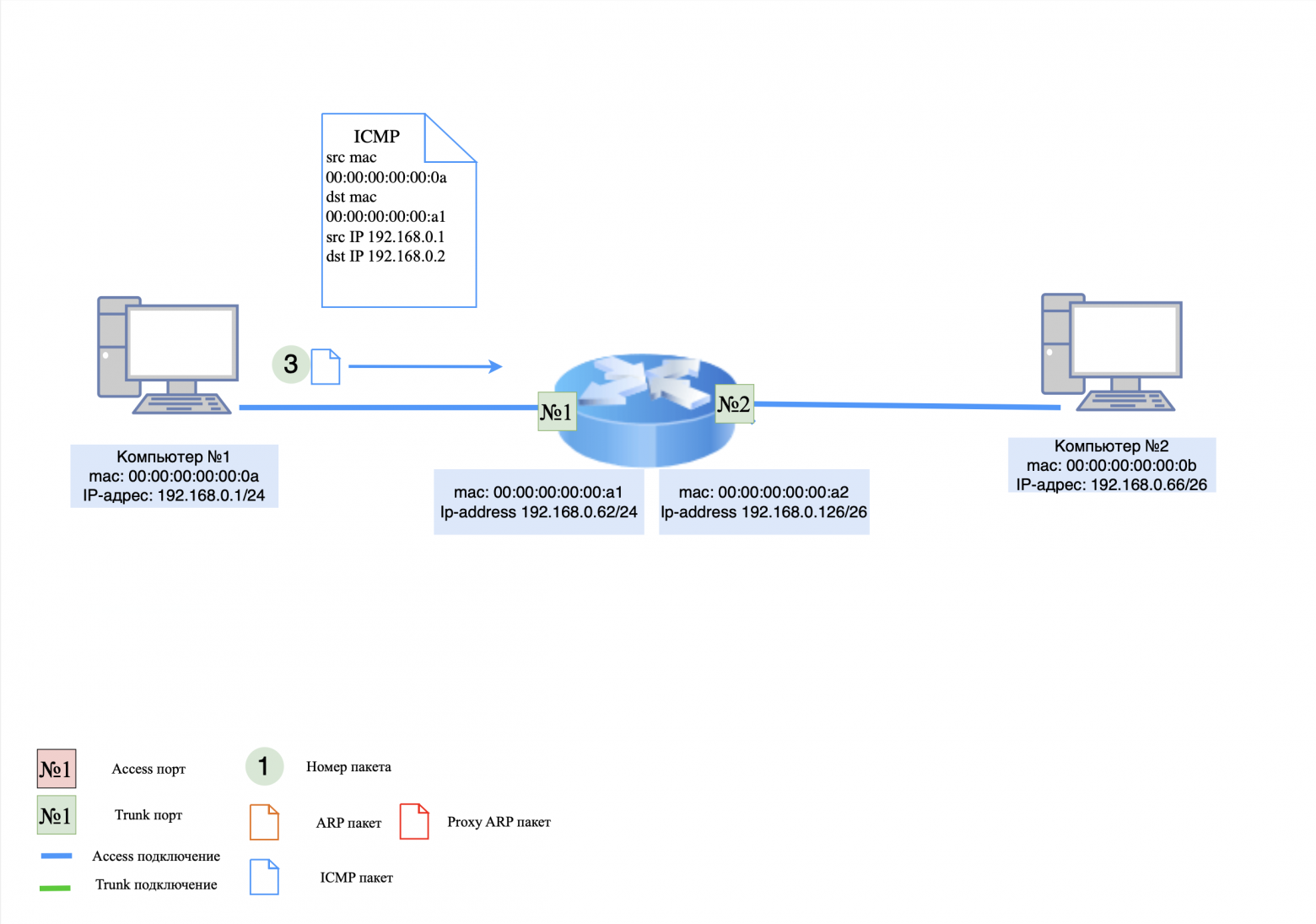
Now computer #1 thinks it knows the MAC address of computer #2 and sends an ICMP request.
on the computer side No. 1: ICMP request is sent to router;
on the router side: The router does not have an entry for computer #2 in its MAC table, so the request is rejected and the router generates an ARP request for 192.168.0.66.
Step 3: ARP Request/Response
on the router side: An ARP request is sent to computer #2;
on the computer side No. 2: The ARP response is sent to router.
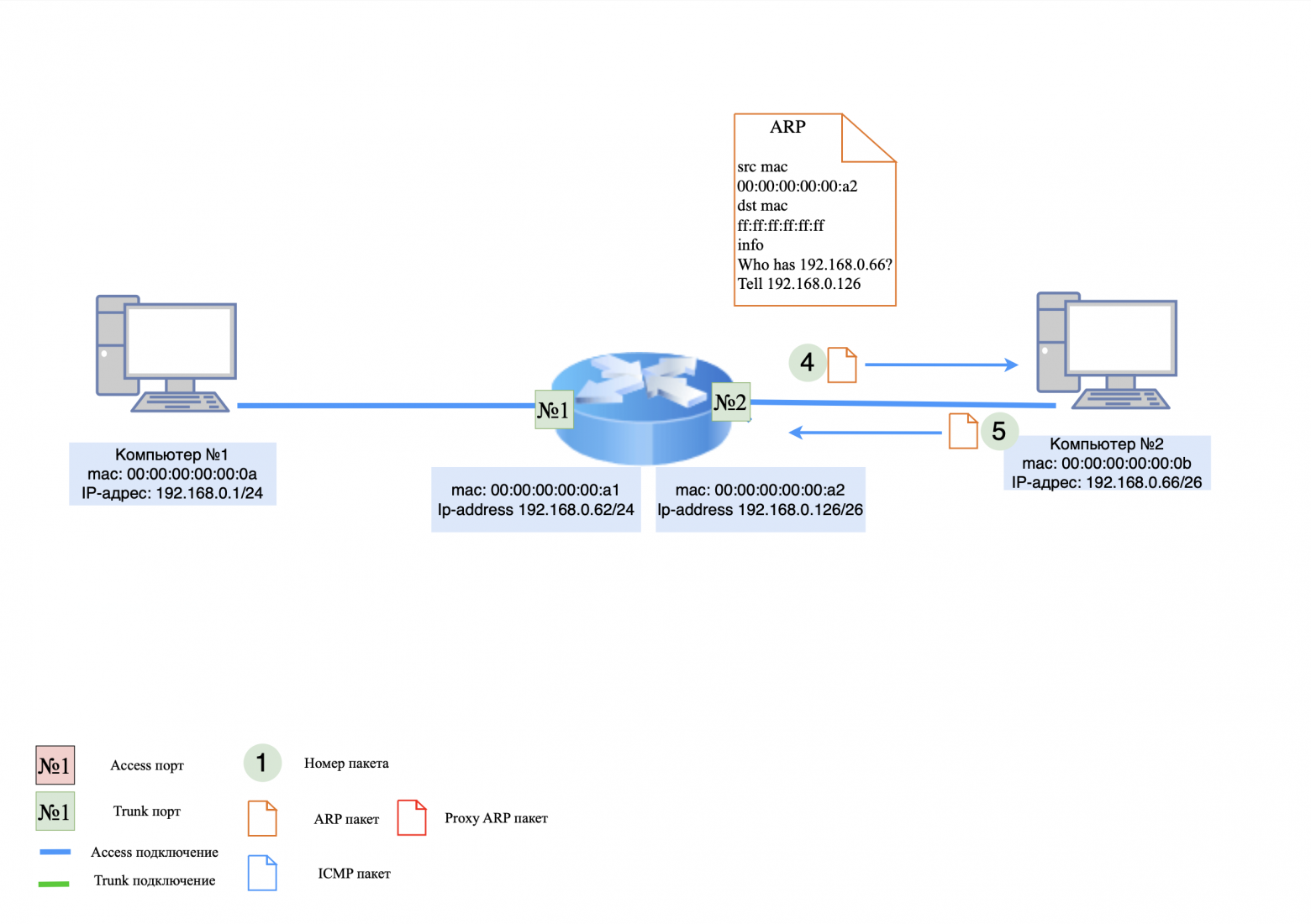
Step 4: ICMP Request
The router now knows the MAC address of computer #2 and can transmit packets between computers.
on the computer side No. 1: The computer generates a new ICMP request and sends it to the router;
on the router side: The router changes the MAC addresses in the ICMP request and forwards it to computer #2.
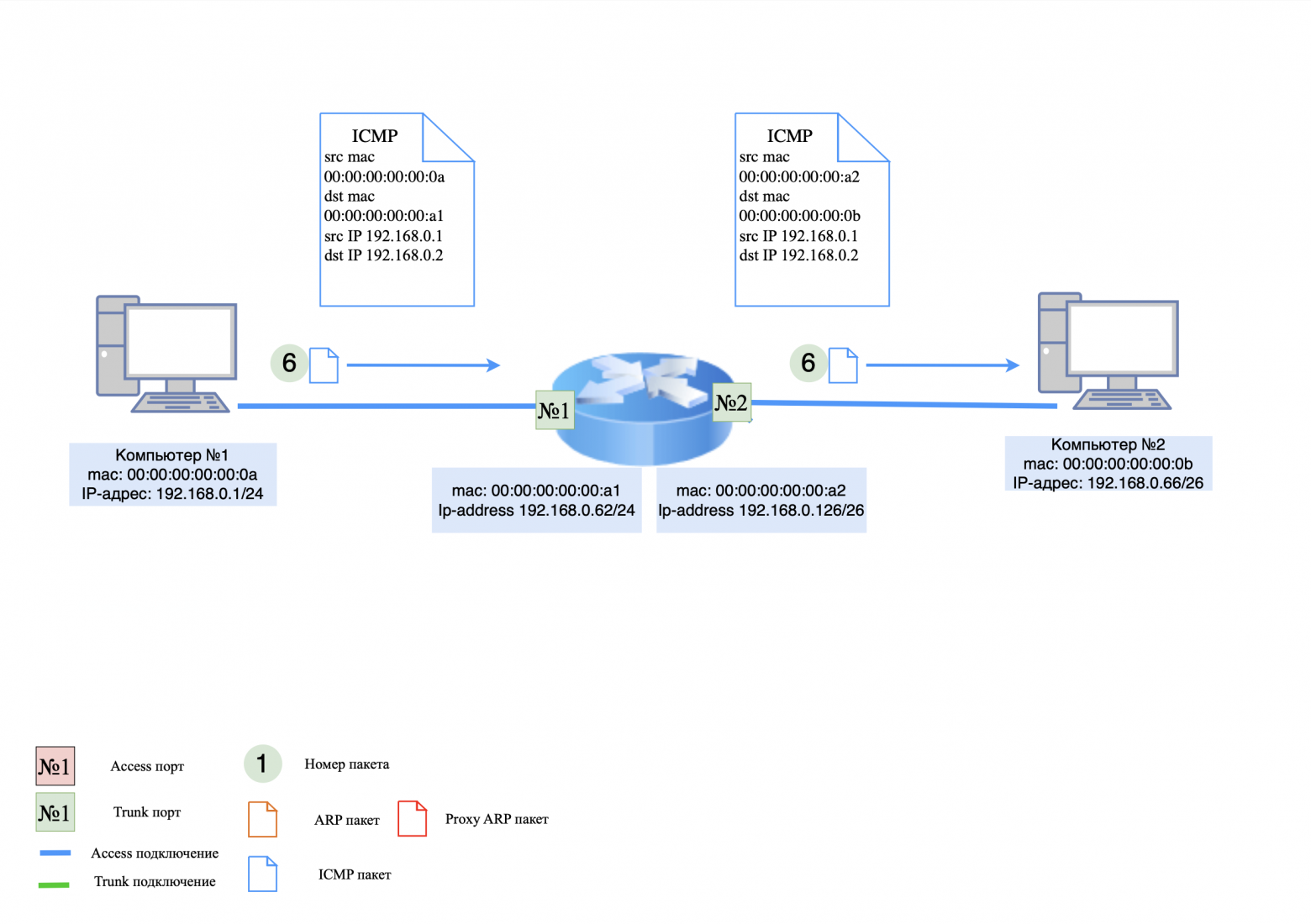
Step 5: ICMP response
This is where the difference from regular routing comes into play. Computer #2 does not know the MAC address of computer #1, so it generates an ARP request again.
on the computer side No. 2: An ARP request is sent to the network;
on the router side: The ARP request is processed by the router and it responds to computer #2 that the IP address has its MAC address.
Now computer #2 thinks it knows the MAC address of computer #1 and generates an ICMP response.
on the computer side No. 2: ICMP response is sent to the router;
on the router side: The router changes the MAC addresses in the ICMP response and forwards it to computer #1.
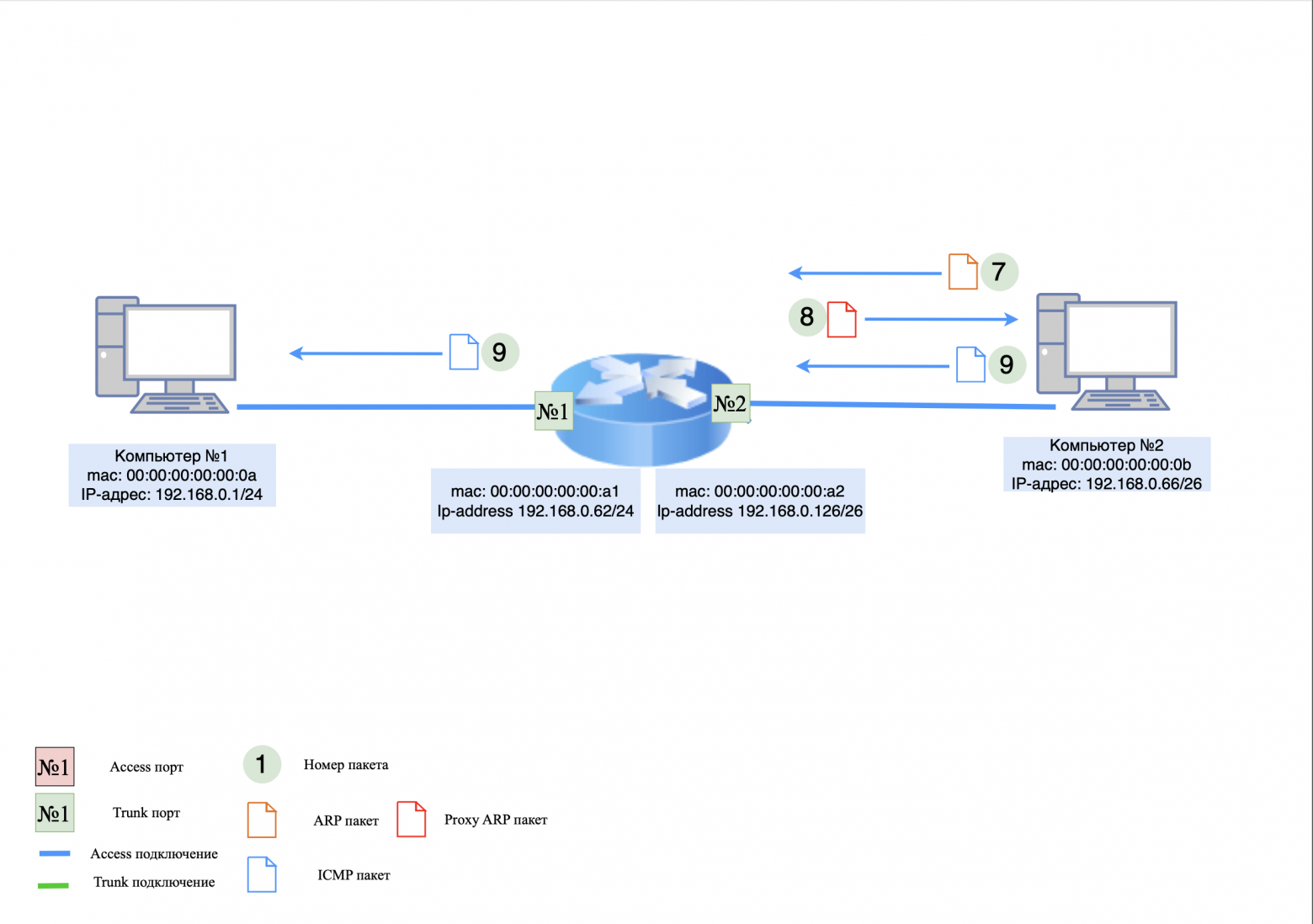
❯ Summary
Proxy ARP is a useful but potentially insecure mechanism because it allows devices to communicate without explicit routing. Although this feature is enabled by default on many devices, it is often disabled to improve security and prevent routing errors.
❯ But why do we need to know about Proxy ARP if setting up regular routing is easier and safer for our network?
The answer is simple: knowledge about Proxy ARP is necessary because in some cases this feature can be extremely useful, for example, in complex or old network infrastructures. It helps facilitate the interaction of devices on different subnets without explicitly configuring routing. However, it is important to note that this mechanism has its own risks and should be used with caution.
❯ Routing via super VLAN
VLANs help segment the network, but if data needs to be transferred between VLANs, routing is used:
routing between VLANs via a router (Router-on-a-stick);
routing via Layer 3 switch, which can perform the functions of a router.
There is also a concept super VLAN (Super VLAN or Private VLAN), which allows you to reduce the number of routes in the network. Instead of routing each VLAN separately, you can combine multiple VLANs into one group with a single gateway.
❯ What is Super VLAN and why is Proxy ARP needed?
❯ Super VLAN definition
Super VLAN is a concept used in networks to connect multiple logical VLANs into one common broadcast domain (Layer 2). This allows you to reduce the number of broadcast frames and use IP address space more efficiently.
Super VLAN consists of two key components:
Primary VLAN (main VLAN) - VLAN in which gateways for end devices are located;
Sub VLAN (secondary VLANs) - logically separated VLANs that use a common gateway from the Primary VLAN.
This scheme is often used in large corporate networks and to manage a large number of users in a single infrastructure.
❯ How does Super VLAN data transfer work?
In standard VLANs, routing between different VLANs is performed by the router (L3 device). In Super VLAN, the different VLANs do not have their own gateways; they use a single IP gateway from the Primary VLAN.
The problem occurs if two devices from different Sub VLANs (for example, VLAN 101 and VLAN 102) try to communicate. Since they belong to different VLANs, they would normally not be able to send an ARP request and learn each other's MAC address.
❯ Why does Super VLAN use Proxy ARP?
Proxy ARP solves this problem by spoofing ARP responses and tricking devices into thinking they are on the same network.
Example of work:
Computer A (192.168.1.10 in VLAN 101) wants to send a packet to Computer B (192.168.1.20 in VLAN 102);
Computer A sends an ARP request to obtain the MAC address 192.168.1.20;
but since VLAN 101 and VLAN 102 are isolated, the ARP request will not reach Computer B;
the router (or switch supporting Proxy ARP) responds to the request on behalf of Computer B, substituting its MAC address;
Computer A sends the packet to the router's MAC address, which forwards it to VLAN 102.
This way, devices from different VLANs within a Super VLAN can communicate without setting up a separate default gateway. If communication between computers from different VLANs is not required, Proxy ARP should be disabled.
❯ Using Proxy ARP in Super VLAN
Proxy ARP allows you to:
hide VLAN boundaries – devices do not realize that they are in different VLANs, since they receive ARP responses as if they were on the same network;
provide communication between Sub VLANs without routing – without Proxy ARP, traffic simply would not be transmitted, since a standard ARP request does not cross VLAN boundaries;
reduce the need to configure the gateway on client devices – they simply exchange ARP, and the router transparently replaces the MAC address.
❯ Summary
Super VLAN is the combination of several VLANs into one broadcast space. Proxy ARP is used to allow devices from different Sub VLANs to communicate without knowing that the network is partitioned.
Important
Super VLAN is suitable for large networks where you need to combine multiple VLANs without wasting IP addresses on each end device. However, the setup requires strict routing and security controls to avoid data leaks between VLANs.
❯ An example of how routing works between two routers
Consider two routers, R1 and R2, that connect two different networks. Initially, no routes are configured and packets cannot be transmitted between networks. After adding routes, the connection is established.
Devices on the network:
router R1:
Ge1 interface (LAN 1): 192.168.0.100/24;
Ge2 interface (channel to R2): 192.168.1.100/24.
router R2:
Ge1 interface (LAN 2): 192.168.1.101/24;
Ge2 interface (channel to R1): 192.168.2.100/24.
computer #1: 192.168.1.1/24 (connected to R1);
computer #2: 192.168.2.1/24 (connected to R2);
There are initially no entries in the route tables for networks 192.168.1.0/24 on R1 and 192.168.2.0/24 on R2.
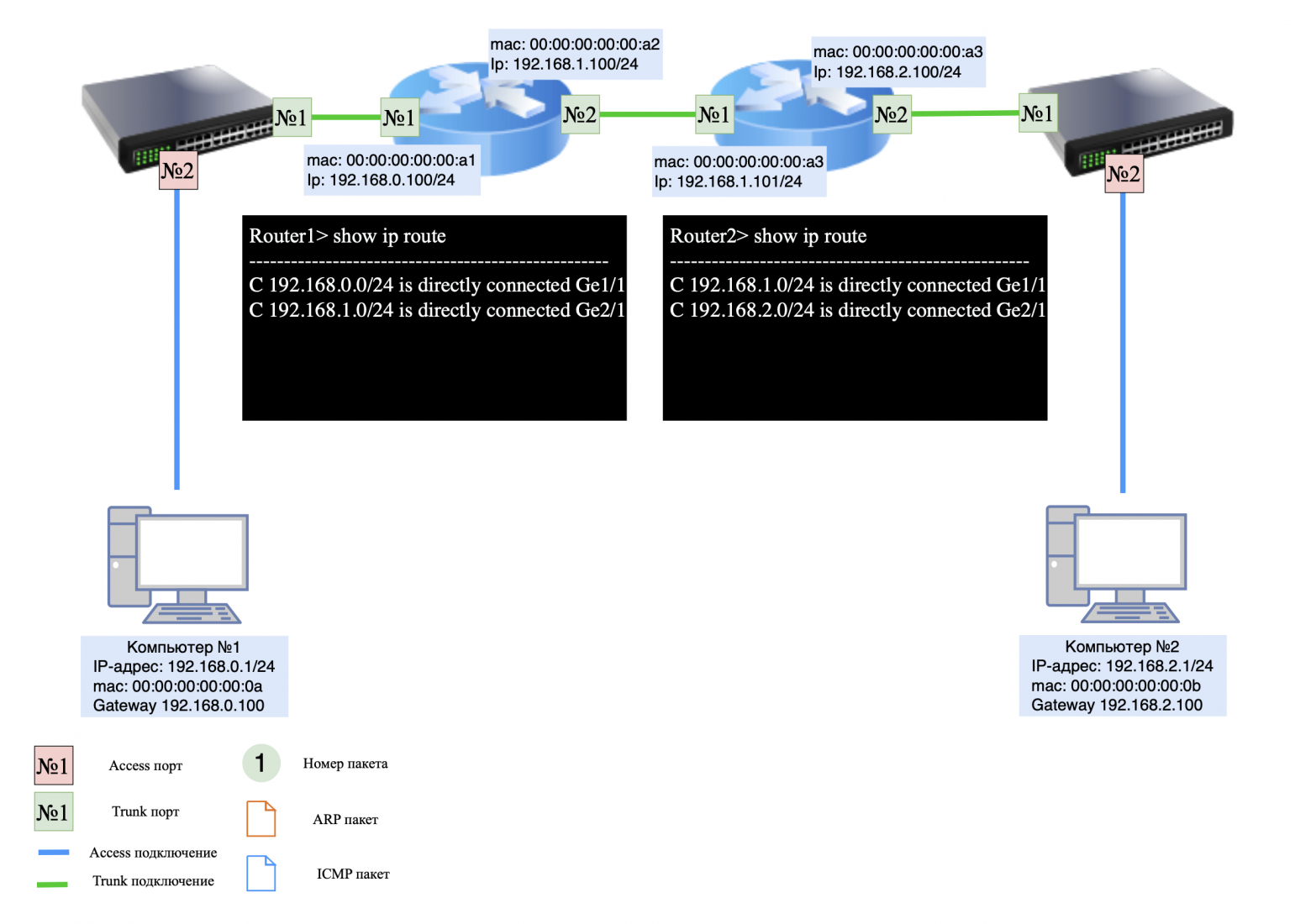
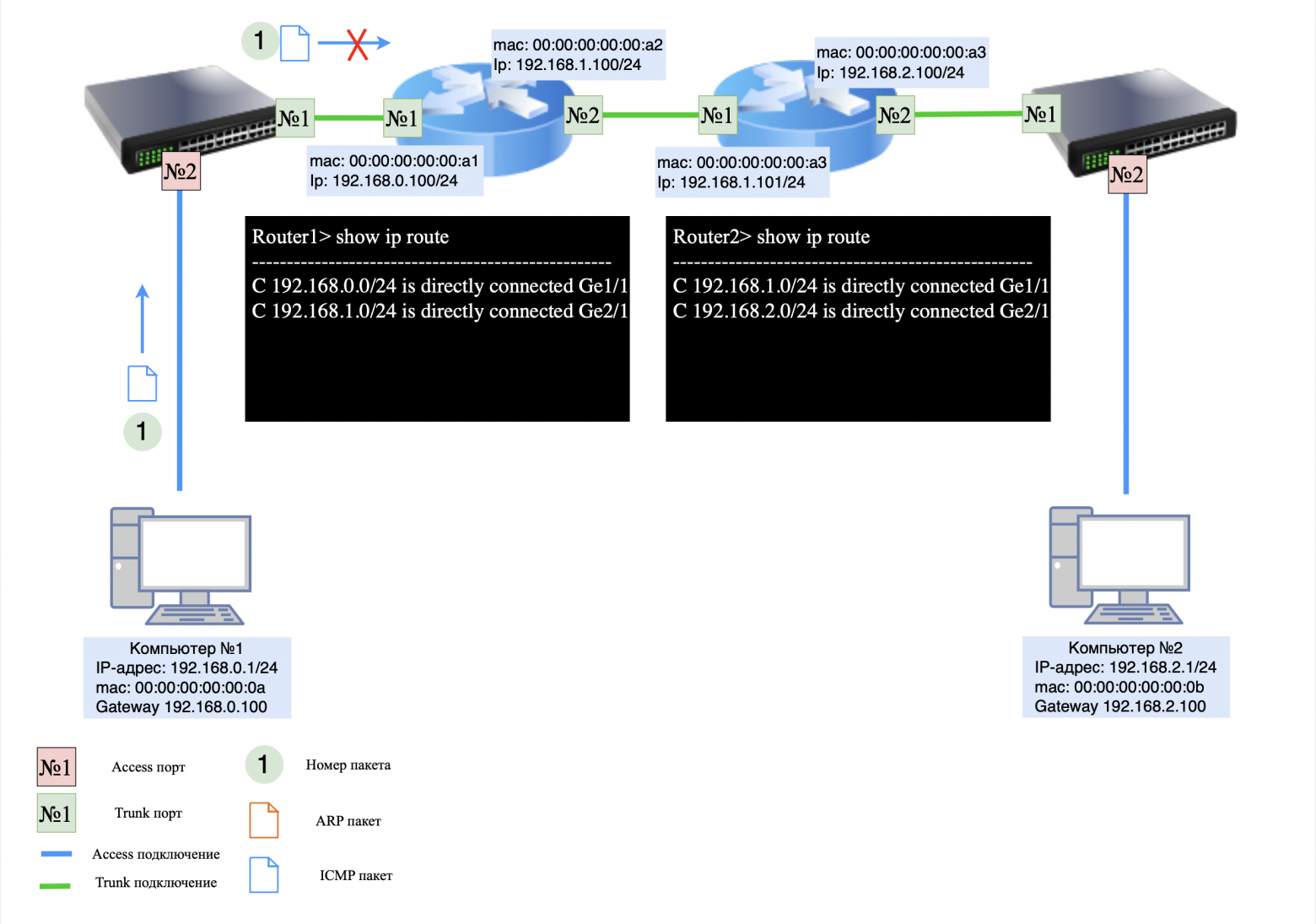
❯ The packet does NOT reach its destination (no routes)
Let's assume Computer #1 is trying to send an ICMP request (ping) to Computer #2:
computer #1 sees that the address 192.168.2.1 is not in its subnet, and sends the packet to the default gateway (R1, 192.168.1.100);
R1 receives the packet, but does not know how to deliver it to network 192.168.2.0/24 because there is no entry in the route table for this network;
The packet is rejected and an error message appears on R1: Destination Host Unreachable.
The same thing will happen on R2 if Computer #2 tries to send a response.
❯ Adding static routes
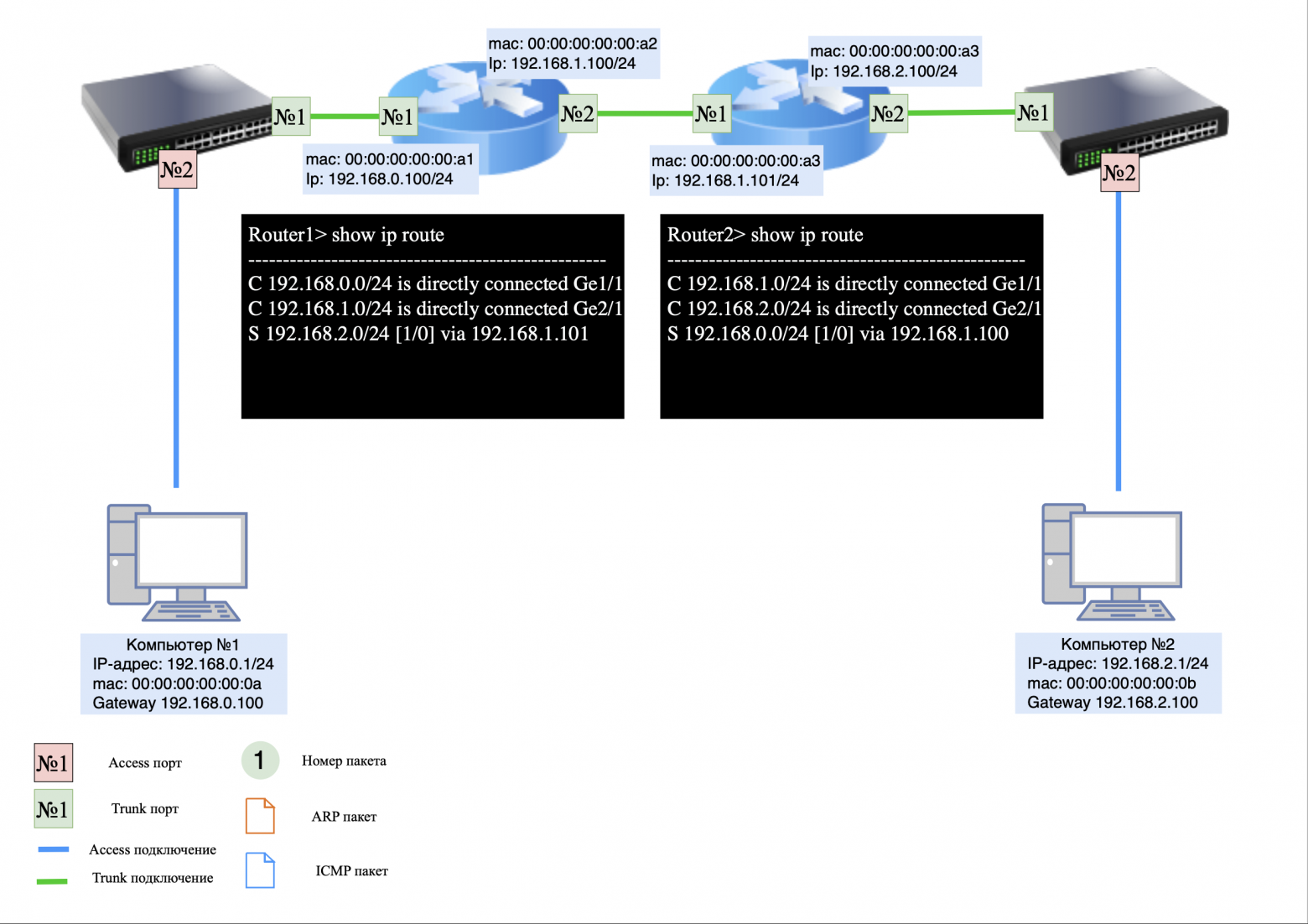
Now let's add routes for correct packet transmission:
On R1 add a route to the network 192.168.2.0/24 via R2 (192.168.1.101):
ip route add 192.168.2.0/24 via 192.168.1.101
On R2 add a route to the network 192.168.1.0/24 via R1 (192.168.1.100):
ip route add 192.168.1.0/24 via 192.168.1.100
Now both routers know where to route the packets.
❯ How is the packet transmitted now?
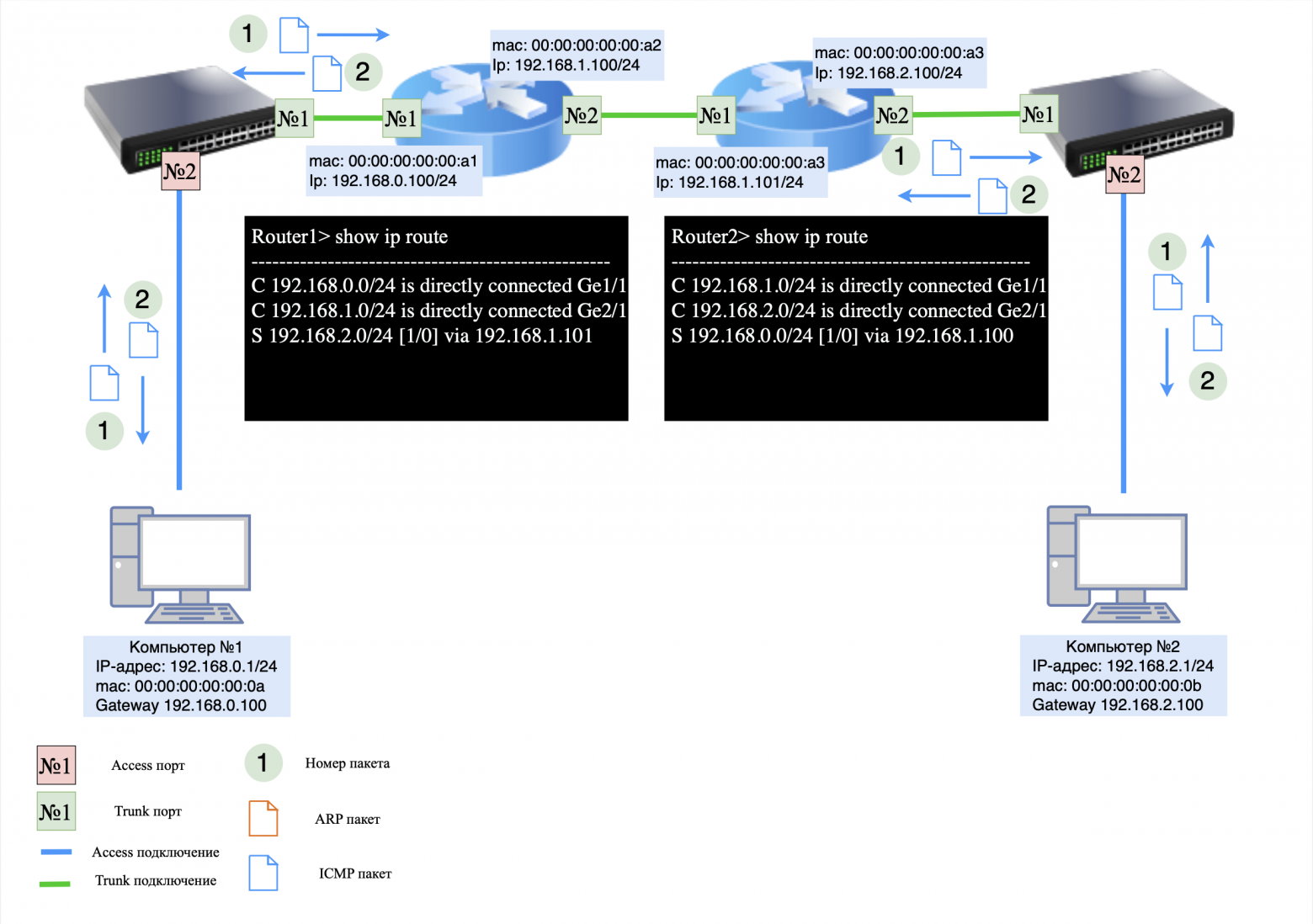
Now, when Computer #1 sends a packet to Computer #2, the process looks like this:
Computer #1 sends the packet to R1 (192.168.0.100) because 192.168.2.1 is not on its subnet;
R1 checks the route table and finds that network 192.168.2.0/24 is reachable through 192.168.1.101;
R1 sends the packet through interface 192.168.1.100 to R2 (192.168.1.101);
R2 receives the packet, checks the route table and sees that network 192.168.2.0/24 is its local network;
R2 sends an ARP request to determine the MAC address of Computer #2 (192.168.2.1);
computer #2 responds with an ARP response, and R2 transmits the packet.
When Computer #2 sends a response:
computer No. 2 forwards the packet to gateway R2 (192.168.2.100);
R2 checks the route table and sends a packet to R1 (192.168.1.100);
R1 forwards the packet to network 192.168.0.0/24, and Computer #1 receives a response.
❯ Summary
Without routes configured, packets cannot pass through and are discarded.
After adding static routes, routers R1 and R2 know where to route packets.
The network is working correctly and devices can exchange traffic.
❯ Conclusion
In this article, we took a detailed look at various aspects of routing in computer networks, including basic routing concepts such as static and dynamic routing, as well as more complex mechanisms such as super VLAN routing and the use of Proxy ARP to communicate between devices on different VLANs. We also analyzed examples of networks using routers, and also looked at specific routing schemes, including inter-vlan routing and Router-on-a-stick. These topics provide an important foundation for understanding how data flows between different network segments and how a network can be configured to effectively share information.
In the next article we will move on to more complex topics and look at diagrams for building different types of networks: local networks (LAN), wide area networks (WAN) And data processing centers (DPC). We'll discuss how these networks are designed, what technologies and topologies are used to implement them, and how to properly design the infrastructure to ensure reliable and scalable network solutions.
P.S. Why are packets sent to the network with a smaller mask?
Routers and switches choose a route to a network with a smaller mask (that is, with more hosts covered) unless a more exact match is found in the routing table.
For example, a network with the address 192.168.0.0/16 spans the subnets 192.168.1.0/24 and 192.168.2.0/24. If a device receives a packet for the address 192.168.1.50, it first looks for the route with the most exact match, and then chooses a more general route if there is no exact match.
Why is this important?
Simplifying routing: A backup route with a smaller mask allows traffic to be transmitted even if there are no accurate entries.
Scalability optimization: Global routes span multiple subnets at once, reducing the size of the routing table.
Why are routes with a narrower mask considered more specific?
A route with a narrower mask indicates a smaller range of IP addresses. This allows the router to more accurately determine where to route the packet. For example:
route 192.168.1.0/24 defines one specific subnet;
route 192.168.0.0/16 covers many subnets, including 192.168.1.0/24, 192.168.2.0/24 and so on.
When a router selects a route, it follows the rule: the narrower the mask, the more accurate the route.
Route selection example:
Routing table:
192.168.1.0/24 → IT subnet;
192.168.0.0/16 → General office network.
Packet for address 192.168.1.100:
the router sees that the address matches both routes;
however the route 192.168.1.0/24 more precisely, since it covers only this subnet.
Packet for address 192.168.2.50:
route 192.168.1.0/24 does not fit because the address is outside its limits;
a wider route is chosen 192.168.0.0/16, covering all addresses from 192.168.0.0 to 192.168.255.255.
News, product reviews and competitions from the team Timeweb.Cloud — in our Telegram channel ↩

For those who read to the end
Some important information
Colleagues, good afternoon! I created a Telegram channel from a networker for networkers.
If you are a network engineer, system administrator, developer, student, or just interested in networks - you here.
What awaits you?
Analysis of global failures and unexpected network problems.
Mini-articles with useful tips and explanations of complex topics in simple language.
Stories from the life of networkers - including from subscribers.
Channel link: https://t.me/ProstoKirReal
Why This Matters In Practice
Beyond the original publication, It's complicated about simple things. How the Internet works. Part 3. What is Routing, Proxy ARP and Super VLAN matters because teams need reusable decision patterns, not one-off anecdotes. Greetings, colleagues! My name is @ProstoKirReal . I would like to discuss with you how the Internet works from twisted pair cables connecti...
Operational Takeaways
- Separate core principles from context-specific details before implementation.
- Define measurable success criteria before adopting the approach.
- Validate assumptions on a small scope, then scale based on evidence.
Quick Applicability Checklist
- Can this be reproduced with your current team and constraints?
- Do you have observable signals to confirm improvement?
- What trade-off (speed, cost, complexity, risk) are you accepting?
FAQ
What is this article about in one sentence?
This article explains the core idea in practical terms and focuses on what you can apply in real work.
Who is this article for?
It is written for engineers, technical leaders, and curious readers who want a clear, implementation-focused explanation.
What should I read next?
Use the related articles below to continue with closely connected topics and concrete examples.





