It's complicated about simple things. Link layer (L2) of the OSI model
Greetings, colleagues! My name is ProstoKirReal , and today we Let's continue studying the OSI model , discussing the link layer (L2). This layer plays a key role in ensuring reliable data transmission in local networks. Before we get acquainted with this level, we need to know o
Editor's Context
This article is an English adaptation with additional editorial framing for an international audience.
- Terminology and structure were localized for clarity.
- Examples were rewritten for practical readability.
- Technical claims were preserved with source attribution.
Source: original publication

Greetings, colleagues! My name is ProstoKirReal, and today we Let's continue studying the OSI model, discussing the link layer (L2). This layer plays a key role in ensuring reliable data transmission in local networks.
Before we get acquainted with this level, we need to know one concept.
❯ What is a frame or frame?
Frame is a piece of data that is broken into several parts for further transmission over the network.
At different levels of the OSI model, pieces of data are called differently: at the data link layer they are frames, at the network layer they are packets, at the transport layer they are segments or datagrams, and at the application layer they are messages or data.
Main frame components:
- Header: includes control information such as source and destination addresses (src/dst MAC addresses), protocol type (E-Type), and other parameters.
- Data field (Payload): contains directly transmitted data. This may be part of a network packet transmitted from higher layers of the OSI model.
- Check sequence (Trailer or CRC): used to check data integrity. CRC (Cyclic Redundancy Check) is a checksum that helps detect errors that occur during data transmission.
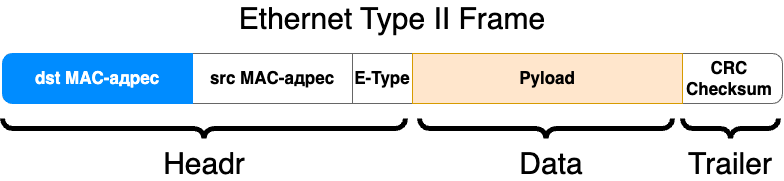
Examples of network frames:
- Ethernet frame: the most common frame type on local area networks (LANs). An Ethernet frame includes fields such as source and destination MAC addresses, Ethernet type, data, and CRC.
- Wi-Fi frame: used in wireless networks and has its own characteristics, such as additional fields for data management and protection.
❯ What happens at the link level?
The main task of the link layer is the transmission of information within one local network. This is done using unique MAC addresses that each network equipment has.
The MAC address can be compared to the series and number in the passport. Each citizen has a unique number. If we look a little higher at the OSI model, then the first and last name can be compared to an IP address.
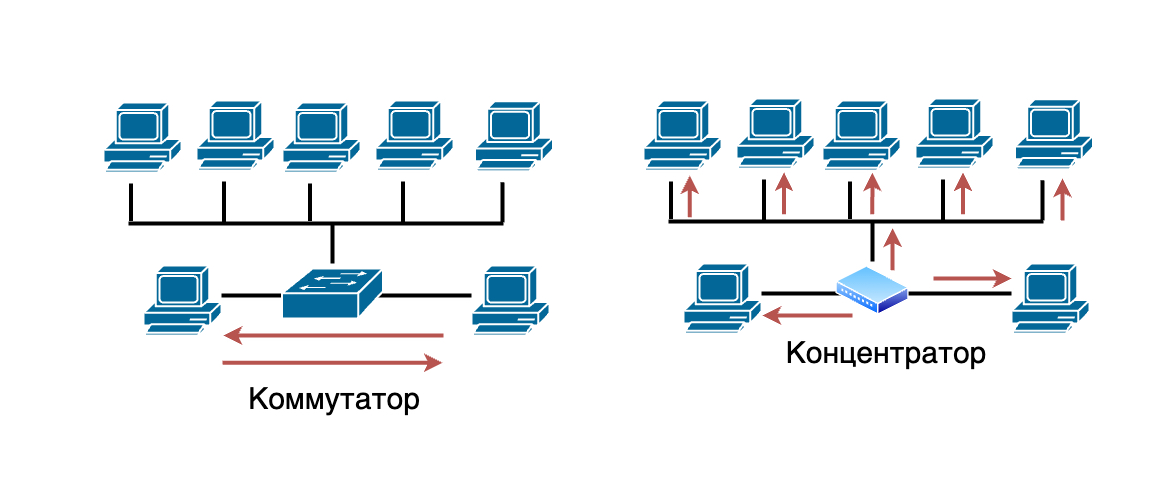
Within a network, switches (devices for transmitting network packets) have a complete MAC table of all MAC addresses that participated in data transmission over the network. Switches, thanks to this MAC table, transmit frames to specific devices rather than sending them throughout the network. The Hub, in turn, transmits frames to all devices on the network.
What is the link layer?
Data Link Layer is the second layer of the OSI model. It is responsible for reliable data transmission over a physical channel, provides error detection and correction, and controls access to the transmission medium.
Basic functions of the link layer:
- Data formatting: converting raw data bits into structured frames.
- Error detection and correction: Ensuring data integrity by detecting and correcting transmission errors.
- Media access control: access control to a common physical transmission medium, collision prevention.
- Addressing: using MAC addresses to identify devices on a local network.
Examples of technologies and standards:
- Ethernet: the primary standard for local area networks (LAN).
- Wi-Fi: wireless standard based on 802.11.
- MAC addresses: unique identifiers for network interfaces.
- Switches: devices for connecting nodes in a network at the L2 level.
Key technologies and standards:
- 802.11 (Wi-Fi): The wireless local area network (WLAN) standard developed by IEEE covers different versions such as 802.11a, 802.11b, 802.11g, 802.11n, 802.11ac and 802.11ax. These standards define how devices communicate with each other wirelessly at specific frequencies and bandwidth.
MAC (Medium Access Control) and LLC (Logical Link Control):
- MAC: a sublayer of the data link layer responsible for controlling access to the physical transmission medium. It provides access control method such as CSMA/CD in Ethernet.
LLC: a sublayer of the data link layer responsible for managing logical connections, frames, and error control, providing the interface between the network and the MAC sublayer.
- VLAN (Virtual Local Area Network): a technology that allows one physical network to be logically divided into several virtual networks. This helps improve network management, security, and performance because devices on different VLANs cannot communicate without a router.
- ATN (Aeronautical Telecommunication Network): a network designed to support air traffic and air traffic control. ATN provides communications between various aviation systems and services for safe and efficient flight control.
- HDP (Health Device Profile): Bluetooth profile designed for transmitting medical data between devices. HDP standardizes data transmission methods for medical devices, ensuring interoperability and reliability of transmission.
- Fibre Channel: a high-speed networking standard used primarily to connect storage area networks (SANs). Fiber Channel provides high throughput and low latency, making it ideal for mission-critical applications and databases.
- Frame Relay: data link technology used for internetworking. It transmits data in the form of frames over virtual channels, providing high data transfer rates and efficient use of network bandwidth.
- HDLC (High-Level Data Link Control): a link layer protocol developed by ISO for transmitting data over synchronous and asynchronous communication lines. HDLC provides connection establishment and termination, data transfer, and error control and correction.
- PPP (Point-to-Point Protocol): a link layer protocol used to establish a direct connection between two network nodes. PPP supports authentication, encryption, and data compression, and is often used to connect to the Internet via modems and DSL.
- Q.921: a link-layer protocol used in ISDN (Integrated Services Digital Network) to establish, manage, and terminate connections. Q.921 manages the signaling and control functions required for ISDN data transmission.
- Token Ring: local network technology developed by IBM, where devices are connected in a ring, and data transfer is carried out according to the principle of passing a token. Only the device that owns the token can transmit data, reducing the chance of collisions.
Application of the link layer in practice
The data link layer plays an important role in local networks. For example, when a switch receives a data frame, it uses MAC addresses to determine where to send the frame. This allows devices on the same local network to communicate with each other without interference from routers.
❯ What happens if there are two identical MAC addresses on the local network?
I'll tell you right away, nothing good. In an ideal world, every network device would have a unique MAC address. But it often happens that network equipment in one batch has the same MAC addresses, or even in the entire batch.
Examples of problems that may arise:
- Communication interruption: If a switch receives packets from two different ports with the same MAC address, it will constantly update its switch table, forwarding traffic to one port or the other, resulting in loss of communication for both devices.
- Network instability: Constant updates to the switching table can cause unpredictable network behavior, up to and including complete shutdown of some network segments.
Conflicts and collisions:
- Devices may not receive packets: Routers and switches use MAC addresses to forward data. If two devices have the same MAC address, data may be delivered to the wrong device or may not be delivered at all.
- Packet collisions: Packets destined for the same MAC address may overlap, causing them to be lost or damaged.
Switching problems:
- Error in switch MAC address tables: switches build MAC address tables to route traffic. If two devices have the same MAC address, the switch may constantly update its table, causing packets to be routed incorrectly.
- Broadcast Storms: Overbroadcasting may occur as the switch tries to send traffic to all ports to find the correct destination address.
Additional problems may also arise at levels above the channel level.
But if the same MAC addresses are in different LANs or in different VLANs, then nothing bad will happen.
❯ Conclusion
The data link layer of the OSI model ensures reliable data transmission in local networks and controls access to the transmission medium. Understanding this layer will help you effectively configure and maintain network equipment such as switches and network adapters.
In the next article, we'll look at the network layer (L3) and its role in data routing.
Thank you for your attention, and see you in the next article!
Read also:
- ➤ How to prepare for an interview as an aspiring network engineer? Basic knowledge
- ➤ IOLA (IOLANET2): a unique retro network of a domestic manufacturer and an unsuccessful experiment
- ➤ How to launch an AMPS cellular network using SDR
- ➤ The very first Android smartphone in the world: what was the HTC Dream like? We are writing applications for Android 1.0 in 2024
- ➤ Gary Kildall - inventor, entrepreneur, legend
News, product reviews and competitions from the Timeweb.Cloud team - in our Telegram channel ↩

Why This Matters In Practice
Beyond the original publication, It's complicated about simple things. Link layer (L2) of the OSI model matters because teams need reusable decision patterns, not one-off anecdotes. Greetings, colleagues! My name is ProstoKirReal , and today we Let's continue studying the OSI model , discussing the link layer (L2). This...
Operational Takeaways
- Separate core principles from context-specific details before implementation.
- Define measurable success criteria before adopting the approach.
- Validate assumptions on a small scope, then scale based on evidence.
Quick Applicability Checklist
- Can this be reproduced with your current team and constraints?
- Do you have observable signals to confirm improvement?
- What trade-off (speed, cost, complexity, risk) are you accepting?
FAQ
What is this article about in one sentence?
This article explains the core idea in practical terms and focuses on what you can apply in real work.
Who is this article for?
It is written for engineers, technical leaders, and curious readers who want a clear, implementation-focused explanation.
What should I read next?
Use the related articles below to continue with closely connected topics and concrete examples.





