It's complicated about simple things. The most popular L3 and L4 headers of the OSI model
Greetings, colleagues! My name is @ProstoKirReal . IN previous article I talked about the most popular headlines on L2 OSI model level. Today I'd like to talk to you about meaningful headlines at the level L3 (network level) and level L4 (transport) OSI model. This part is final
Editor's Context
This article is an English adaptation with additional editorial framing for an international audience.
- Terminology and structure were localized for clarity.
- Examples were rewritten for practical readability.
- Technical claims were preserved with source attribution.
Source: original publication
Greetings, colleagues! My name is @ProstoKirReal.
IN previous article I talked about the most popular headlines on L2 OSI model level. Today I'd like to talk to you about meaningful headlines at the level L3 (network level) and level L4 (transport) OSI model.
This part is final and is a kind of “cheat sheet” that you could return to again and again.
❯ What headers are in an IP packet at the L3 level?
IN this article I have already touched on this level, why it is needed and what functions it performs.
Network layer protocols
There are various protocols used at the network layer, each with their own header format. The most common protocols are IPv4, IPv6, ICMP, ARP, OSPF, GRE.
❯ IPv4 header

One of the most popular headers is IPv4. Let's look at each title in detail:
1. Version 4 bits
This field indicates the IP protocol version. For IPv4 the value is 4. This field determines which protocol is used in the packet header. IP networks also use IPv6, which has a version value of 6 in this field.
2. Header Length 4 bits
This field specifies the length of the IP packet header in 32-bit words. The minimum header length is 5 words (20 bytes), which corresponds to a basic header without options. The maximum header length is 15 words (60 bytes), which allows you to include additional options. The value is specified in the number of 32-bit words (for example, a value of 5 means 5 × 4 = 20 bytes).
3. Type of Service 8 bits

This field is used to indicate the desired quality of service. In IPv4, this field is divided into several subfields:
Three priority bits (Precedence):
• Set the priority of the packet, starting from 000 (lowest priority) to 111 (highest priority). This can be used to manage traffic on high-traffic networks, such as prioritizing packets such as voice or video calls over regular web traffic.
TOS field:
• D (Delay): minimum delay (1 = minimum delay, 0 = normal delay). This option can be useful for latency-sensitive applications, such as online games or video conferencing, where minimal latency is critical to quality of service.
• T (Throughput): high throughput (1 = high throughput, 0 = normal throughput). For example, when transferring large files or streaming video, you can specify this service type to provide high throughput.
• R (Reliability): high reliability (1 = high reliability, 0 = normal reliability). Used in applications where data integrity is important, such as financial transactions or the transfer of important documents.
Two reserved bits:
• Always set to 0.
The reserved bit may be replaced by a field ECN.
More about ECN
Explicit Congestion Notification (ECN) is a mechanism used in networking protocols to control network congestion to avoid packet loss caused by overflowing router or switch buffers. ECN was introduced in updates to the IP and TCP protocols and is an extension of congestion control.
Basic elements of ECN:
IP header: ECN is implemented in IP packet headers (both IPv4 and IPv6). It uses two bits per field Type of Service (ToS) in IPv4 (or field Traffic Class in IPv6), which are called ECN bits. These bits signal the current congestion condition on network devices. In IPv4, this 8-bit field was previously used only to prioritize traffic, and with the introduction of ECN, two of these bits were allocated to indicate congestion conditions. The four possible values of these bits are:
00: ECN is not supported (Non-ECN-Capable Transport, Not-ECT).
01 or 10: ECN supported, but no congestion detected (ECN-Capable Transport, ECT).
11: Congestion Experienced (CE) detected.
TCP header: TCP must also support ECN in order to interoperate with the IP header. There are special flags in the TCP header for this:
ECN-Echo (ECE): Used by the receiver to notify the sender of congestion detected on the network.
Congestion Window Reduced (CWR): This flag is sent by the sender to indicate that it has received a congestion signal and has taken action to reduce the load (for example, reducing the congestion window).
How ECN works:
Sending a package: The sender sets the ECN-Capable Transport (ECT) flag (01 or 10) in the IP header, indicating ECN support.
Passing through the network: If a router or switch detects that its buffer is starting to fill, instead of discarding packets, it sets the ECN bits to 11 (CE), signaling congestion.
Receiving the package: The receiver, upon receiving a packet with CE set, sets the flag ECE in the TCP header of the next packet sent to notify the sender of congestion.
Sender's reaction: The sender, having received a congestion signal via the ECE flag, reduces the data rate (for example, reduces the size of the congestion window) and sends a packet with the flag set CWR to confirm that it has taken measures to reduce congestion.
Advantages of ECN:
Reduced packet loss: ECN avoids situations where routers are forced to drop packets when overloaded. This improves network efficiency and reduces latency.
Soft traffic management: Instead of suddenly dropping traffic as in classic congestion control techniques (such as using Drop Tail algorithms), ECN allows for a more graceful response to congestion, which improves application performance.
Support for modern protocols: ECN is integrated into modern network protocols (eg TCP, SCTP, DCCP) and is part of technologies such as Quality of Service (QoS) management.
Limitations and requirements:
Support on all devices: For ECN to work, it must be supported by both end devices and routers or switches along the data path.
Compatibility: If any device on the network does not support ECN, it will ignore these bits, which may limit the effectiveness of this mechanism.
Implementation in OS and applications: To use ECN, operating systems and network applications also need to support this mechanism.
4. Total Length 16 bits
The maximum packet length is limited by the width of the corresponding field and is 65,535 bytes. However, such large packets are rarely used on most computers and networks. When transmitting data over various networks, the packet length is selected taking into account the maximum packet length of the underlying protocol that carries IP packets. If these are Ethernet frames, then the optimal packet length is 1500 bytes so that it fits in the data field of the Ethernet frame. IN RFC 791 specifiesthat all hosts should be able to accept packets up to 576 bytes in length, regardless of whether they arrive in whole or in fragments. Hosts are encouraged to send packets larger than 576 bytes only if they are confident that the receiving host or intermediate network can handle such packets.
5. Identification (Packet ID) 16 bits
This field is used to uniquely identify a packet when fragmented (each fragment has the same number). When a large packet is broken into smaller pieces, this field helps put the pieces together and determine what kind of package they make up.
6. Flags (Flags) 3 bits

This field contains control flags for handling fragmentation:
• Reserved (1 bit) - This bit is reserved for future use and should always be set to 0. This ensures compatibility with future versions of the protocol.
• DF (Don't Fragment, do not fragment) — this flag indicates that the packet should not be fragmented. If the router detects that the packet is too large to be sent on the next hop and the DF flag is set, the packet will be discarded and an ICMP message with the error "Fragmentation Needed and DF Set" will be sent.
• MF (More Fragments, more fragments) (1 bit) — this flag indicates that the packet consists of several fragments. If this bit is set, it means that the next fragment of the packet will be transmitted. If the MF bit is clear (0), this means that this fragment is the last in the chain of fragments.
Examples of using flags
1. Reserved bit (0) | DF(0) | MF (0)
The packet may be fragmented and this is the last or only fragment.
2. Reserved bit (0) | DF(0) | MF (1)
The packet may be fragmented and more fragments follow.
3. Reserved bit (0) | DF(1) | MF (0)
The packet must not be fragmented and must be the only or last fragment.
4. Reserved bit (0) | DF(1) | MF (1)
This combination is not used because if the DF flag is set, then fragmentation is disabled and MF has no meaning.
7. Fragment Offset 13 bits
The "Fragment Offset" field indicates the offset of the fragment relative to the beginning of the original datagram (for a packet that has undergone fragmentation). The offset value is measured in units of 8 bytes (64 bits). This field plays a key role in restoring the order of fragments when reassembling a package at the receiving node.
Details:
Offset in units of 8 bytes. Because offset is measured in units of 8 bytes, the value in this field is multiplied by 8 to obtain the actual byte offset. For example, if the field value is 1, then the actual offset is 8 bytes.
Restoring the order of fragments. When transmitting a packet that has been split into several fragments, each fragment receives an offset corresponding to its place in the original datagram. This allows the receiving node to correctly reassemble the fragments into the original packet, regardless of the order in which they were received.
Maximum offset value. Since the field size is 13 bits, the maximum offset value is 8191 units (or 65528 bytes), which corresponds to the maximum possible offset in the original datagram.
Examples of use:
First fragment. For the first fragment, the offset is always 0 because it starts at the beginning of the original datagram.
Subsequent fragments. For subsequent fragments, the offset indicates where in the original datagram the fragment begins. For example, if the first fragment is 1000 bytes long, the next fragment will be at offset 125 (1000 bytes / 8).
8. Time to Live (TTL, Time to Live) 8 bits
This field specifies the maximum number of hosts (routers) that a packet can pass through before being discarded. It is used to prevent packets from looping in the network. Each router through which the packet passes decreases the TTL value by 1. If the TTL reaches 0, the packet is dropped.
9. Protocol (Upper level protocol) 8 bits
The Protocol field indicates which transport layer protocol is used to process the data contained in the IP packet. This field helps determine how the packet payload should be interpreted and processed at the receiving node. Example values include:
· 6: TCP (Transmission Control Protocol). Used for reliable, connection-oriented data transfer. TCP provides flow control, data integrity checking, and retransmission of lost packets.
· 17: UDP (User Datagram Protocol). A connectionless protocol used for fast data transfer without guarantee of delivery. UDP is suitable for applications where speed and low latency are important, such as video streaming and online gaming.
· 1: ICMP (Internet Control Message Protocol): A protocol for sending error messages and other informational messages. ICMP is used, for example, in the ping command to check the availability of hosts on a network.
These codes are defined in the IANA (Internet Assigned Numbers Authority) documents..
10. Header Checksum 16 bits.
The "Header Checksum" field contains a checksum used to verify the integrity of the IP packet header. If the checksum value during verification does not match the calculated value, this indicates an error in the header.
Details:
Checksum calculation. To calculate the checksum, all 16-bit words of the packet header are summed. The result of the summation is bitwise inverted, and the resulting value is written in the “Header Checksum” field. When checking integrity, this process is repeated, and if the checksum matches the calculated one, the header is considered correct.
Integrity check. When a packet is received, the receiving device recalculates the header checksum. If the checksum in the header matches the calculated one, this confirms that the header was not corrupted during transmission. If the values do not match, the packet is considered corrupted and may be discarded.
Limiting data control. The checksum only verifies the packet header, not its data. This means that errors in the packet payload will not be detected by the header checksum.
Examples of use:
Error detection. The checksum helps detect errors that occur when packets are transmitted over a network, such as random bit changes due to interference.
Increased reliability. The use of a checksum increases the reliability of network communications, as it allows timely identification and processing of damaged packets.
Routers and End Nodes. The checksum is verified at every intermediate router and end node, ensuring header integrity at every stage of transmission.
I would like to make one more important note. The header checksum is calculated from the entire header, and the header has a Total Length field. Because of this field, packets of different lengths will have different checksums. In my practice, I had to manually change some header fields, and because of this I had to manually calculate the checksum.
11. Source IP Address (sender's IP address) 32 bits
This field contains the IP address of the host that sent the packet. It is used to identify the source of the packet and to route the response back to the sender.
12. Destination IP Address 32 bits
This field contains the IP address of the host that should receive the packet. It is used to route the packet to its final destination.
13. Options
The Options field contains additional options that can be used for various purposes, such as security, routing control, or diagnostics. Options may include different parameters and their format may vary. This field is not always present, and if it is not present, the header is filled with zeros to a multiple of 32 bits.
Details:
Variable length. The Options field can vary in length depending on the specific options used in the package. This makes the field flexible and allows you to add a variety of parameters to suit different needs.
Additional options. Options may include parameters such as Record Route, Timestamp, security parameters, and other special instructions.
Options Format. Each option has a specific format, which may include fields for option type, option length, and option data. Depending on the specific option, these fields may have different meanings and structures.
Availability of options. The "Options" field is not necessarily present in every IP packet. If no options are used, the field is absent and the header is padded with zeros to ensure a multiple of 32 bits (4 bytes). This requirement helps maintain proper alignment of the IP packet header.
Examples of use
Routing control:
Source Routing (routing by source). This option allows the sender to specify specific routes that the packet should take. This can be useful in case of congestion on some routes or to bypass faulty sections of the network.
Record Route. This option allows you to record the IP addresses of the routers through which the packet passes. This way, administrators can analyze routes and optimize the network.
Network diagnostics:
Timestamp. The option adds timestamps to the packet as it passes through routers. This allows you to measure the time it takes a packet to pass through each router, identify delays, and identify areas of the network that need improvement.
Ping with Record Route option. Administrators can use the ping utility with the route recording option to diagnose network problems. This allows you to see which nodes the packet is passing through and where problems might occur.
Safety:
IPsec (Internet Protocol Security). Uses special options to encrypt data and ensure packet authenticity. This helps prevent eavesdropping and tampering of data during transmission.
Authentication options. Some network protocols include options for authenticating data sources. For example, TCP can use the MD5 option to protect BGP sessions from unauthorized interference.
❯ IPv6 header

The IPv6 header has a simpler and more efficient structure compared to IPv4:
Version 4 bits
Indicates the IP protocol version. For IPv6, the value is 6. This field helps distinguish between IPv4 and IPv6 packets.
Traffic Class 8 bits
Similar to the ToS field in IPv4, it is used to indicate traffic priority and ensure quality of service (QoS). This field allows routers and end nodes to process packets based on their priority.
Usage example
In enterprise networks where different types of data are transmitted (for example, video, voice, general traffic), this field is used to assign priority to video and voice data, ensuring minimal latency and high reliability.
Flow Label 20 bits
Used to mark packets belonging to the same data stream. This field helps ensure proper quality of service (QoS) for packets belonging to specific flows.
Usage example
In streaming media applications such as IPTV, the stream label allows routers to identify and process packets belonging to the same video stream, ensuring smooth video playback without delays or data loss.
4. Payload Length (Payload Length) 16 bits
Defines the length of the payload (data) in the packet, excluding the IPv6 header. This field helps determine the size of the data transmitted in the packet.
Usage example
Network devices and end nodes use this field to determine the size of data, which allows efficient control of packet buffering and processing, especially when transmitting large amounts of data.
Next Header 8 bits
Identifies the header type that immediately follows the IPv6 header. This field allows you to determine which protocol is used after the IPv6 header (for example, TCP, UDP, ICMPv6).
Usage example
In network devices, this field is used to determine the next protocol, which allows the packet to be correctly processed in accordance with the requirements of a particular protocol, be it the transport or application layer.
Hop Limit 8 bits
Specifies the maximum number of nodes a packet can pass through before being discarded. This field performs the same function as TTL in IPv4, preventing packets from looping.
Usage example
This field is used to prevent packets from endlessly moving through the network. If a packet cannot be delivered within the specified number of hops, it will be discarded, preventing network congestion.
Source Address 128 bits
IP address of the host that sent the packet. This field is used to route the response back to the sender.
Destination Address 128 bits
IP address of the host that should receive the packet. This field is used to route the packet to its final destination.
❯ ICMP header
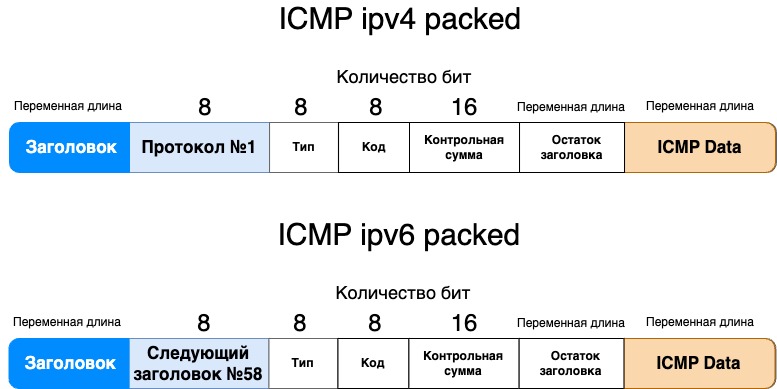
ICMP (Internet Control Message Protocol) used for exchanging control messages and diagnostics.
ICMP header fields:
1. Type 8 bits
Indicates the ICMP message type. Example types include echo request (Type 8) and echo reply (Type 0). This field helps determine how the ICMP message should be interpreted.
Usage example
Echo requests and echo replies (pings) are used to check the availability of hosts on a network. System administrators send pings to the target node to check if it responds and what the latency is.
2. Code (Code) 8 bits
Provides additional information about the message type. For example, for a destination unreachable message, this code indicates what type of error occurred (for example, network or host unreachable).
Usage example
When a host receives an ICMP destination unreachable (Type 3) message, the code may indicate the reason for the unreachability, such as network (Code 0) or host (Code 1) unreachability. This helps in diagnosing problems with routing and node availability.
3. Checksum 16 bits
Used to check the integrity of the ICMP message header and data. The checksum is calculated as the bitwise inverse of the sum of all 16-bit words in the header and data.
Usage example
When receiving an ICMP message, the end node calculates the checksum and compares it with the received one. If the values do not match, the message is considered corrupted and discarded, which helps ensure data integrity and error protection.
4. Rest of header (variable length)
Depending on the ICMP message type and code, this field may include additional data such as the original IP header and the first 8 bytes of the original payload. This field allows you to include additional information needed for diagnosis.
Usage example
In destination unreachable messages, this field contains the original IP header and part of the payload, which helps the sender identify which packet caused the error. This is important for troubleshooting and routing adjustments.
❯ ARP header

ARP (Address Resolution Protocol) used to determine the MAC address from a known IP address.
ARP header fields:
1. Hardware type 16 bit
Indicates the hardware type, such as Ethernet (value 1). This field helps determine the format of the hardware address in the ARP message.
Usage example
On Ethernet networks, the value of this field is always 1. This allows hosts to correctly interpret the format of the hardware (MAC) addresses used in ARP messages. When a host receives an ARP request or an ARP response, it checks the value of this field to ensure that the message is destined for the Ethernet network. If the value is not 1, the message is ignored.
On Wi-Fi (802.11) networks, the value of this field is 1, as is the case on Ethernet (if a standard Ethernet MAC address is used).
In FDDI (Fiber Distributed Data Interface) networks, the value of this field is 6.
On Infiniband networks, the value of this field is 32.
In networks using Frame Relay technologies, this value is 15.
2. Protocol type 16 bits
Specifies the protocol type for which address resolution is performed.
Usage example
On standard Ethernet networks, the value of this field for the IPv4 protocol is always 0x0800. When a device sends an ARP request to determine the MAC address associated with an IP address, it sets the value of this field to 0x0800.
For IPv6 the value 0x86DD can be used.
In MPLS (Multiprotocol Label Switching) networks, the value of the “Protocol Type” field can be 0x8847 for unicast traffic or 0x8848 for multicast traffic. This helps devices on the network understand that ARP requests or responses are related to address resolution in the context of MPLS.
3. Hardware address length 8 bits
Defines the length of the hardware address, for example 6 bytes for Ethernet.
Usage example
On Ethernet networks, the value of this field is 6, which indicates the standard MAC address length (48 bits).
4. Protocol address length 8 bits
Defines the length of the protocol address, for example 4 bytes for IPv4. This field helps determine the size of the IP address.
Usage example
For IPv4, the value of this field is 4, which indicates the standard IPv4 address length (32 bits).
5. Operation 16 bits
Indicates the ARP message type.
Usage example
When a device sends an ARP request, the value of this field is 1. When it responds to a request, the value is 2. This allows you to differentiate between requests and responses.
6. Sender hardware address variable length
The MAC address of the sender of the ARP message.
7. Sender protocol address variable length
The IP address of the sender of the ARP message.
8. Target hardware address variable length
Recipient MAC address. In an ARP request, this field is filled with zeros because the recipient address is not yet known.
9. Target protocol address variable length
The IP address of the recipient of the ARP request or response.
❯ OSPF header

OSPF (Open Shortest Path First) is a routing protocol designed to exchange route information across IP networks. OSPF header fields include important data to ensure proper operation and authentication of the protocol. Here is a detailed description of the OSPF header fields:
1. Version 8 bit
Indicates the OSPF protocol version used in the packet. This field is important to ensure compatibility between different versions of OSPF.
Usage example
Version 2 (value 2) is the most common and is used in most network devices. If the field contains a different version, such as 3, this indicates the use of OSPFv3, which supports IPv6.
2. Type 8 bits
Specifies the OSPF type of the packet, which allows hosts to correctly interpret and process received data. Types include Hello (1), Database Description (2), Link State Request (3), Link State Update (4), and Link State Acknowledgment (5).
Usage example
The Hello packet is used to establish and maintain adjacency between routers. Link State Update packets contain link state updates that routers use to build their routing tables.
3. Packet length 16 bits
Indicates the total length of the OSPF packet, including the header. This field helps recipients allocate memory correctly to process the packet.
Usage example
If the packet length is specified as 64 bytes, this means that the OSPF header and data occupy a total of 64 bytes. This value is important for the entire packet to be read and processed correctly.
4. Router ID 32 bit
The unique identifier of the router that sent the packet. This field helps identify the source of the OSPF packet and distinguish between routers on the network.
Usage example
The router ID could be, for example, 192.168.1.1. This unique value allows other routers to identify and associate with the source of the packet.
5. Area ID 32 bits
Identifies the OSPF area to which the packet belongs. This field helps divide and organize OSPF networks into areas to simplify routing.
Usage example
If the area ID is 0.0.0.0, this means that the packet belongs to the OSPF backbone area. The value 1.0.0.1 may indicate a specific user area on the network.
6. Checksum 16 bits
Used to check the integrity of the OSPF packet header and data. A checksum is calculated to detect errors in data transmission.
Usage example
If the checksum in a packet is 0x1A2B, then the recipients of the packet can calculate their checksum and compare it with this value to ensure that the packet was not corrupted during transmission.
7. Authentication type 16 bits
Specifies the authentication type used to authenticate the OSPF packet. For example, this could be "None" for no authentication or "Simple Password" for using a password.
Usage example
If the field value is 0, it indicates no authentication. If the value is 1, it means using a simple password, which may require password verification for security.
8. Authentication 64 bit
Contains authentication data if required by the authentication type. This field is used to verify the authenticity of the package and protect against unauthorized access.
Usage example
If the authentication type is set to "Simple Password", this field can contain a 64-bit password that routers must verify to establish trust. If "None" is used, this field will be filled with zeros.
❯ GRE header
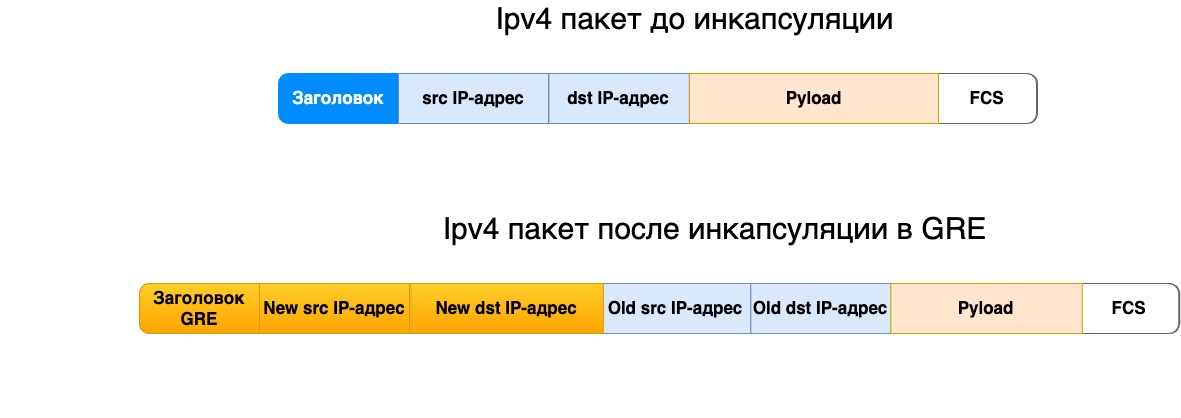
GRE (Generic Routing Encapsulation) is a protocol used to encapsulate different network protocols within a single network connection. It allows you to create virtual tunnels between network nodes and transfer various types of data through this tunnel. GRE header fields help ensure proper data transfer and tunnel control.
Original GRE packet header, described in RFC 1701 (Generic Routing Encapsulation (GRE)), was the first standard for GRE and laid the foundation for encapsulating various protocols within IP packets. However, today RFC 1701 considered obsolete.
Instead, simpler and more efficient versions are used, such as those defined in RFC 2784 And RFC 2890. These new standards provide interoperability and make it easier to work with GRE in modern networking applications.
Let's consider each of them separately.
RFC 2784 GRE:
This is the core standard for GRE and describes the basic structure of the GRE header and its application. It is the basis for all other GRE specifications.
RFC 2784 defines a minimal GRE header that includes key fields such as Protocol Type, allowing different protocol types to be encapsulated within GRE.
Here is a detailed description of the fields in this GRE header:
Flag Bits contains various control bits that indicate the use of additional functions or settings. Value 1 is set, value 0 is not set.
• Checksum Present 1 bit: this flag indicates that the header contains a Checksum field. If set, the GRE main header is followed by a checksum field.
12 bits reserved. The field is reserved for future extensions and should be set to zero.
Version : 3 bits. Field indicating the version of GRE. Currently version 0 is in use.
Protocol Type 2 bytes.
Specifies the protocol type that is encapsulated in the GRE package. For example, for IP this value will be 0x0800. This field allows you to identify what type of data is inside the GRE packet.
5. Checksum 2 bytes
Used to check the integrity of data in the GRE header. If the Checksum Present flag is set, this field will be present. The checksum is calculated based on the contents of the GRE header and data, which helps detect errors in transmission.
16 bits reserved. If the flag is set Checksum Present, then this field is present and reserved for future extensions and must be set to zero.
7. Encapsulated Packet (Data)
The GRE header is followed by the encapsulated data. This data can be any packets of various network protocols that are encapsulated in GRE. For example, this could be IP packets, Ethernet frames, or other types of data.
RFC 2890 — «Key and Sequence Number Extensions to GRE»:
This document extends RFC 2784 and adds support for the use of Key and Sequence Number in the GRE header.
These extensions allow for tunnel uniqueness as well as packet ordering, which is useful for improving connection management.
Here is a detailed description of the fields in this GRE header:
Flags (Flag Bits). Contains various control bits that indicate the use of additional functions or settings. Value 1 is set, value 0 is not set.
• Checksum Present 1 bit: this flag indicates that the header contains a Checksum field.
• Reserved 1 bit. The original GRE package (RFC 1701) included a flag Routing Present, this package does not contain this flag, but the space is reserved.
• Key 1 bit: this flag indicates that a key field is present in the header.
• Sequence number: this flag indicates that the sequence number field is present in the header.
• 9 bits reserved. The field is reserved for future extensions and should be set to zero.
Version : 3 bits. Field indicating the version of GRE. Currently version 0 is in use.
Protocol Type 2 bytes
Specifies the protocol type that is encapsulated in the GRE package. For example, for IP this value will be 0x0800. This field allows you to identify what type of data is inside the GRE packet.
4. Checksum 2 bytes
Used to check the integrity of data in the GRE header. If the Checksum Present flag is set, this field will be present. The checksum is calculated based on the contents of the GRE header and data, which helps detect errors in transmission.
5. Key (Key) 4 bytes
When several different GRE tunnels are sent from one sender, the final recipient needs to distinguish which tunnel is intended for whom. This field enters a unique tunnel identifier called a key.
Sequence Number: 4 bytes.
Encapsulated Packet (Data)
The GRE header is followed by the encapsulated data. This data can be any packets of various network protocols that are encapsulated in GRE. For example, this could be IP packets, Ethernet frames, or other types of data.
❯ What headers are in the IP packet at the L4 level?
Let's look at the headers of Layer 4 (transport layer) protocols, including TCP, UDP, and SCTP. Each of these protocols has its own characteristics and functions, reflected in the structure of their headers.
IN this article I have already touched on this level, why it is needed and what functions it performs.
❯ TCP header

TCP (Transmission Control Protocol) is a transport layer protocol that provides reliable, connection-oriented data transmission. The TCP header contains the following fields:
1. Source Port 16 bit
Specifies the source port number through which data is sent. This field helps identify the application or process on the sending node that initiated the data transfer.
Usage example
If the source port is 80, this may indicate that the data is being sent from a web server using HTTP.
2. Destination Port 16 bit
Specifies the destination port number to which data should be sent. This field helps route the data to the appropriate application on the receiving end.
Usage example
If the destination port is 25, it points to the email service (SMTP) on the recipient side.
3. Sequence Number 32 bits
Indicates the number of the first byte of data in the TCP segment. This field is used to keep track of the order of the data and reassemble it in the correct order at the receiving end.
Usage example
If the sequence number is 1001, it means that the first byte of data in that segment is number 1001.
4. Acknowledgment Number 32 bits
Indicates the next byte of data expected from the sender. This field is used to acknowledge receipt of data and control flow.
Usage example
If the letter of credit number is 2001, this means that the recipient is expecting a data byte starting with number 2001.
5. Header length (Data offset) 4 bits
Specifies the length of the header, measured in 32-bit words. The minimum size is 20 bytes (five 32-bit words) and the maximum is 60 bytes (fifteen 32-bit words). The header length determines the offset of the payload relative to the start of the segment.
Usage example
A Data offset value of 1111_2 indicates that the header occupies fifteen 32-bit words (15 words * 32 bits / 8 bits = 60 bytes).
6. Reserved 3 bits
Reserved for future use (set to zero).
7. Flags 9 bits
Contains control flags that control the state of the connection:
NS (Nonce Sum): to protect against attacks, it clarifies whether there have been changes in the data.
CWR (Congestion Window Reduced): reports a decrease in the congestion window.
ECE (ECN-Echo): announces support for ECN (Explicit Congestion Notification).
URG (Urgent): indicates the presence of urgent data.
ACK (Acknowledgment): indicates that the L/C number field is valid.
PSH (Push): indicates that the data should be transferred to the application immediately.
RST (Reset): used to reset a connection if it cannot be established or maintained.
SYN (Synchronize): initiates a connection by synchronizing the starting sequence numbers.
FIN (Finish): ends the connection, indicating the end of data transfer.
Usage example
If the SYN flag is set, it indicates that the connection has begun to be established.
8. Window size 16 bits
Specifies the receiver window size, which indicates how much data can be sent before an acknowledgment is received. This field controls data flow and prevents buffer overflow.
Usage example
If the window size is 4096, this means that the recipient can receive up to 4096 bytes of data before an acknowledgment is required.
9. Checksum 16 bits
Used to check the integrity of the TCP header and data. The checksum is calculated based on the header and data, which allows errors in transmission to be detected.
Usage example
If the checksum detects inconsistencies, the packet may be rejected and the data will be re-requested.
10. Urgent Pointer 16 bits
Specifies the offset to the end of the urgent data if the URG flag is set. This field allows urgent data to be processed before regular data.
Usage example
If the urgent data pointer is 100, this means that the urgent data ends 100 bytes from the start of the segment.
Options variable length
Used for various advanced parameters such as maximum segment size (MSS) and other TCP-specific parameters. If there are no options, this field may be filled with zeros.
Usage example
The MSS option can specify the maximum segment size that can be accepted without fragmentation.
12. Padding (variable length)
Description: provides a header length multiple of 32 bits. This field is used only if the header length is not a multiple of 32 bits, and is filled with zeros.
Usage example: If the TCP header is 20 bytes long and the options field is 4 bytes, then 4 bytes of padding can be added to achieve a multiple of 32 bits.
❯ UDP header

UDP (User Datagram Protocol) is a transport layer protocol that provides connectionless data transfer. The UDP header contains the following fields:
1. Source port 16 bits
Specifies the source port number that initiates data transfer. This field helps identify the application or process sending the data.
Usage example
If the source port is 53, it points to the DNS service.
2. Destination port 16 bits
Specifies the destination port number to which data should be sent. This field helps route the data to the appropriate application on the receiving end.
Usage example
If the destination port is 67, it indicates the DHCP service.
3. Length 16 bits
Indicates the total length of the UDP header and data in bytes. This field helps determine the size of the transmitted data and ensures that the packet is read correctly.
Usage example
If the length is 28 bytes, it means that the UDP header and data occupy 28 bytes in total.
4. Checksum 16 bits
Used to check the integrity of the UDP header and data. A checksum is calculated to ensure that there are no errors in data transmission. This field is optional in some implementations, but is recommended for testing purposes.
Usage example
If the checksum is 0, this may indicate that the checksum verification was not performed, which may be allowed in some network configurations.
❯ SCTP header

SCTP (Stream Control Transmission Protocol) is a transport layer protocol that provides multi-stream and reliable data transmission. The SCTP header contains the following fields:
1. Source port 16 bits
Specifies the source port number through which data is sent. This field helps identify the application that initiated the data transfer.
Usage example
If the source port is 5000, this may indicate a specific application that uses SCTP for communication.
2. Destination port 16 bits
Description: specifies the destination port number to which data should be sent. This field helps route the data to the appropriate application on the receiving end.
Usage example: if the destination port is 6000, it may indicate an application that receives data via SCTP.
3. Verification tag 32 bits
The Verification Tag field is used to protect against connection spoofing and ensure that only expected and authorized messages can be processed.
Usage example
· Establishing a connection: When the client and server establish a connection via SCTP, they exchange an initial message that contains a Verification Tag. This tag is used to confirm that both parties agree to establish a connection and that they are who they say they are.
· Message Authentication: Verification Tag is also used to verify that incoming messages actually belong to the current connection. This helps prevent man-in-the-middle attacks and ensures that messages are not accidentally or intentionally sent to the wrong connection.
· Change Verification Tag: When a connection is established, the Verification Tag is randomly selected by one of the parties (for example, the server) and sent to the other party (for example, the client). The client must return this tag back in its response message. Both participants in the connection use this tag to verify the integrity and belonging of messages to the established connection.
4. Chunk Data variable length
Each SCTP message consists of one header and one or more chunks. Chunks can be of different types, including:
DATA: Transfers user data.
INIT: Initiates a connection.
INIT ACK: Confirms the connection has been established.
SACK (Selective Acknowledgment): Used to confirm that data has been received.
HEARTBEAT: Checks path availability.
HEARTBEAT ACK: Confirms receipt of HEARTBEAT.
ABORT: Disconnects the connection.
SHUTDOWN: Ends data transfer.
Example of an SCTP header with a DATA chunk:
SCTP header
Source Port: 16 bit
Destination Port: 16 bit
Verification Tag: 32 bits
Checksum: 32 bits
Chunk DATA
Type: 8 bit
Flags: 8 bit
Length: 16 bit
Transmission Sequence Number: 32 bits
Stream Identifier: 16 bit
Stream Sequence Number: 16 bit
TSN (Payload Protocol Identifier): 32 bits
Data: variable length
This is the structure of one of the types of chunks. Other types of chunks have their own specific fields.
❯ Conclusion
Headers at the network and transport layers of the OSI model are critical to ensuring reliable and efficient data transmission in networks. Understanding their structure and functions allows network administrators and engineers not only to configure and optimize networks, but also to solve performance and security problems. With complexities such as fragmentation, IPv6 migration, and vulnerabilities, it is important to continually update knowledge and implement best practices to maintain an efficient and secure network infrastructure. In the future, as technology advances and new protocols emerge, our understanding and approaches to working with network headers will continue to evolve, requiring further learning and adaptation.
News, product reviews and competitions from the Timeweb.Cloud team — in our Telegram channel ↩

📚 Read also:
➤ Upgrading a mobile computer with a soldering iron;
➤ Tape drives in a home PC;
➤ Managing the project and its documentation using Python;
➤ How we conceived a small exhibition, but ended up discovering two unknown Soviet computers;
➤ How the Riddick anthology was created.
Why This Matters In Practice
Beyond the original publication, It's complicated about simple things. The most popular L3 and L4 headers of the OSI model matters because teams need reusable decision patterns, not one-off anecdotes. Greetings, colleagues! My name is @ProstoKirReal . IN previous article I talked about the most popular headlines on L2 OSI model level. Toda...
Operational Takeaways
- Separate core principles from context-specific details before implementation.
- Define measurable success criteria before adopting the approach.
- Validate assumptions on a small scope, then scale based on evidence.
Quick Applicability Checklist
- Can this be reproduced with your current team and constraints?
- Do you have observable signals to confirm improvement?
- What trade-off (speed, cost, complexity, risk) are you accepting?
FAQ
What is this article about in one sentence?
This article explains the core idea in practical terms and focuses on what you can apply in real work.
Who is this article for?
It is written for engineers, technical leaders, and curious readers who want a clear, implementation-focused explanation.
What should I read next?
Use the related articles below to continue with closely connected topics and concrete examples.





