Lessons from Building a $1,000,000 Utility
In the fall of 2008, we spent two to three weeks of our spare time writing a small database backup utility. Today it brings us about $230,000 a year, and we can confidently say that in total we will earn more than $1,000,000 from it.
In the fall of 2008, we spent two to three weeks of our spare time writing a small database backup utility (MS SQL Server, and later MySQL). Today it brings us about $230,000 a year, and we can confidently say that in total we will earn more than $1,000,000 from it.
Below, I'll tell you how it happened and what lessons we learned from it. It's entirely possible that we simply got dumb lucky and this experience is completely wrong, doesn't match any theory, and will only harm your venture — read at your own risk.
The Beginning
It all started with an unmet need. At our day jobs, we were doing various projects on .NET + SQL. And the simple task of creating a database backup, compressing it, and uploading it to an FTP server often required a patchwork of scripts and utilities. We looked at the available solutions — they fell into one of three categories:
- Expensive and complex (RedGate, LiteSpeed, Idera).
- Seemingly decent for file backup, but SQL backup was an unclear afterthought (Handy Backup, IBackup).
- Cheap or free half-baked tools with a VB6 vibe.
The market clearly lacked a simple utilitarian product. I shared the idea with a friend who specialized in Windows applications and offered him half of the revenue. I would handle the GUI and website, while he would handle the application itself.
The Interface
We defined our strategy as follows: keep everything simple so that even a beginner user could get results in a minimum number of clicks. Namely: select databases, compress, send to a folder or FTP, receive an email confirmation, and schedule it to run daily. We laid out all these actions on the main form, hiding everything else behind Advanced and Configuration buttons.
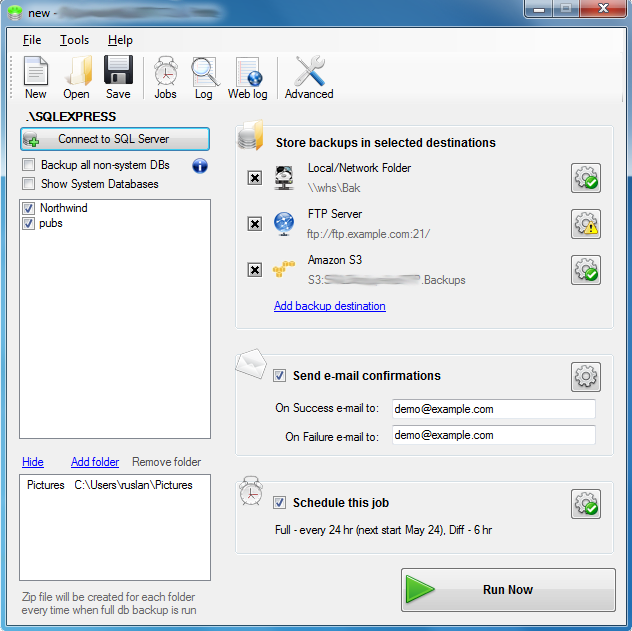
Lesson 1 (also the main one): Find the shortest possible way to satisfy the need and don't burden users with details.
Every other day, someone suggests we add this or that feature. The first question we ask is: what percentage of our users will actually need this? If it's less than 5%, we won't do it.
Lesson 2 (really a continuation of the first): functionality that most people don't need is harmful because it complicates understanding.
Here's how we dealt with some of the complexities:
- The program had to work with multiple projects/jobs. However, for most users it's enough to create just one project by selecting several databases for backup. We made the program automatically open the same project as last time and connect to the same SQL server — so most people don't even realize you can work with multiple projects.
- SQL Connection String — still the most complex part for the user. On first launch, without asking the user, we try the most common connection strings, so that upon opening the program, most users are already connected to the server and can see their list of databases.
- Sending emails — to avoid burdening users with SMTP configuration, by default we send emails through a web service on our server. For free users, the feature is free for one week, after which you can either buy the paid version or use your own Gmail or other SMTP server.
- Scheduling — most people just need a Full Backup once a day. Which can be set up right on the main form. For more advanced users, all settings are hidden behind the Settings button.
Money
After working for a while, we released the first version. Then we listed it on all shareware sites and left comments on relevant forums. Customers slowly started coming in. Two months after release, a large company noticed us — their product was based on SQL and their users with limited technical knowledge were responsible for their own backups. We were a perfect fit for them and they sent all their users our way. On top of that, they even took on the responsibility of tech support. Money started flowing in.
The main version (Standard) currently costs $59. For companies where that's pocket change, we have Professional with AES encryption for $69. For the budget-conscious — Lite (maximum 5 databases) for $29. About a year ago, I read some article about how prices on a Pricing page should be listed from high to low so that the user, frightened by the first large numbers, finds the middle price relatively modest. We thought: what could we release that's expensive enough to scare users? That's how the Lifetime version was born at $199 (now $149) with free lifetime updates. And we were very surprised when people started buying it enthusiastically!
Then a friend suggested another idea that brought in thousands of dollars. In addition to products, we sell Extended Support for a small fee (those who buy it get priority support) and free updates for 1 year (default is 1 month). The additional effort is close to zero, but the money keeps trickling in...
Lesson 3 — let users pay as much as they want and can afford.
Piracy and Greed
From day one, we decided to spend only minimal time fighting piracy. The program has a built-in algorithm for checking license keys that isn't hard to crack. The idea is this: if someone runs a keygen to crack it, they probably wouldn't have paid for the program anyway. But this way, they'll use it, and maybe when they settle down, they'll feel the need to pay.
Many people install a single key on multiple machines — we just send polite emails reminding them that this isn't right. Companies in civilized countries try to honor agreements and buy the missing licenses. We could deal with the less civilized ones by adding activation, but that would complicate life for the majority of honest customers. And again: they're using our product, and that's already a good thing.
Lesson 4 — focus on the product, not on protection. Today's pirate is tomorrow's customer.
Most people are perfectly fine with the free version, which can do everything the Standard version does but with a limit of two databases. Grateful users even offer donations. And we're happy: when their needs grow, they'll pay, and in the meantime we're competing with free DIY solutions.
Recently we added backups to Amazon S3, Google Drive, and Dropbox. At first we wanted to charge extra. But we decided not to burden users and simply added it to the existing versions. More users means more revenue.
Lesson 5 — happy customers are more important than filling your pockets right now.
What's Next...
In the next article, I'll talk about working with contractors, how we poured a ton of money into the wrong things, how we promoted ourselves, how our employee tried to create a competing product, how we handle difficult customers, how we receive and split revenue, our views on financing, how we back up to the Cloud, how we introduced a trial, what happened with localization, and where we're heading next.



