One-Shot Prompting: How I Started Vibe-Coding 10x Faster
A product manager rediscovers programming through AI tools and builds Shotgun, a desktop Go app that feeds complete project context to LLMs for dramatically better one-shot code generation compared to Cursor's built-in context handling.
I'm a manager by trade. But I used to write code and always loved it. I seriously developed mobile apps and even earned over 100 stars for one of my Stack Overflow answers.
But a lot of time has passed since then.
And recently this topic has captivated me again. How does it captivate a modern person, exhausted by a billion frameworks and 15 years behind the times? With Cursor and vibe-coding, of course.
And so I started coding.
I built several bots, then took a swing at a CMS. Now I'm even making my own tool for running LLM pipelines with n8n import.
The Two Problems I Kept Hitting
But throughout all of this, I invariably ran into two problems:
- Cursor (and its sibling Windsurf) handles untyped and weakly-typed languages terribly. It invents variable names, changes them on the fly, and generally doesn't care. Beyond that, it codes fine. But this one thing personally generates 90% of my bugs.
- As soon as you need to make a logically complex change touching not just a couple but six or seven files — that's it, game over. Logic, consistency, and any semblance of reason are lost (if you can even say that about an LLM).
I suffered and suffered, then started noticing that the agent in Cursor is very creative with context. To put it mildly, it forgets it — and "forgets" is putting it gently.
Even if you directly specify which files to use, it may completely ignore what's described in them, simply because it's not in the first hundred lines but somewhere around line 500.
Search is even worse. The entire project structure is right there in front of it. No — it stubbornly doesn't see it, and reluctantly runs a search only after reminders. Sometimes it just invents files that don't exist.
This infuriated me.
And I started taking action, creatively modifying my prompts.
Started with the Directory Structure

It turned out you can run a script that outputs the directory/file tree and copy it into the prompt. And lo and behold — Cursor starts finding files immediately, without making up their existence.
It seems the creators of this multi-billion-dollar company haven't gotten around to showing it the structure through internal tools.
A similar discovery happened with file contents.
It genuinely sees them better when you copy the full listing rather than just linking them with built-in tools.
So that's what I started doing, and development speed noticeably increased.
I Found a Cheat Code
It turns out you can force-feed Cursor context like a goose for foie gras, feeding it kilometer-long prompts.
And the results are significantly better.
But the approach had a downside.
Doing this is EXTREMELY TEDIOUS. Copy-pasting the code of every file — that's rough. Doing it from the command line is inconvenient for someone exhausted by management.
But I shared the approach with friends in an AI chat, and it turned out I wasn't the only one doing such things. Many people independently arrived at this, and moreover, someone shared an advanced technique with me:
Why do you need Cursor if you can copy everything into Google AI Studio?
It accepts practically infinite context, and a minimum of 25 requests per day are free. For a hobby, that's more than enough.
One problem: the inconvenience of composing such prompts didn't go away.
So I decided to fix it.
Vibe-Coding an App Using Itself (Recursion!)
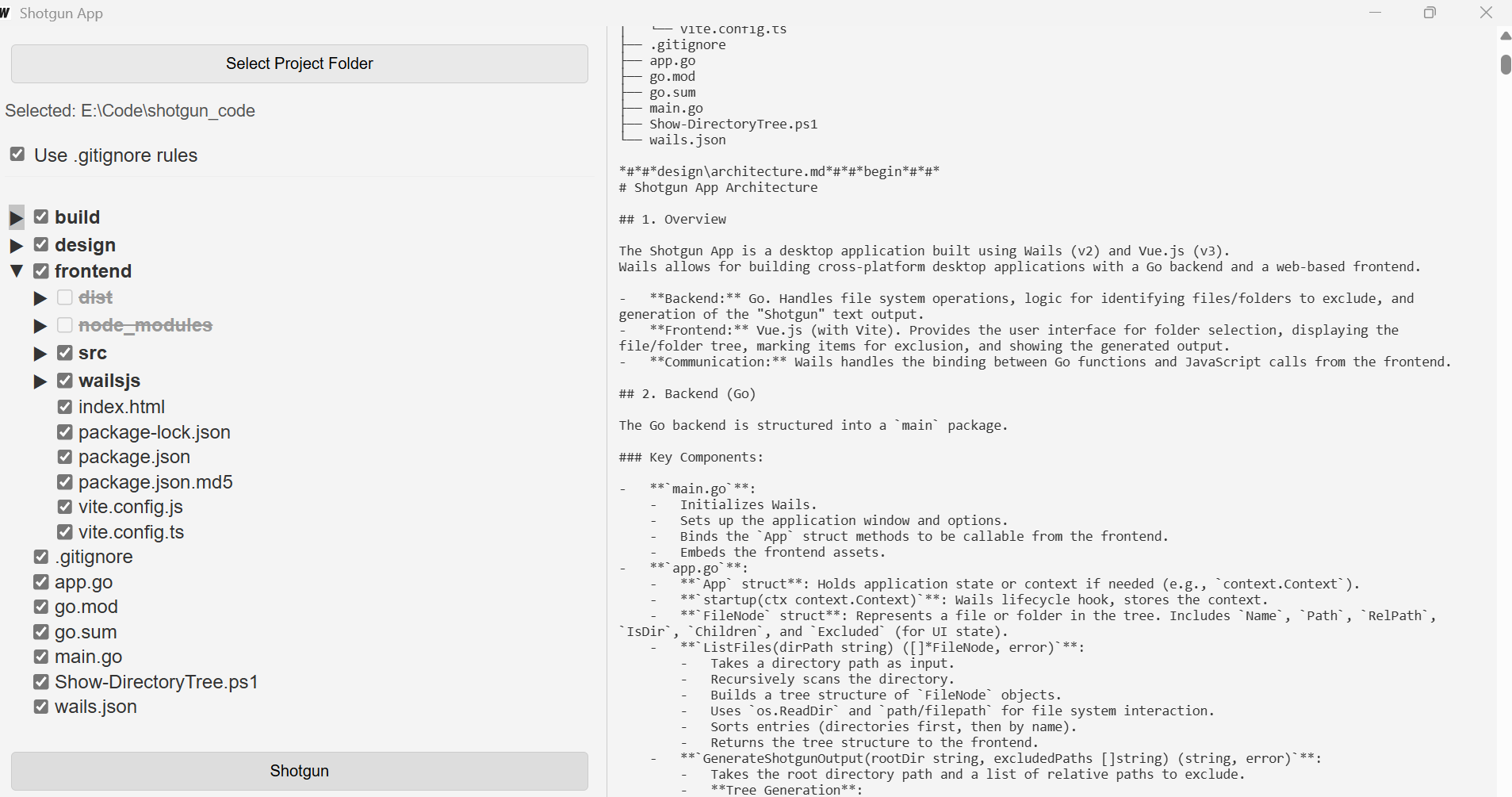
Since there's a problem, it needs to be solved. As a tool, I chose Go.
I like Go for its cross-platform capability and fascist-strict linter settings out of the box — many bugs never reach production simply because the build fails. This doesn't let LLMs take liberties like inventing a new variable name and telling nobody about it. Which means it's suitable for vibe-coding!
For the GUI framework, I chose Fyne, but after making a hello world, I realized Gemini writes very poorly with it. I quickly switched to the web-like stack Wails, which turned out to be very reliable and pleasant.
So: we're building a desktop Go application with UI on Wails. For the frontend framework, I chose Vue because I'd been wanting to try it (spoiler: great framework, no complaints).
Development
First, I needed to build the foundation that would start helping me quickly write code.
The foundation turned out to be extremely simple. It's a little program that simply outputs a directory listing as a tree and file contents.
I made it literally in a couple of hours, most of which were spent getting the directory tree to work properly.
It immediately became clear that some directories needed to be ignored. Node modules reliably froze the app. So adding gitignore rules became the first feature beyond the basics.
Developing the Prompt
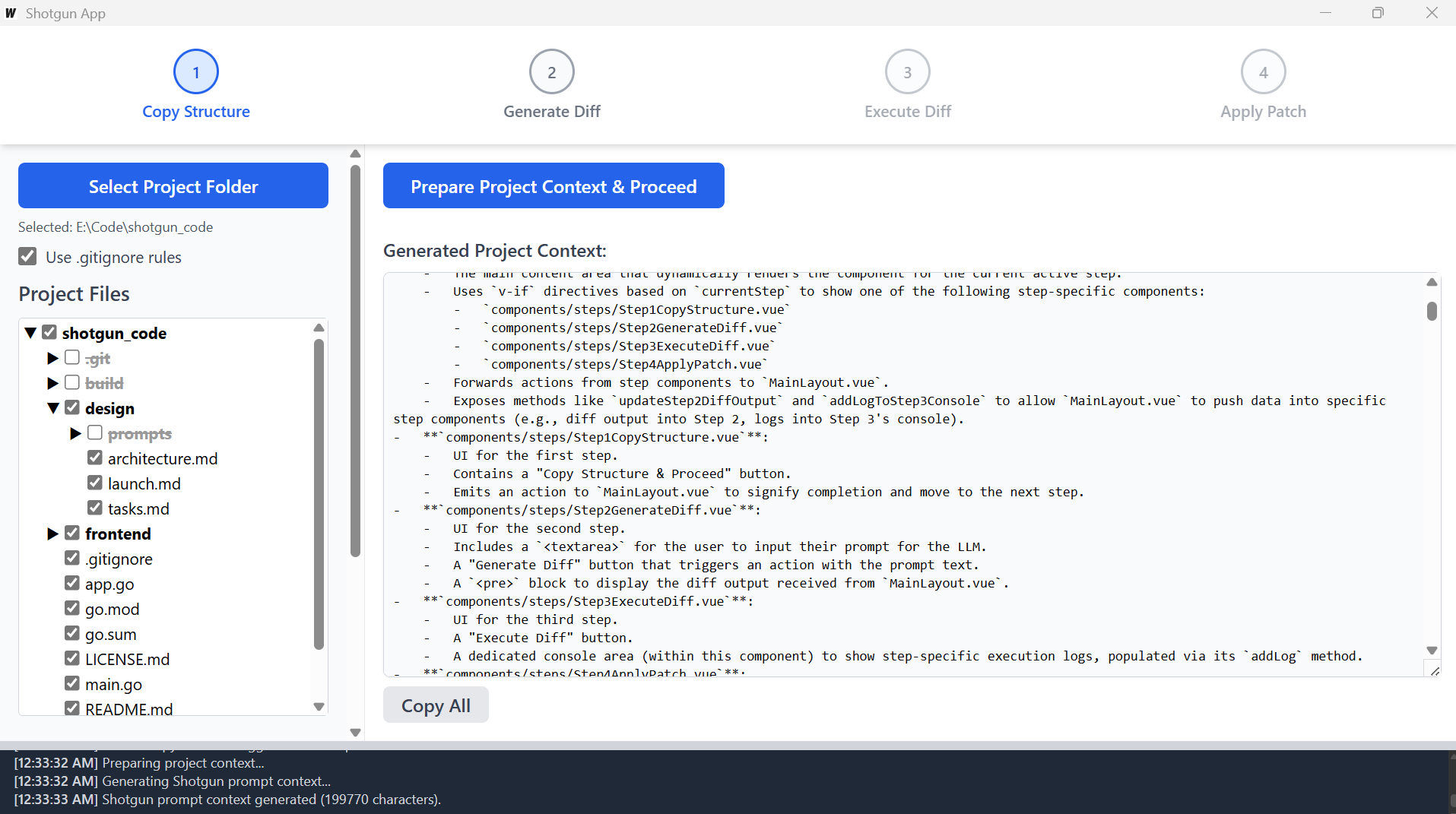
We had the listing. But a listing isn't everything. For a great LLM response, you need the right prompt structure.
So now I needed to create a prompt to insert the listing into. Ideally, a working template that produces results automatically.
Said and done. I started constructing a prompt that would give me results. And here a question arose: what exactly do I want?
It turned out I wanted the following:
- Give the LLM a task
- Provide context
- Provide rules
- Paste into AI Studio in one click
- Get a file diff to apply to my codebase
So I went to ChatGPT asking it to construct such a marvel.
It made something, but very weak.
No matter. I took that something and brought it back to the model with a note: "Here, the model constructed a prompt for such-and-such purpose, evaluate and improve it."
It evaluated and improved. I didn't stop there, of course.
We did about 8 cycles. The last ones were done by O3 paired with Gemini, then only Gemini (I used Gemini 2.5 Pro).
And the result was a wonderful prompt that works reliably, and I barely had to lift a finger beyond creative prompt-feeding.
The diff format that came out is somewhat idiosyncratic, but the models understand it, so I'm not planning to change it for now (but I accept PRs, welcome).
Polishing and Building
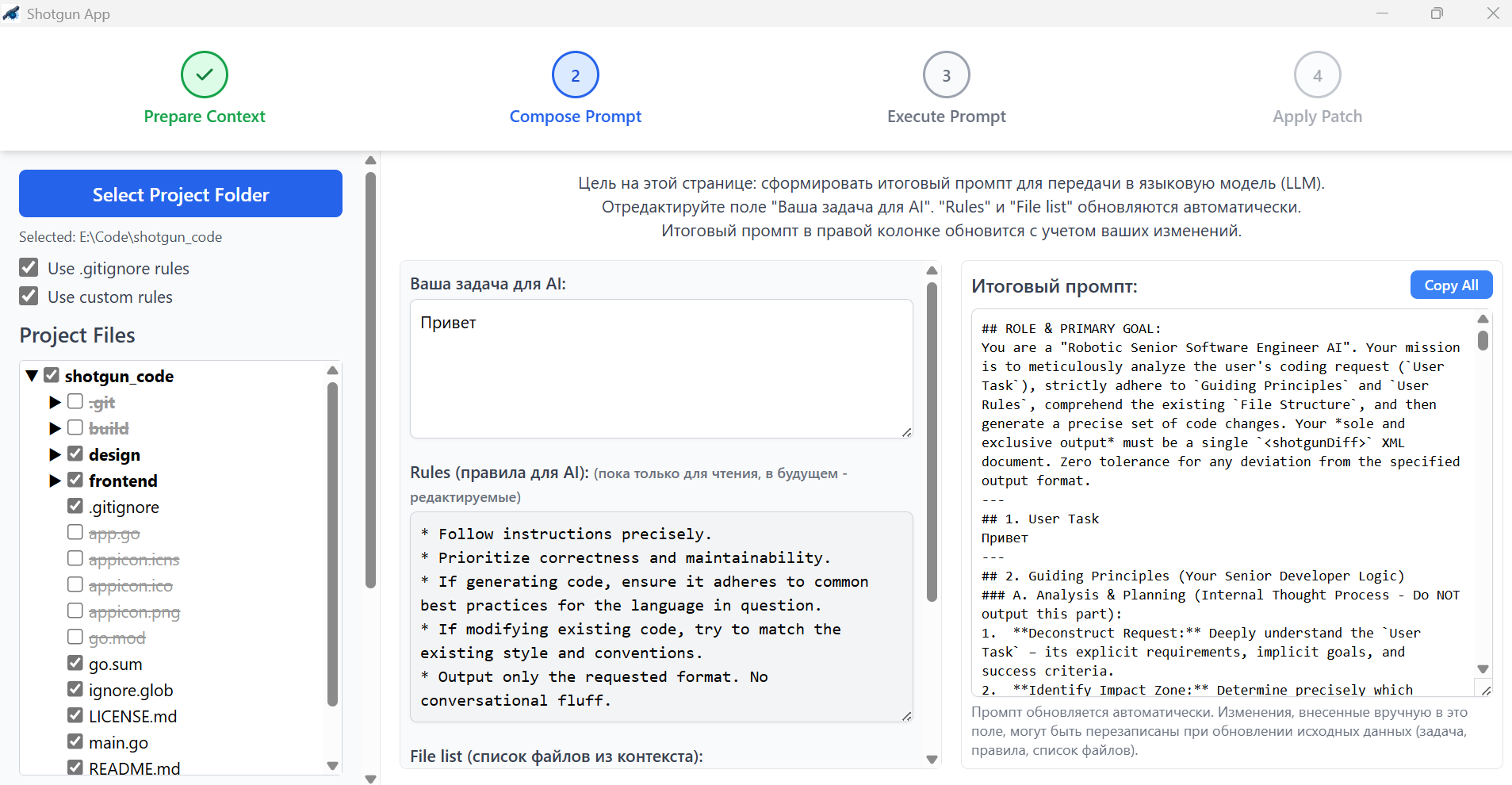
Once I had the development prompt, the further feature-building cycle became utterly trivial:
- Paste the prompt template into AI Studio
- Fill in the task
- Copy in the context that my own app prepared for me
- Get a diff
- Drag the diff into Cursor and say "apply diff" — and it obediently applies it
And to my amazement — features started landing on the first try, almost bug-free. Literally: describe a task, apply the diff, and it works.
An astonishing feeling compared to vanilla Cursor.
At that point I realized I was on the right track. And I started finishing the tool at cosmic speed using itself.
Finishing Touches

The biggest problem for me was understanding how I wanted all of this to look.
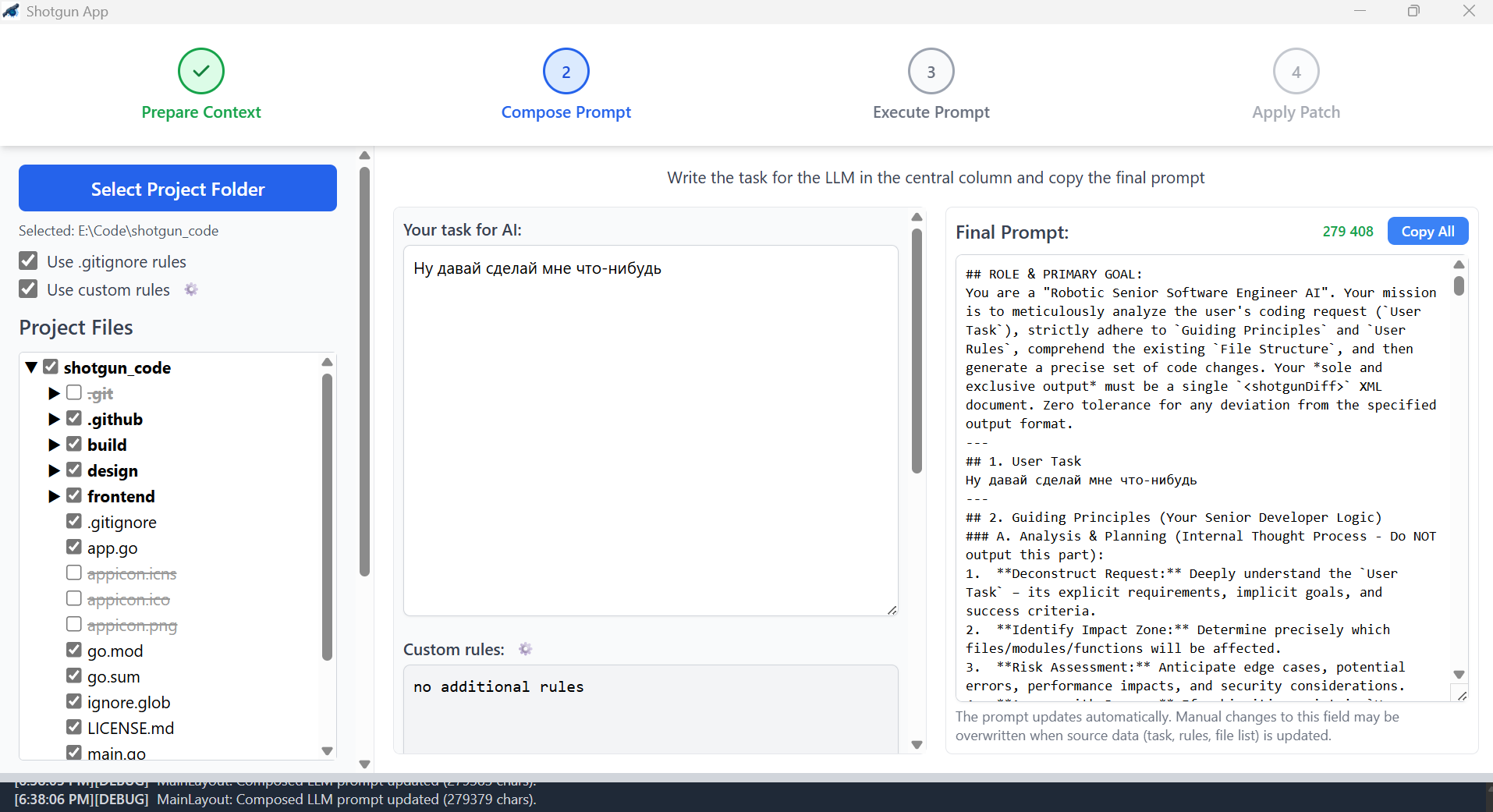
Well, thinking is so last century, so I asked Gemini for ideas. It suggested a pattern: accordion. Since our process has stages, we make the GUI in stages.
Said and done.
First, I needed to automate the prompt assembly, so I quickly implemented the key second screen of the app.
Then I added finishing touches based on audience feedback.
At this point a name was born: Shotgun
Because if you need to kill a mob in one shot, you obviously need a shotgun. Leave the machine gun to those with unlimited Cursor subscriptions :)
By the way, the icon was also made by AI.
Releasing as Open Source
I confess, at first I thought I could somehow monetize the app.
But then I realized: probably not.
There are tons of free tools, and anyone can replicate this.
So the decision was to farm glory rather than money, and release everything as open source.
Tada — download it here.
I burned a ton of time figuring out "what even are you, GitHub CLI" and learning to build binaries, but I managed, though it took quite a while.
I chose a funny license. I called it "vibe-code MIT." You can use the tool freely and modify it however you want, but only if you follow me on Twitter (Telegram works too). I think this best matches the spirit of the times, so I'm not changing it =)
Results

Writing and polishing the app took me two intensive days on May 8-9 and half the weekend of May 10-11.
You'll laugh, but this is my first serious programming experience in 15 years. And my first open source project ever. But I enjoyed it.
I had never worked with Go or its GUI before — programming with it turned out to be pleasant, at least Cursor handles it beautifully.
I now use the tool myself and can't imagine life without it. It saves me enormously. Token savings in Cursor are now 10x, and patch quality is also 10x, because I feed Gemini the full codebase and ask it to build complex features — which it does on the first try.
I'd appreciate feedback, stars, and PRs. And don't be too harsh about the code quality — after all, I'm not a proper programmer, I just really love technology.
Very happy to finally have a reason to write on again!
FAQ
What is this article about in one sentence?
This article explains the core idea in practical terms and focuses on what you can apply in real work.
Who is this article for?
It is written for engineers, technical leaders, and curious readers who want a clear, implementation-focused explanation.
What should I read next?
Use the related articles below to continue with closely connected topics and concrete examples.





