Reading QR Codes by Hand
A detailed guide on how to manually decode QR codes without a smartphone, covering the structure of QR codes, system information, masks, encoding modes, and step-by-step data extraction.
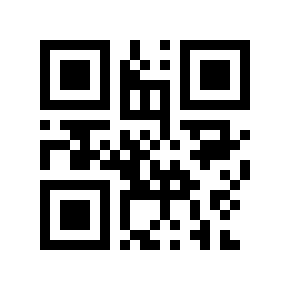
Sometimes situations arise when you need to read a QR code but don't have a smartphone at hand. What do you do? The only thing that comes to mind is to try reading it manually. If you've ever found yourself in such a situation, or if you're simply curious about how machines read QR codes, this article will help you understand the process.
This article covers the basic features of QR codes and the methodology of deciphering information without using computing devices.
Illustrations: 14, characters: 8,510.
For those unfamiliar with what a QR code is, there's a good article on English Wikipedia. You can also read a thematic blog on Habr and several good articles on related topics that can be found through search.
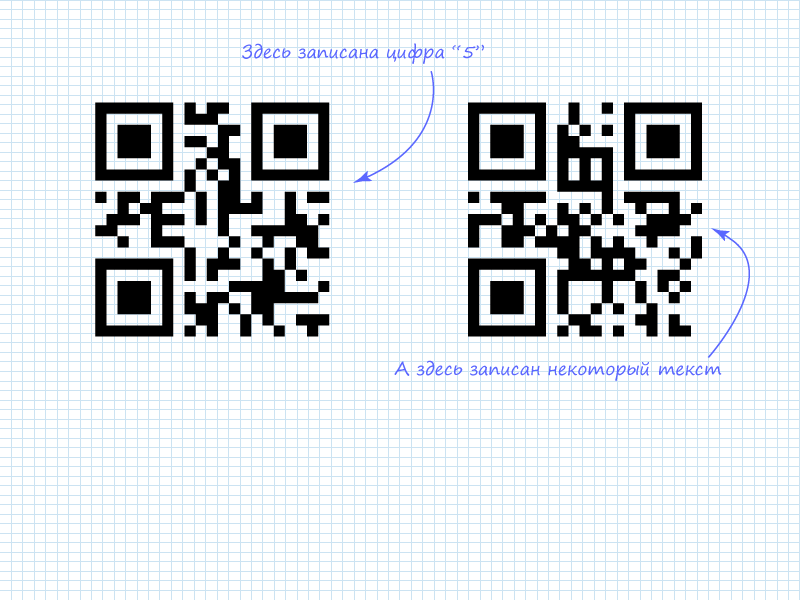
Let's examine the task of directly reading information from a QR image using two codes as examples. The information was encoded in the online generator QR Coder.ru.
To understand how to extract data from a code, you need to understand the algorithm. There are several standards in the QR code family — you can familiarize yourself with their basic principles in the specifications. Briefly: the data to be encoded is split into blocks depending on the encoding mode. A header is added to the blocked data indicating the mode and number of blocks. There are also modes that use a more complex information placement structure. We won't cover these modes since manually extracting information from them is impractical. However, based on the principles described below, you can adapt to these modes as well.
In case of incorrect data reading, QR uses special codes that can correct reading errors. These are called Reed-Solomon codes. We won't cover the principle of calculating codes or error correction in data blocks — that's a topic for a separate article. The Reed-Solomon (RS) error-correcting codes are written after all the informational data. This greatly simplifies the task of directly reading information: you can simply read the data without touching the codes. As practice shows, the RS correction codes usually occupy most of the QR matrix.
According to the standard, data with RS codes is "scrambled" before being written to the image. Special masks are used for this purpose. There are 8 algorithms, among which the best one is selected. The selection criteria are based on a penalty system, which you can also read about in the specification.
The "scrambled" data is written in a specific sequence onto a template image, where technical information for decoding devices is added. Based on this algorithm, we can outline the data extraction scheme from a QR code:
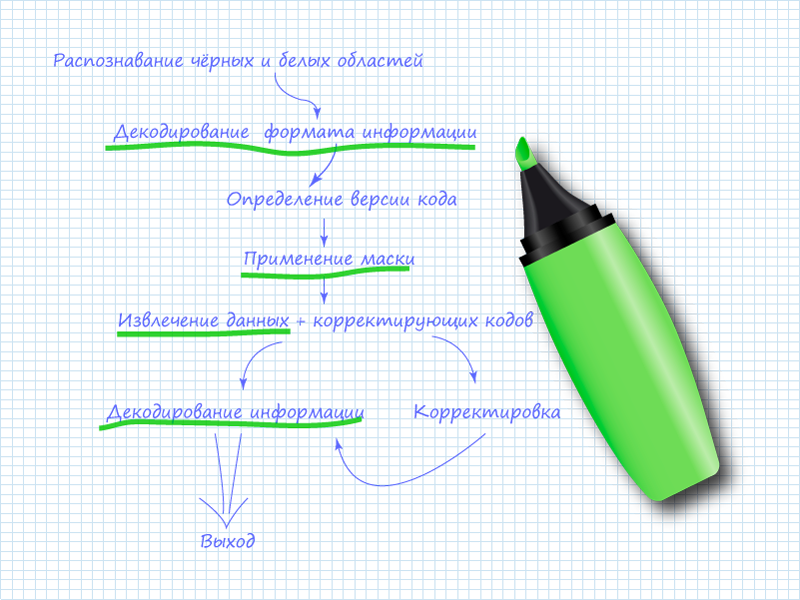
Here, the items underlined in green marker are the ones you'll need to perform when manually reading the code. The remaining items can be skipped since a human is doing the reading.
Step 0. The QR Code
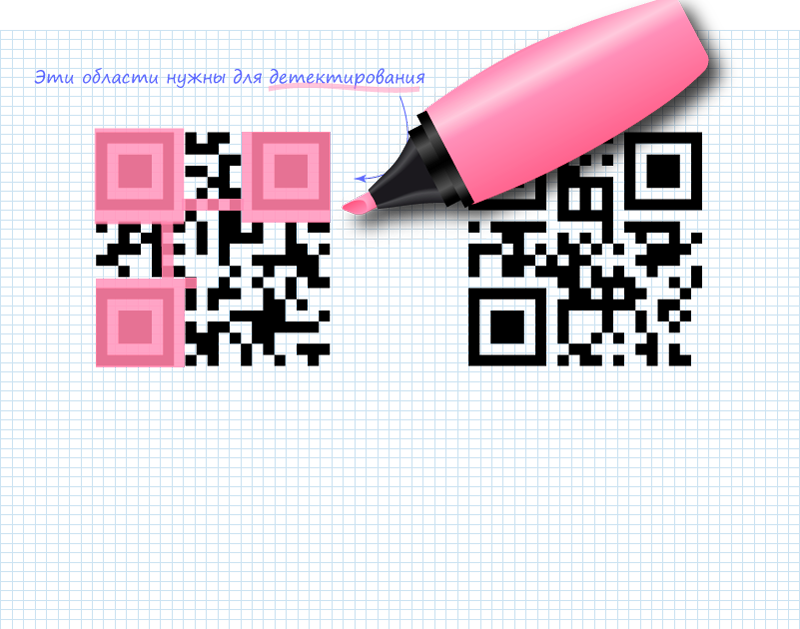
Looking at the images, you can notice several distinct areas. These areas are used for QR code detection. This data is not of interest from the perspective of recorded information, but they need to be crossed out or simply remembered in their positions so they don't interfere. The entire remaining field of the code carries useful information. It can be divided into two parts: system information and data. There is also version information for the code. The version determines the maximum volume of data that can be recorded in the code. When the version increases, special blocks are added, for example like this:
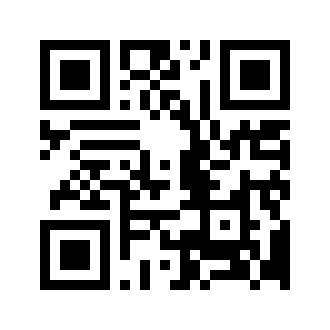
You can use them to orient yourself and understand which QR version you have. High-version codes are also typically impractical to read manually.
The placement of system information is shown in the figure:
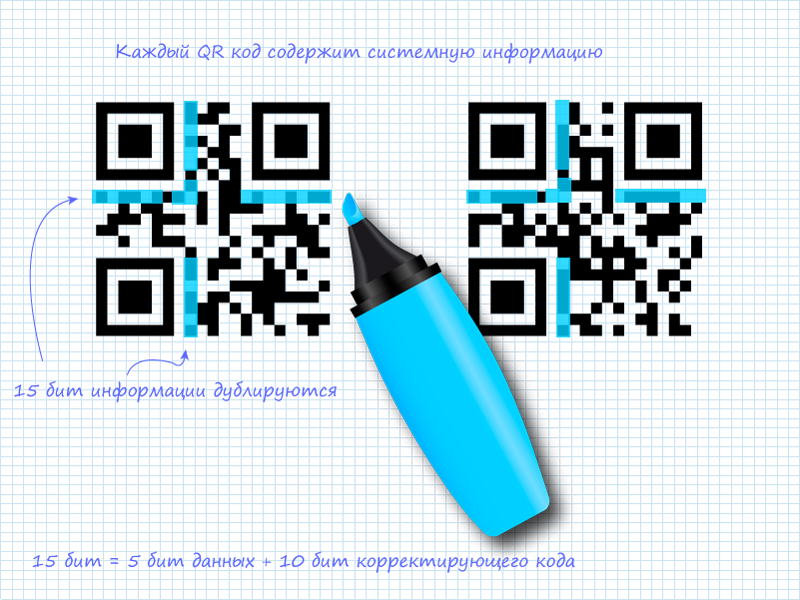
System information is duplicated, which significantly reduces the probability of errors during code detection and reading. System information consists of 15 bits of data, of which the first 5 are useful information and the remaining 10 are BCH(15,5) code that allows correcting errors in system data. RS codes also belong to the BCH code class. Note that in the figure, the two 15-bit strips do not intersect.
Step 1. Reading 5 Bits of System Information
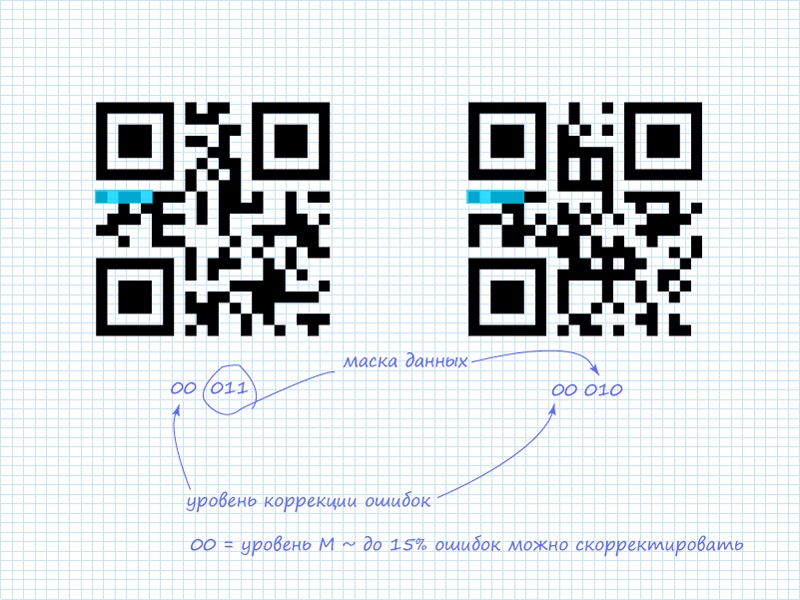
As already mentioned, only the first 5 bits are of interest. Of these, 2 bits indicate the error correction level, and the remaining 3 bits indicate which of the 8 available masks is applied to the data. In the QR codes we're examining, the system information contains:
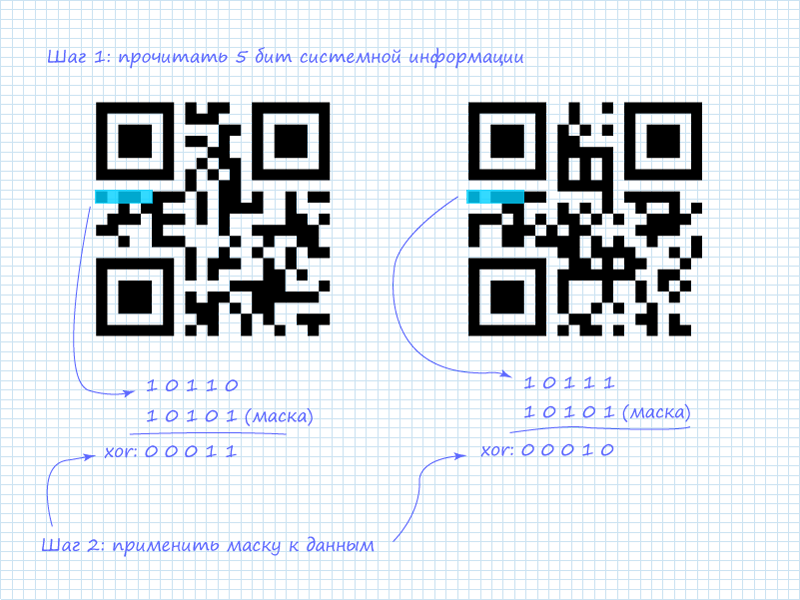
Step 2. Mask for System Information
In addition to the already mentioned protection schemes for system information, a static mask is also applied to all system information. It looks like this: 101010000010010. Since only the first 5 bits are of interest, the mask can be shortened and easily remembered: 10101 (ten — one-oh-one). After applying the XOR (exclusive or) operation, we get the information.
Possible error correction levels:
| L | 01 |
| M | 00 |
| Q | 11 |
| H | 10 |
Possible masks:
| 000 | (i + j) mod 2 = 0 |
| 001 | i mod 2 = 0 |
| 010 | j mod 3 = 0 |
| 011 | (i + j) mod 3 = 0 |
| 100 | ((i div 2) + (j div 3)) mod 2 = 0 |
| 101 | (i*j) mod 2 + (i*j) mod 3 = 0 |
| 110 | ((i*j) mod 2 + (i*j) mod 3) mod 2 = 0 |
| 111 | ((i+j) mod 2 + (i*j) mod 3) mod 2 = 0 |
Step 3. Reading the Data Header
To understand what kind of data we'll be dealing with, we first need to read a 4-bit header that contains information about the mode. The specifics of reading data are depicted in the figure:
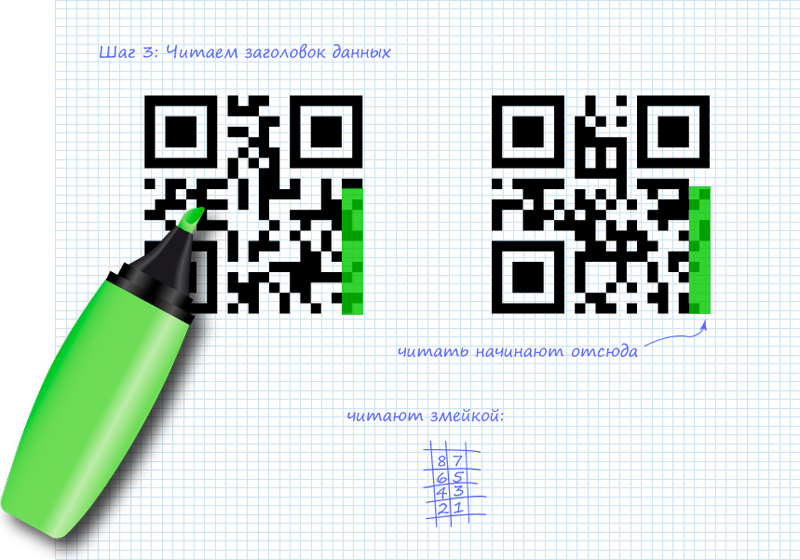
List of possible modes:
| ECI | 0111 |
| Numeric | 0001 |
| Alphanumeric | 0010 |
| 8-bit (byte) | 0100 |
| Kanji | 1000 |
| Structured Append | 0011 |
| FNC1 | 0101 (1st position) 1001 (2nd position) |
Step 4. Applying the Mask to the Header
After extracting the 4 bits describing the mode, we need to apply the mask to them. In our case, the two codes use different masks. The mask is determined by the expression shown in the table above. If the expression evaluates to TRUE for a bit with coordinates (i,j), the bit is inverted; otherwise, everything remains unchanged. The origin is in the upper-left corner (0,0). Looking at the expressions, you can notice patterns in them. For the QR codes we're examining, the masks will look like this:
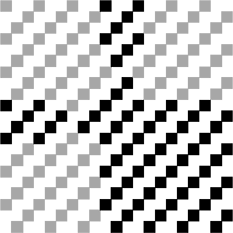
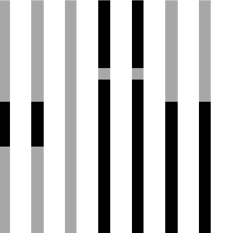
We get the modes:
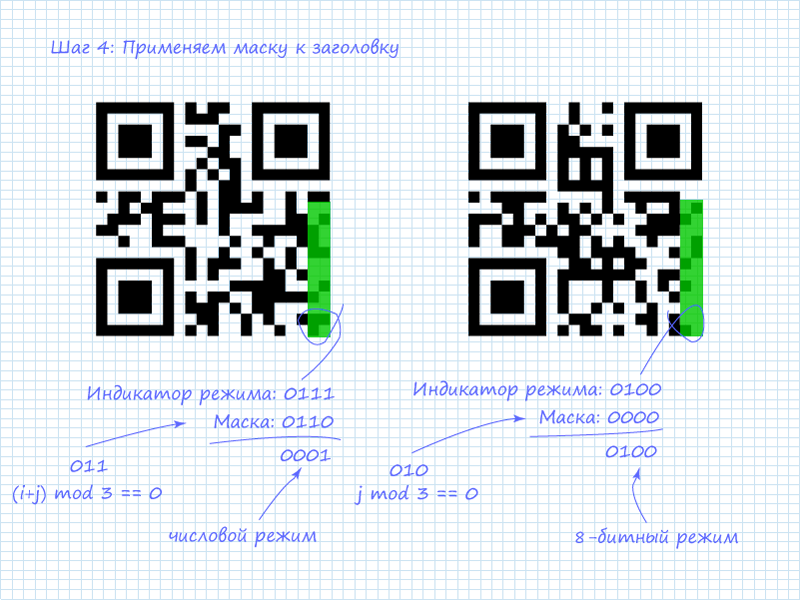
Step 5. Reading the Data
After obtaining mode information, we can proceed to reading the data. It should be noted that numeric and alphanumeric data are the most interesting to read since they're easily interpretable. But you shouldn't be afraid of 8-bit data either. It can also be easily interpretable information. For example, many online QR generators encode text in this mode using ASCII. Another reason to read the mode first is that the number of data packets depends on it. This also depends on the code version. For versions one through nine, block lengths for the more readable modes are:
| Numeric | 10 bits / 4 bits |
| Alphanumeric | 9 bits |
| 8-bit (byte) | 8 bits |
The first block after the mode indicator is the character count. For numeric mode, the count is encoded in the next 10 bits, and for 8-bit mode in 8 bits (pardon the tautology).
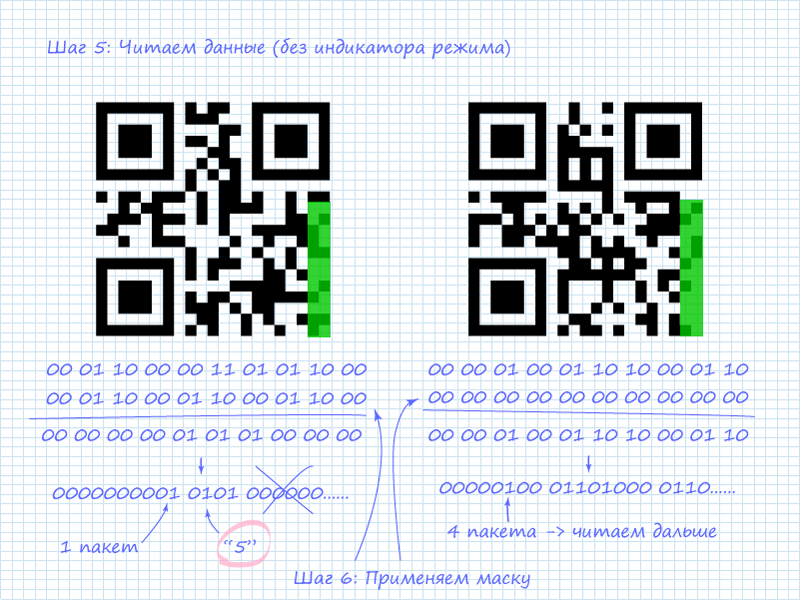
The figure shows that in the left QR code, as noted, the digit 5 is encoded. This is visible from the character count indicator and the subsequent 4 bits. In numeric mode, 4-bit blocks are used alongside 10-bit blocks to save space when 10-bit capacity isn't needed. The right code has 4 encoded characters. At this point, we don't know what's encoded in it. Therefore, we need to proceed to reading the next column to extract all 4 blocks of information.
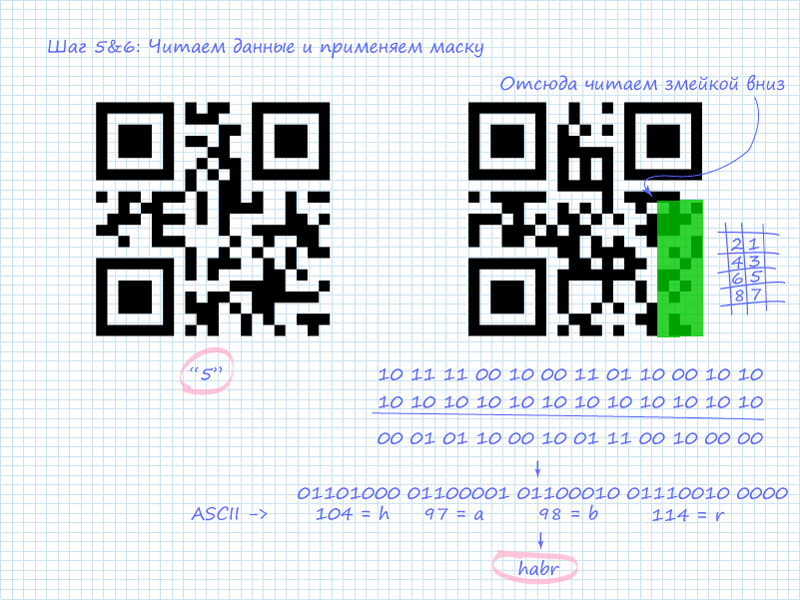
The figure shows that all 4 packets are ASCII codes of Latin letters forming the word "habr".
Naturally, the best way remains to pull out your phone and, pointing the camera at the QR image, read all the information. However, in emergency situations, the described methodology might come in handy. Of course, you can't keep all the mode indicators, mask types, and ASCII characters in your head, but remembering the popular combinations (at least those covered in this article) is quite doable.
Specification:
P.S. Please follow the resource rules and Creative Commons Attribution 3.0 Unported (CC BY 3.0) conditions.



