Restoring Defocused and Blurred Images: Improving Quality
The final part of the image deconvolution trilogy explores Total Variation prior methods that outperform the classic Wiener filter, with an open-source implementation in SmartDeblur achieving commercial-grade quality.
I present to you the final article in the trilogy "Restoring Defocused and Blurred Images." The first two generated considerable interest — the field is truly fascinating. In this part, I'll examine a family of methods that deliver better quality compared to the standard Wiener filter — methods based on Total Variation prior.
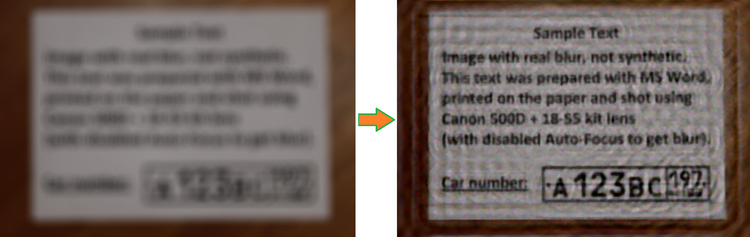
As is tradition, I've also released a new version of SmartDeblur (with open-source code) implementing this method. The resulting quality is on par with commercial alternatives like Topaz InFocus. Here's an example of processing a real image with very heavy blur:
Introduction
I won't describe the basic theory of deconvolution here — it was covered in great detail in the previous articles. For those who haven't read them or have forgotten, I recommend starting with them to understand the terminology and classical approaches:
Part 1. Theory;
Part 2. Practice.
Before moving on to describing Total Variation (hereafter TV prior), we need to understand what shortcomings algorithms like the classical Wiener filter have. The main ones are: a ringing effect (periodic halos at object edges) even with low noise levels, blurring of boundaries and fine details, and poor noise suppression from a human perception standpoint. All of this severely limits the practical application of the Wiener filter, restricting its use to technical image restoration tasks, such as reading text of interest.
Therefore, a large number of various methods have been developed recently, all aimed at improving visual quality. It should be noted that the amount of detail typically does not increase.
TV Prior Description
The main quality of Total Variation prior from a results standpoint is the preservation of sharp edges and smoothing of deconvolution artifacts. It is expressed as follows:
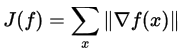
Unfortunately, computing this functional cannot be done in a simple manner, as it requires applying rather complex optimization techniques.
As an alternative, a smoothed functional can be used instead of the absolute value:
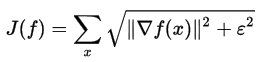
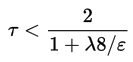
When epsilon approaches zero, the result converges to the original Total Variation definition, but the optimization process becomes more complex. Conversely, with a sufficiently large epsilon, the optimization result will resemble a Wiener filter with edge blurring. Unfortunately, the formula above has a non-quadratic form, so it cannot be simply computed in Fourier frequency space as was possible with Wiener and Tikhonov filters. Therefore, one of the iterative optimization methods is needed to find an approximate solution — for example, the classical gradient descent method:

Where tau is computed using the following formula:
And the gradient of the smoothed functional is defined as:
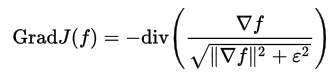
The number of iterations must be sufficiently large — several hundred.
This is the most basic approach to implementing TV prior, what you might call "brute force." Nevertheless, even it produces very good results. Based on it, many research papers have appeared that attempt to further improve quality and reduce computation time.
Practical Implementation
The formulas described are, in principle, straightforward, though very cumbersome to implement. The main challenge is achieving high performance, since the number of iterations is very large and each iteration contains many complex operations — namely, several full image convolutions, computing the full gradient, and divergence.
I'll say upfront that I haven't managed to achieve good performance yet. On an image of several megapixels, the final computation takes 2-3 minutes. But Preview works fast — around 0.2 seconds.
The Windows build can be downloaded at:
github.com/downloads/Y-Vladimir/SmartDeblur/SmartDeblur-1.27-win.zip
Source code (under GPL v3 license) is available at: github.com/Y-Vladimir/SmartDeblur
Main changes compared to the previous version described in Part 2:
- Added two deconvolution methods: TV prior and Tikhonov filtering
- Added support for Gaussian blur restoration
- Improved processing speed (approximately 2.5x faster)
- Reduced memory consumption (approximately 1.5x less)
- Maximum processed image size is 3000 by default (but can be changed in settings)
- Added settings section
- Added Updates Checker
- Drag & Drop support
- Added Help Screen with sample image and tuning tips
- Fixed flickering bug in preview mode
Written in C++ using Qt.
Comparison
And now the most important part — what quality can you expect when processing blurred images. We'll compare with the top commercial alternative, Topaz InFocus. Other alternatives (like FocusMagic) have either long been abandoned or produce completely unacceptable results. So let's go.
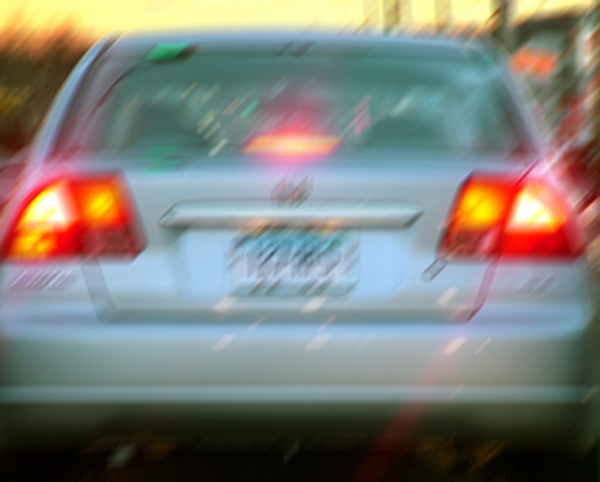
First, let's take a promotional example from the Topaz InFocus website: www.topazlabs.com/infocus/_images/licenseplate_compare.jpg
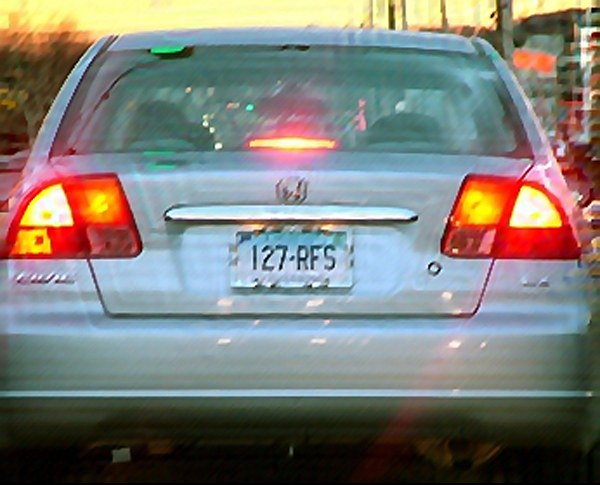
Here's the result from Topaz InFocus:
And here's the SmartDeblur result with the following parameters:
Type: Motion Blur, Length: 10.1, Angle: -45, Smooth: 60%
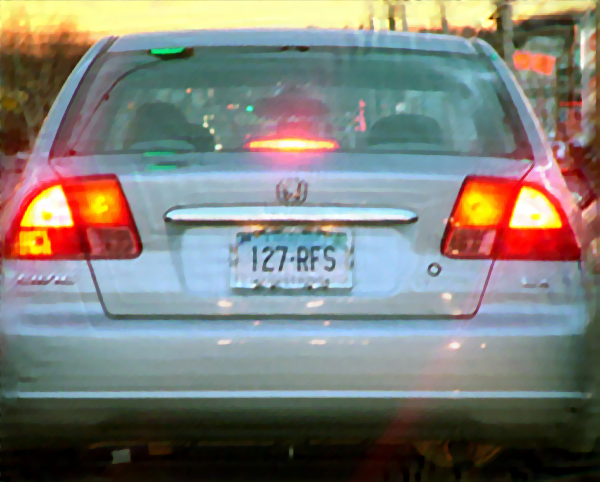
As we can see, the results are very similar. And it's not obvious which is better. Topaz InFocus apparently also uses an algorithm similar to TV prior plus post-processing in the form of edge sharpening. It should be noted that the source blurred image is, with very high probability, synthetic — i.e., an undistorted image was taken and a Motion Blur filter was applied. This is evident from the nearly perfect restoration, as well as the suspiciously round distortion parameters — a 45-degree angle and 10-pixel length.
Now let's take a real image that I photographed yesterday on my Canon 500D with manual focus offset:
Result from Topaz InFocus with the following parameters:
Type: Out-of-Focus, Radius: 5.5, Suppress Artifacts: 0.34
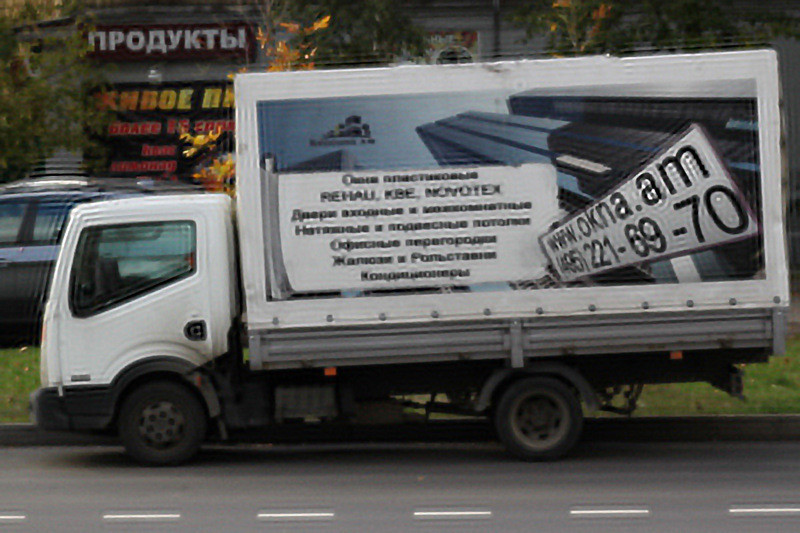
SmartDeblur result with the following parameters:
Type: Out of Focus, Radius: 5.9, Smooth: 60%
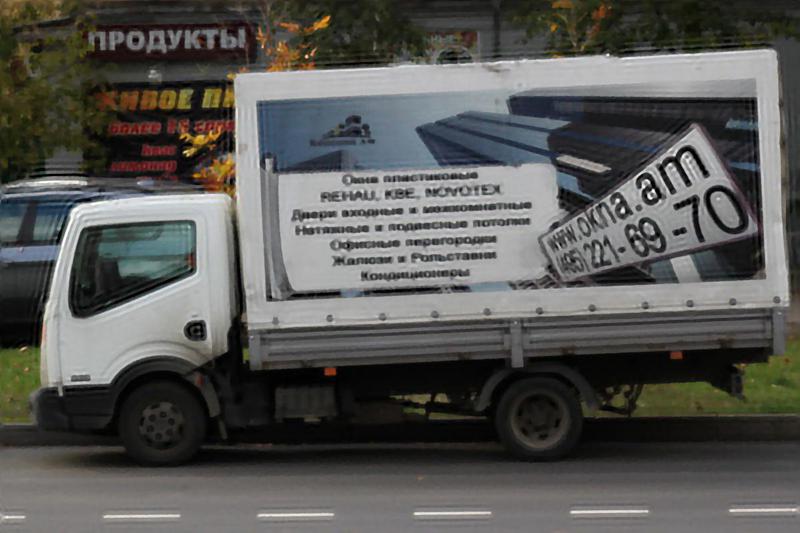
It's a tie here, you could say. Parameters in each program were tuned to achieve the best quality.
Another real example I shot:
SmartDeblur result with the following parameters:
Type: Motion Blur, Length: 6.6, Angle: -37, Smooth: 53%
Conclusions
The third and final article has come to an end. It turned out not particularly long, but I hope it will be useful. As we can see, the achieved processing quality is already quite acceptable for real-world use. The main remaining problem is that in areas with bright objects, a noticeable ringing effect appears after processing. I think this is related to the fact that in bright areas, the linearity of pixel brightness representation is violated, giving an incorrect interpretation of the actual brightness. Perhaps logarithmic brightness preprocessing is needed, or something else.
Once again, a reminder:
The Windows build can be downloaded at:
github.com/downloads/Y-Vladimir/SmartDeblur/SmartDeblur-1.27-win.zip
Source code (under GPL v3 license) is available at: github.com/Y-Vladimir/SmartDeblur
And as always — I'll be very happy to receive comments and suggestions about SmartDeblur! For those who will try the program — note that the Smooth quality parameter behaves quite differently in Preview mode and in High-Quality mode. Therefore, the final result of the smoothing slider can only be evaluated after the High-Quality computation is complete.
P.S. A huge request to everyone who writes to me by email. After publishing the two previous articles, I received (and continue to receive) a large number of letters asking me to restore license plate numbers from surveillance camera footage where the entire plate occupies an area of just a few pixels.
I don't do that! SmartDeblur can't do it either. This is an entirely different kind of task, namely Super-Resolution, where multiple low-resolution images are used to produce a high-resolution image with new details that weren't present in the source data. Maybe someday I'll tackle it, but definitely not in the near future.
UPDATE Link to continuation:
Blind Deconvolution — Automatic Restoration of Blurred Images
— Vladimir Yuzhikov




