Solving Wordle with Entropy and Excel
Can you prove mathematically that one starting word is better than another in Wordle? Yes — by treating each guess as an information query and measuring it with Shannon entropy. This article walks through the full implementation in Excel, from downloading the official word list to LAMBDA functions that compute optimal moves.
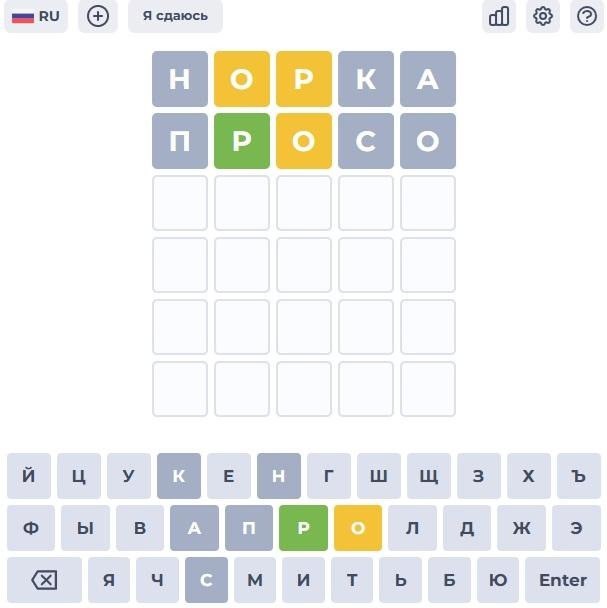
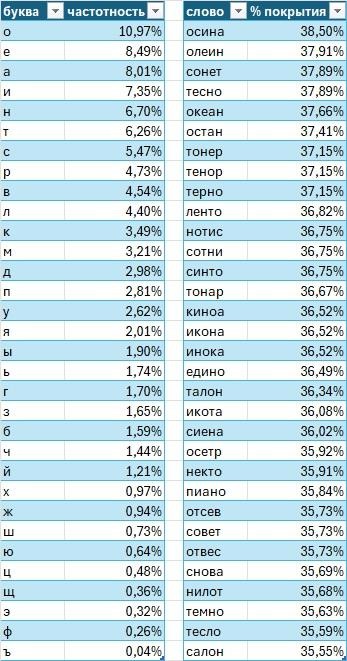
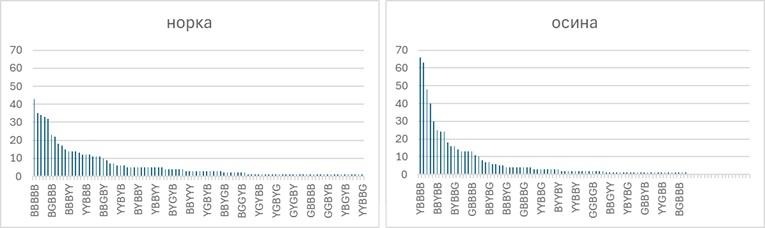
In Wordle, conventional wisdom says to start with a word containing common vowels and consonants — to test as many letters as possible in a single move. On a full Russian-language corpus, that word turns out to be "осина" (aspen). In one well-known comment thread, someone proposed "кроат" (Croat) as a superior alternative based on letter frequency.
But frequency analysis has a blind spot: it ignores letter positions and the way a guess partitions the answer set into patterns. There is a more rigorous question to ask — and information theory already has the tool to answer it.
What Wordle Actually Is
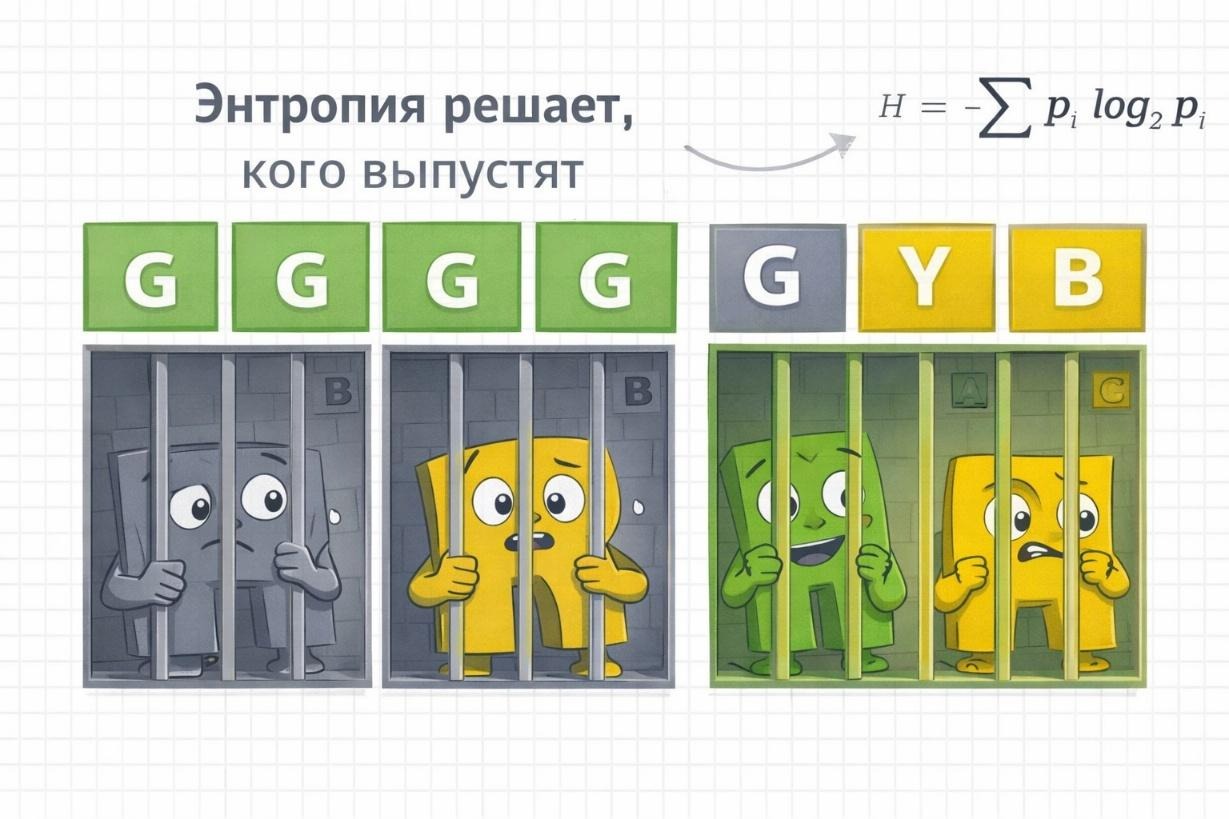
Wordle asks you to guess a five-letter word in six attempts. After each guess, letters are colored: green (correct letter, correct position), yellow (correct letter, wrong position), or grey (letter not in the word). Repeated letters are handled according to specific rules.
Each guess is, in effect, an information query. The colored response is the answer — a pattern that partitions the remaining possible words into groups. A good guess is one whose answer, whatever it turns out to be, sharply reduces the number of remaining candidates. The question is how to measure "sharply reduces" in a way that lets you compare guesses formally.
Two Dictionaries, Not One
Before doing any analysis, it matters which word list you use. Many Wordle analyses work with word lists scraped from GitHub or assembled manually — valid for illustration, but not matched to any specific implementation.
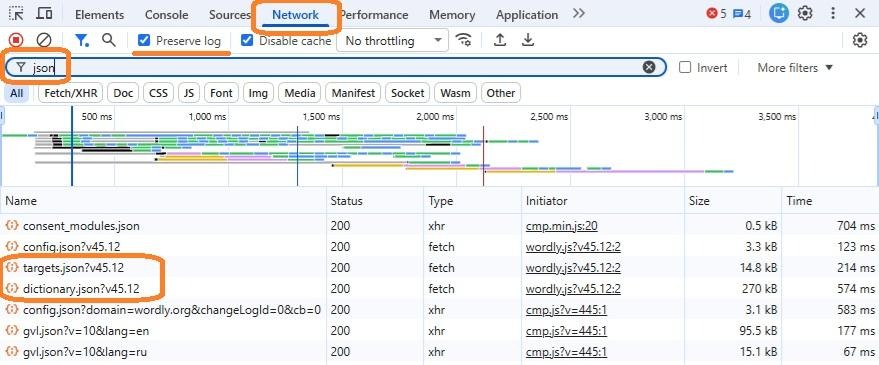
I focused on the Russian version at wordly.org/ru. To extract the dictionary: open the site, press F12 to open Developer Tools, go to the Network tab, enable "Preserve log", clear the log, force-reload the page (Ctrl+Shift+R), and filter by "json". Two dictionaries appear:
- Allowed (Dictionary): All words accepted as guesses — over 4,000 entries.
- Answers (Targets): Words that can actually be the solution — around 600 entries.
This distinction is critical. Guesses come from Allowed; information is gained about Answers. Using only one list conflates the two roles.
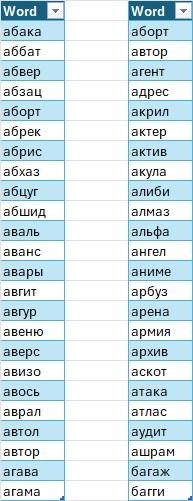
I downloaded both dictionaries using Power Query in Excel 365. The code for Answers:
let
    Url = "https://wordly.org/files/wordle/ru/targets.json",
    Raw = Web.Contents(Url),
    Json = Json.Document(Raw),
    WordsList =
        if Value.Is(Json, type list) then
            Json
        else
            error "Unexpected JSON structure",
    Tbl = Table.FromList(WordsList, Splitter.SplitByNothing(), {"Word"}),
    Lower = Table.TransformColumns(Tbl, {{"Word", Text.Lower, type text}}),
    Len5 = Table.SelectRows(Lower, each Text.Length([Word]) = 5),
    Sorted = Table.Sort(Len5, {{"Word", Order.Ascending}}),
    Deduped = Table.Distinct(Sorted)
in
    Deduped
At time of writing, version 45.12 of the dictionary was in use. The code will work correctly when the version number updates.
Shannon Entropy as a Measure of Information
Each guess partitions the Answers set into groups — one group per possible color pattern. Since every word in Answers is equally likely to be the target, the probability of a given pattern is simply the fraction of answer words that produce it.
Shannon entropy measures the expected information content of a probability distribution:
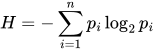
Where H is entropy in bits, p_i is the probability of the i-th outcome, and n is the number of possible outcomes. When all outcomes are equally probable, entropy is maximized. When one outcome is overwhelmingly likely, entropy approaches zero — the guess tells you almost nothing you didn't already know.
In the context of Wordle: the "outcomes" are the possible G/Y/B patterns; p_i is the share of Answers words producing each pattern; H measures how much the guess reduces uncertainty about the target word, on average.
The initial uncertainty is:
H₀ = log₂(602) ≈ 9.23 bits
A good first guess should reduce this by more than 5.5 bits.
Excel LAMBDA Functions
I implemented the full calculation in Excel using LAMBDA functions. Here are the key pieces (with Russian Excel function names translated to their English equivalents for clarity):
CHARS5 — splits a 5-letter word into an array of individual characters:
=LAMBDA(w, MID(w, SEQUENCE(5), 1))W_PATTERN — computes the Wordle color pattern for a given guess against a given target. Correctly handles repeated letters, fully replicating the official Wordle logic:
=LAMBDA(guess, target,
  LET(
    g, CHARS5(guess),
    t, CHARS5(target),
    gr, g=t,
    rem0, TEXTJOIN("", TRUE, IF(NOT(gr), t, "")),
    state,
      REDUCE(
        HSTACK("", rem0),
        SEQUENCE(5),
        LAMBDA(a, i,
          LET(
            pat, INDEX(a, 1, 1),
            rem, INDEX(a, 1, 2),
            ch,  INDEX(g, i),
            IF(INDEX(gr, i),
              HSTACK(pat & "G", rem),
              LET(
                pos, IFERROR(FIND(ch, rem), 0),
                IF(pos>0,
                  HSTACK(pat & "Y", REPLACE(rem, pos, 1, "")),
                  HSTACK(pat & "B", rem)
                )
              )
            )
          )
        )
      ),
    INDEX(state, 1)
  )
)
ENTROPY_W — computes the entropy of a guess against a universe of possible answer words. For each word in the universe, it generates the pattern, groups identical patterns, computes their probabilities, and calculates the Shannon entropy:
=LAMBDA(guess, Universe,
  LET(
    codes, MAP(Universe, LAMBDA(w, W_PATTERN(guess, w))),
    u, UNIQUE(codes),
    cnt, MAP(u, LAMBDA(pat, SUM(--(codes=pat)))),
    n, ROWS(Universe),
    p, cnt / n,
    -SUM(p * LOG(p, 2))
  )
)
FILTER_BY_PATTERN — returns all words from a list that produce a specific pattern when the given guess is made against them:
=LAMBDA(Words, guess, pattern,
  FILTER(Words, MAP(Words, LAMBDA(w, W_PATTERN(guess, w)=pattern)))
)
The Result: "Norka" Beats "Kroat"
Running ENTROPY_W across all words in the Allowed dictionary reveals that "норка" (mink) yields the highest entropy as a first guess: 5.69 bits. This reduces average uncertainty from 9.23 bits to approximately 3.54 bits in a single move.
"Кроат" (Croat) — the letter-frequency champion — scores lower on the entropy measure. It is not a bad word, but it is not the optimal one. The frequency-based ranking gave it first place because it contains common letters, but frequency analysis ignores how those letters partition the answer space by position.
In the worst-case scenario, "норка" leaves a remaining pattern with 43 valid words — equivalent to 5.43 bits of residual uncertainty. A minimax strategy (minimize the worst-case remaining candidate pool) produces results very close to the entropy optimum, as one might expect.
Adapting the Second Guess
Some solvers use two, three, or even four pre-selected words with maximum letter coverage, regardless of what the first response showed. This is a valid approach if the goal is to avoid losing within six attempts. But if the goal is to win in 3–4 moves, a fixed sequence of words is not optimal.
The better approach is to adapt. After the first guess, the pattern response partitions the Answers set. For each resulting subset, a new entropy calculation identifies the word that provides the most information given what remains. In most cases, the best second guess is a word that cannot itself be the answer — a pure information-gathering move, with no concern for whether it might be the target.
The formula in Excel for finding the top second guesses given a first-guess pattern:
=LET(
  guess1, $A$1,
  pat, B1,
  Cand, FILTER_BY_PATTERN(Targets[Word], guess1, pat),
  CandTwo, FILTER_BY_PATTERN(Words[Word], guess1, pat),
  ent, MAP(Words[Word], LAMBDA(g, IFERROR(ENTROPY_W(g, Cand), -1))),
  data, HSTACK(Words[Word], ent),
  sorted, SORT(data, 2, -1),
  top, CHOOSECOLS(sorted, 1, 2),
  topFive, TAKE(top, 5),
  topWords, CHOOSECOLS(topFive, 1),
  topEnt, CHOOSECOLS(topFive, 2),
  canBeGGGGG,
    MAP(
      topWords,
      LAMBDA(w, NOT(ISERROR(MATCH(w, CandTwo, 0))))
    ),
  HSTACK(topWords, topEnt, canBeGGGGG)
)
The canBeGGGGG column indicates whether each candidate second word could itself produce the GGGGG (all-green) win pattern — i.e., could be the actual answer. For most patterns, the highest-entropy second guesses are words that cannot be the answer. Information first; winning follows.
Results in Practice
Applying the maximum-entropy strategy consistently — optimal first word, then adaptive second guess based on entropy, and so on — produces wins within 3–4 attempts for the large majority of games. The strategy matches the findings of broader comparative analyses of Wordle-solving approaches: entropy maximization consistently outperforms frequency-based and minimax strategies in terms of average solve depth.
The full Excel workbook, including all four LAMBDA functions and the dictionary download queries, is available with the original article. For those interested in extending the analysis: the T-Bank implementation of Wordle maintains a separately downloadable Allowed dictionary, though the Answers list was not publicly discoverable at time of writing.



