The Cicada Principle and Why It Matters for Web Designers
Periodical cicadas emerge every 7, 11, 13, or 17 years — all prime numbers that minimize synchronization with predator cycles. This same principle can be applied in CSS to generate naturally random-looking textures from tiny tiling images using prime-number-sized layers.
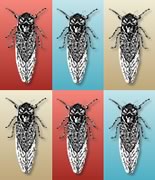
A couple of years ago I read some interesting facts about the life cycle of periodical cicadas. We don't usually see many of these insects around us because they spend most of their lives underground, quietly sucking on plant roots.
However, depending on the species, every 7, 11, 13, or 17 years, periodical cicadas simultaneously emerge en masse and transform into noisy flying creatures, mate, and soon die.
While our strange cicadas cheerfully depart this world, an obvious question arises: is this just coincidence, or are the numbers 7, 11, 13, and 17 somehow special?
It turns out these numbers have something in common. They're all prime numbers, divisible only by themselves and one (that's 1, 2, 3, 5, 7, 11, 13, 17, 19, 23, and so on).
Why does this matter so much?
Research has shown that populations of animals that feed on cicadas — typically birds, spiders, wasps, fish, and snakes — often exhibit shorter cycles of 2-6 years between population peaks and troughs. Thus, if our cicadas appeared, say, every 12 years, then every predator with a life cycle of 2, 3, 4, or 6 years could synchronize its population peaks with the regular appearance of cicadas. In fact, they'd probably declare a universal feast called Cicada Day.
That's not much fun if you're a cicada.
On the other hand, if a brood of cicadas was unlucky enough to emerge during a three-year wasp population peak, it wouldn't happen again for 51 years. In the intervening generations, the cicadas can peacefully rebuild their population and vastly outnumber the predators.
Resourceful little creatures, aren't they?
Great. But How Does This Relate to Web Design?
A couple of weeks ago we looked at how to create seamless tiling textures. This is a super-useful technique, but it can be difficult to strike the right balance.
On one hand, you want to use the smallest possible files to get maximum benefit from the tiling effect. However, as soon as you notice some distinctive feature in the background — say, a little knot in a wood grain texture — repeating at regular intervals, the entire illusion of natural randomness is lost.
Could we borrow some ideas from cicadas to break this pattern?
Generating Natural Randomness with CSS
Example 1
Enough talk. Here's a little proof of concept. The test doesn't need to look perfectly beautiful, but it demonstrates the point well. With the "cicada principle" in mind, I made three semi-transparent square PNGs sized 29, 37, and 53 pixels respectively, and set them as background images on the HTML element of a test page.
 29-a.png (2.0kb)
  37-a.png (1.7kb)
  53-a.png (2.5kb)
html {
background-image: url(29-a.png),url(37-a.png), url(53-a.png);
padding:0;
margin:0;
height: 100%;
}Result
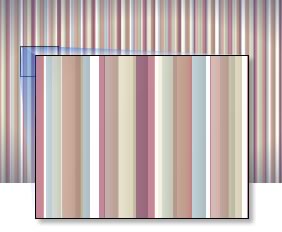 As you can see, these squares overlap and interact, generating new patterns and colors. And since we're using magical prime numbers, the pattern won't repeat for a very long time.
How long exactly? 29 x 37 x 53... or 56,869 pixels!
This was something of a revelation for me. I checked my calculations three times, but the math is rock solid. Remember, these are tiny graphic files, less than 7 kilobytes combined, yet they generate a texture almost 57,000 pixels wide.
Can you imagine what happens if you add a fourth square, say 43 pixels? Or maybe you can't imagine, because the numbers become slightly monstrous and might hypnotize you if you stare at them too long. Suffice to say, you'd get a number more suited to terraforming planets than web design.
OK. In theory, geometric shapes work well, but how else can we use this idea?
Example 2
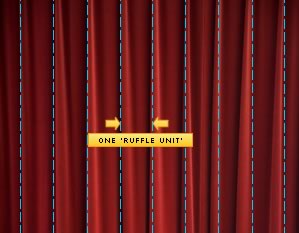 Let's take a more photorealistic example that any of us might have seen in one form or another: a theater curtain. To start, I found some decent graphics here. If you look at our curtain, you'll notice regular vertical blocks.
For this example, I'll call this interval a "ruffle unit," and unlike the first example, it will be more important than the strict pixel dimensions of the images we're working with.
First, I'm going to select one of these blocks and turn it into a seamless background element. This is a JPEG of just 8kb.
 When rendering a single block, this graphic epitomizes everything we hate about seamless backgrounds. Besides the clearly visible seams, it looks very mechanical and completely unconvincing.
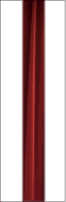 For the second layer, we'll use the prime number three. I'm going to select a new section of curtain and place it inside a transparent PNG that is three ruffle units wide. I blurred the left and right edges so it blends smoothly with the background. The resulting file came in at 15kb.
 When we blend this new element with the previous layer, we get a clearly better result. You can still notice an unnatural periodic pattern, but it's starting to break up a bit.
The magic number for our third layer is seven.
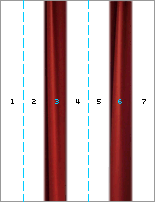 We make a new transparent PNG seven blocks wide, and I'm going to place two new sections of the original image at positions 3 and 6. If that sounds confusing, the diagram on the left should help clarify things. Again, I blurred the image edges to ease the blending with previous layers.
Obviously, this image will be larger both in pixels and file size, but it's still around 32kb — not too harsh by any standard.
 Here's what we get when we overlay this graphic on the two previous layers. I'm quite pleased with the result. Of course, your eye may spot small fragments of the image that seem to repeat (because they actually do repeat), but the lower layers are so random that the eye soon stops looking for a pattern.
If you look at this background numerically and represent each block as a number, you get: 1, 2, 3, 1, 2, 6, 1, 2, 1, 3, 2, 1, 6, 2, 1, 1, 3, 1, 1, 6, 1, 1, 2, 3...
There is a pattern, but it's very hard to recognize.
In this example, a virtually infinite theater curtain background cost us just 53kb. And of course, you can easily add a fourth layer — perhaps 11 blocks wide — if needed. However, I don't think it's necessary here.
Also keep in mind: this example uses the smallest prime numbers — 1, 3, and 7. If we took, say, 11, 13, and 17, we could create a much more complex variation at a given size. In reality, it all comes down to the texture scale relative to screen width.
Example 3
My last example is less practical and more about having fun with prime numbers. I'm not going to walk through the theory again because the basic concept is the same as the previous two examples, but I'd be happy if you tried editing it in Firebug.
2,200 years ago, Chinese Emperor Qin Shi Huang created a terracotta army of 8,000 soldiers to guard his tomb. Each full-size statue of every warrior, horse, and weapon is a unique handmade piece.
Using simple CSS, prime numbers, and a set of images, we're going to assemble our own mighty army. It may lack height, but it makes up for it in numbers.
I present to you... My Mighty Lego Legion!
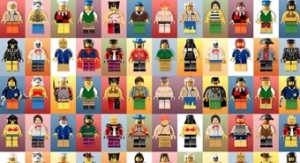 The legion is made from just eight images that combine to create thousands of combinations. It uses:
- 2 background images
- 2 leg images
- 2 torso images
- 2 head images
Summary
Experimenting with this idea, I discovered several principles that seem to work. First, the texture layering order works better when organized as an inverted pyramid.
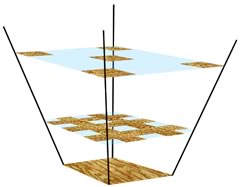 You can make the bottom layer quite small and repetitive, since it's covered by all the layers above it. In practice, it will only be visible about 20-40% of the time.
On the other hand, the top layer must be the largest in size but the least saturated, since this layer is never covered by others. Also, it's probably best not to include easily distinguishable, eye-catching details on the topmost layer. Keep it sparse and generic.
In any case, trial and error is almost always needed.
Browser Support
I kept the markup simple, using multiple backgrounds on the HTML element. This is supported by all modern browsers (Firefox 4, Chrome 10, IE9, Opera 11, Safari 5), but obviously not all older versions.
However, if backward compatibility is a requirement, a suitable option might be tiling in html, body, and a container div. The container might not be semantic, but this small concession can potentially have a big impact on the entire site. It's up to you.
These three examples were the first that came to mind, but I'm sure there are many smarter ways to use the idea. For example:
- An infinite cityscape
- A non-repeating wood texture
- A starry sky
- Dense jungle
- A cloudy sky
Any other ideas?






