Touch simulator. Ch1 We explore capacitive touch screen
He deftly held the tools and soldered the last wires. All so fluffy and beautiful. The smoke rose floridly, and the pleasant smell of rosin filled the raccoon room... One day, Kryak and I came across a nice smartphone. It became interesting to get into it, install applications an
Editor's Context
This article is an English adaptation with additional editorial framing for an international audience.
- Terminology and structure were localized for clarity.
- Examples were rewritten for practical readability.
- Technical claims were preserved with source attribution.
Source: original publication
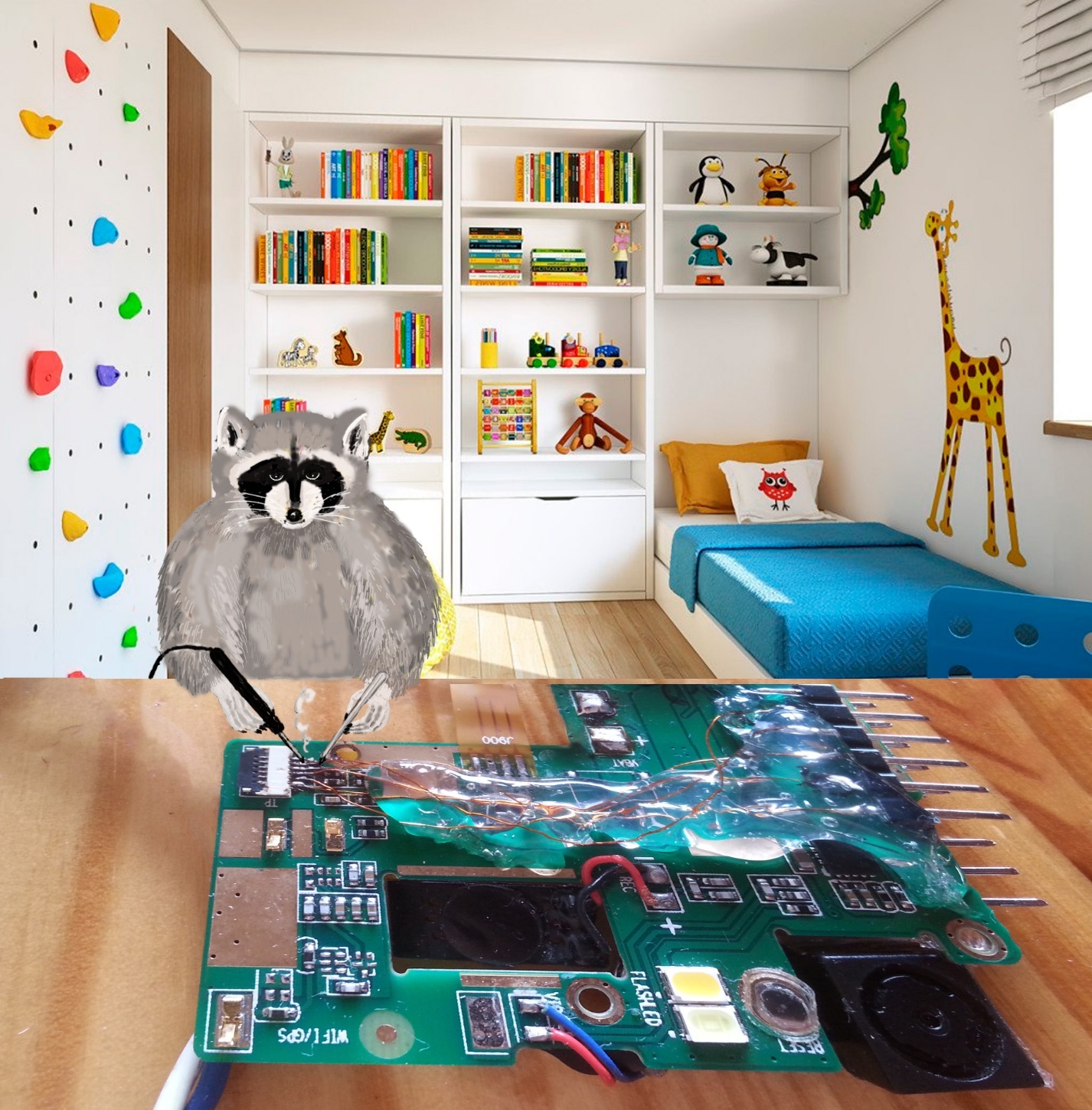
He deftly held the tools and soldered the last wires. All so fluffy and beautiful. The smoke rose floridly, and the pleasant smell of rosin filled the raccoon room...
One day, Kryak and I came across a nice smartphone. It became interesting to get into it, install applications and continue experimenting with it. But the path was blocked by a screen with a password. Poking our finger and realizing that there were more than three attempts, we were happy, because this increased our chances. The phone temporarily went on the shelf, and Quack went about his business. I still needed to finish current projects.
One day I suddenly had an interesting thought.
- Come here, you'll like it! - I call my feathered colleague.
– …?
– We combine interests: we research the sensor, write an application in Python and crack the password! Let's try something new and get access at the same time! A?! Cool?
The duckling was clearly interested in the new fun and went to get his tools.
Curious what came of it?)
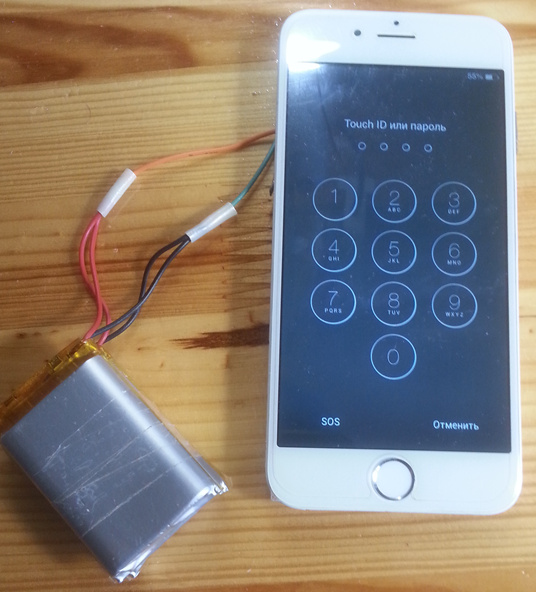
❯ What interface?
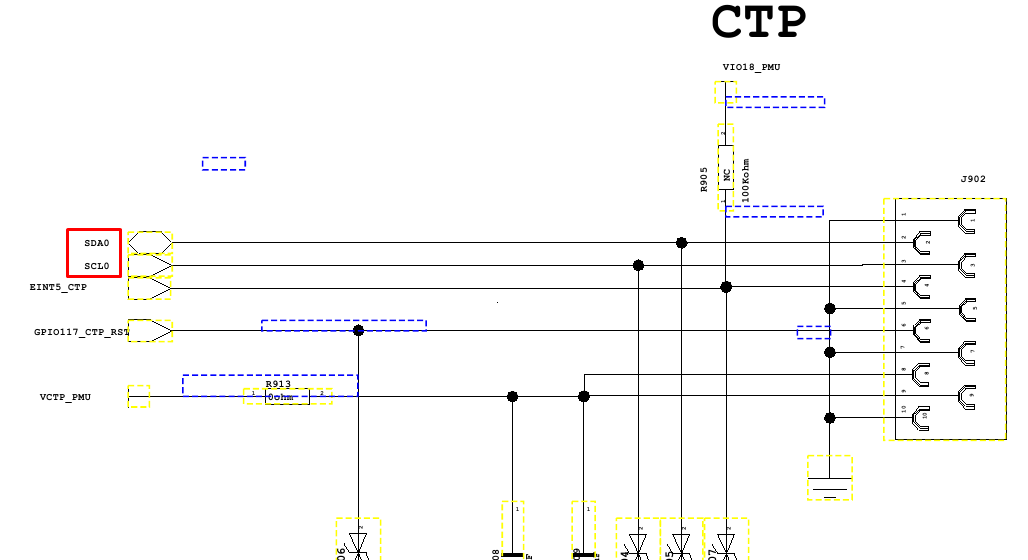
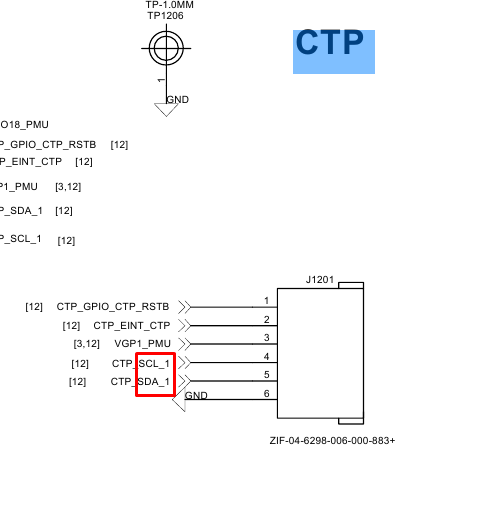
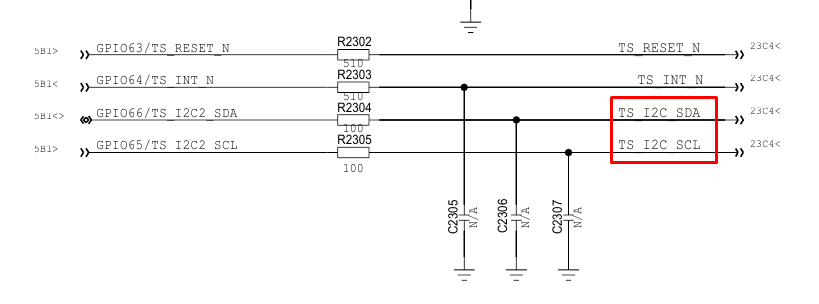
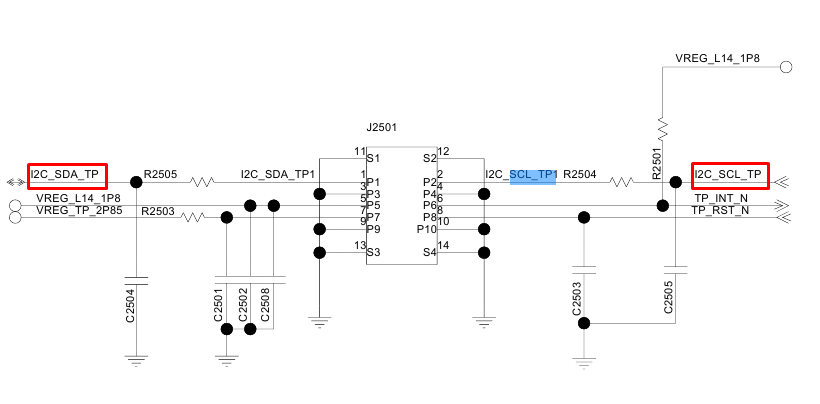
Looking through the diagrams of smartphones, you will notice that the interface of the capacitive sensor controllers is I2C, there are a couple of additional lines (RST, INT) and a standard interface:
Alcatel 6043D.
Explay A351.
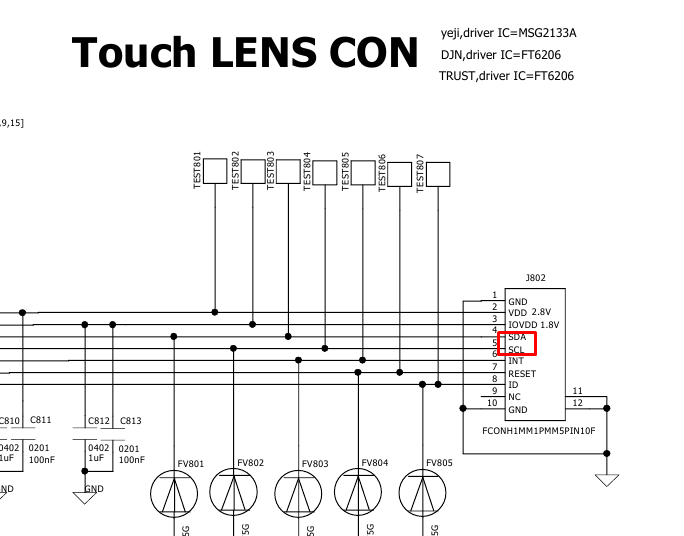
Huawei G620.
Huawei-g6.
There is often no documentation or it is incomplete, so reverse engineering is required.
Perhaps Kryak can handle it - he’s a good specialist:
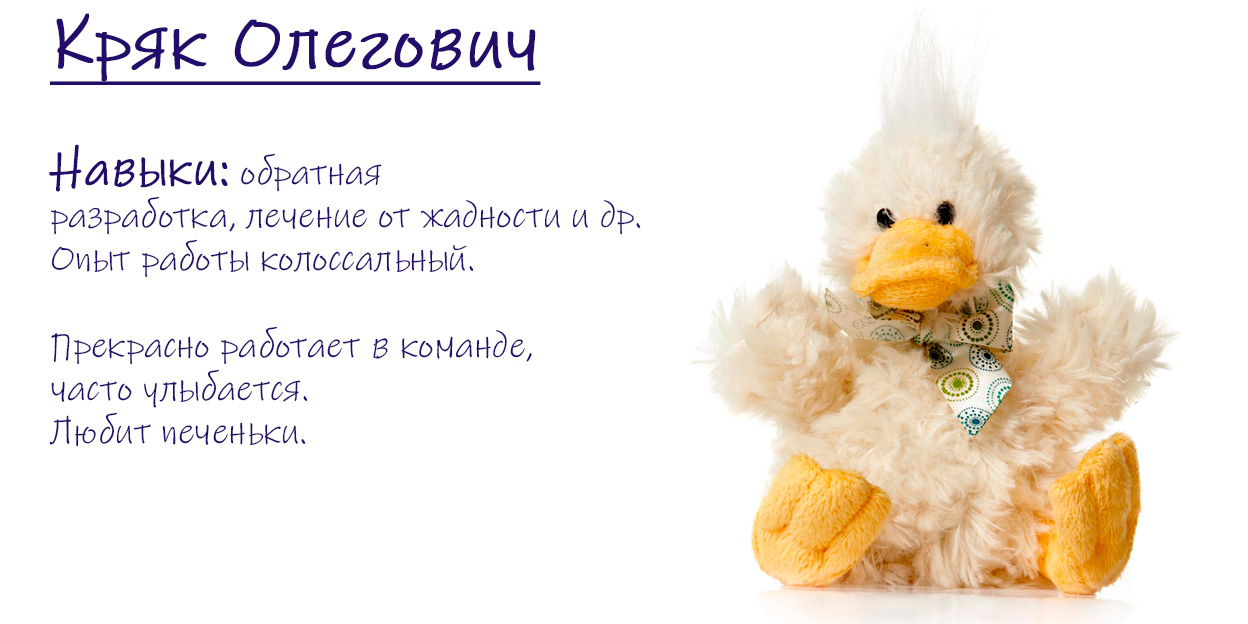
- Cookies?! COOKIES!!!

- Let's get down to business first. Think rationally.
– But I still want a cookie!
- OK.
[Lunch break] ...
❯ Studying our victim
We have not determined the exact model of the smartphone. Some kind of China iPhone 6(S).
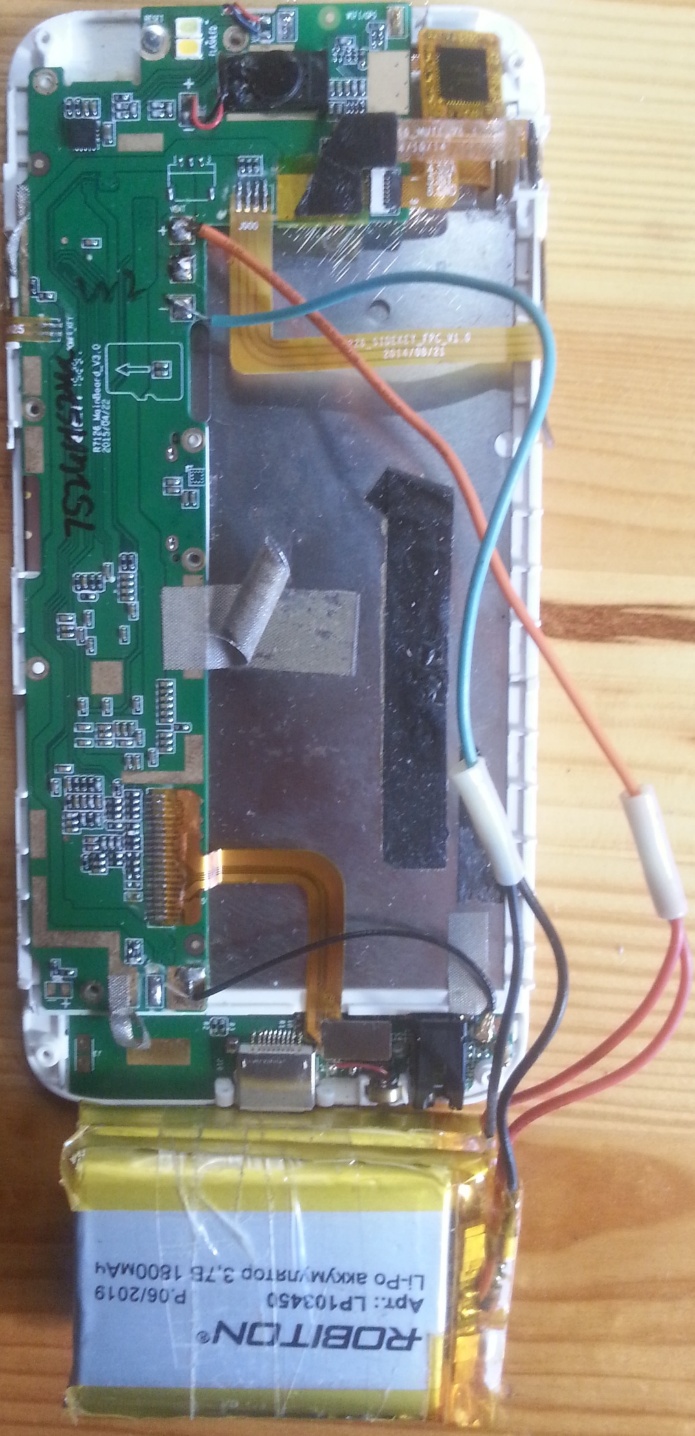
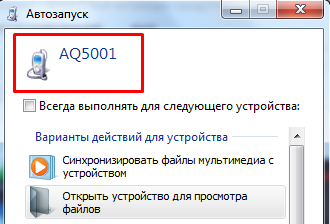
Later we found out that when connected via USB it is identified as AQ5001. Apparently, there are many options for fakes.
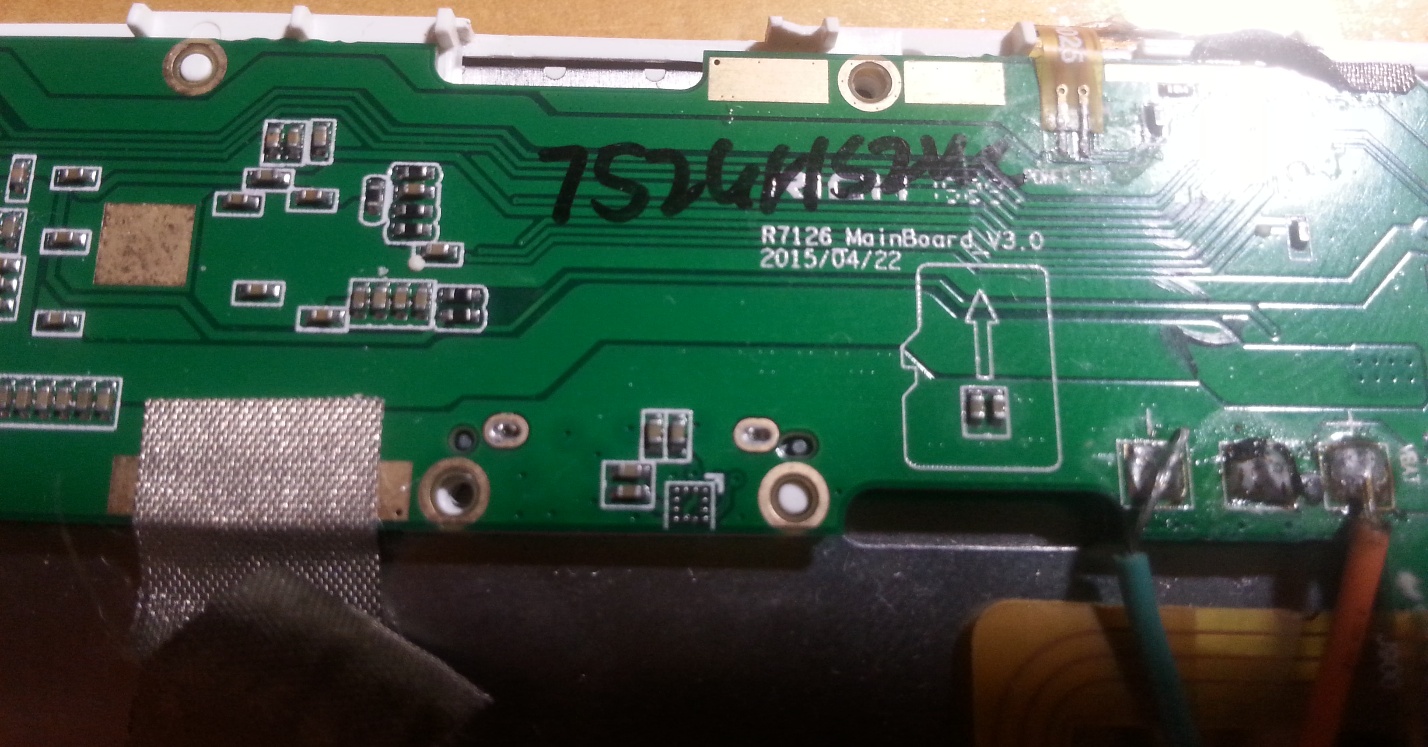
R7126_MainBoard_V3.0
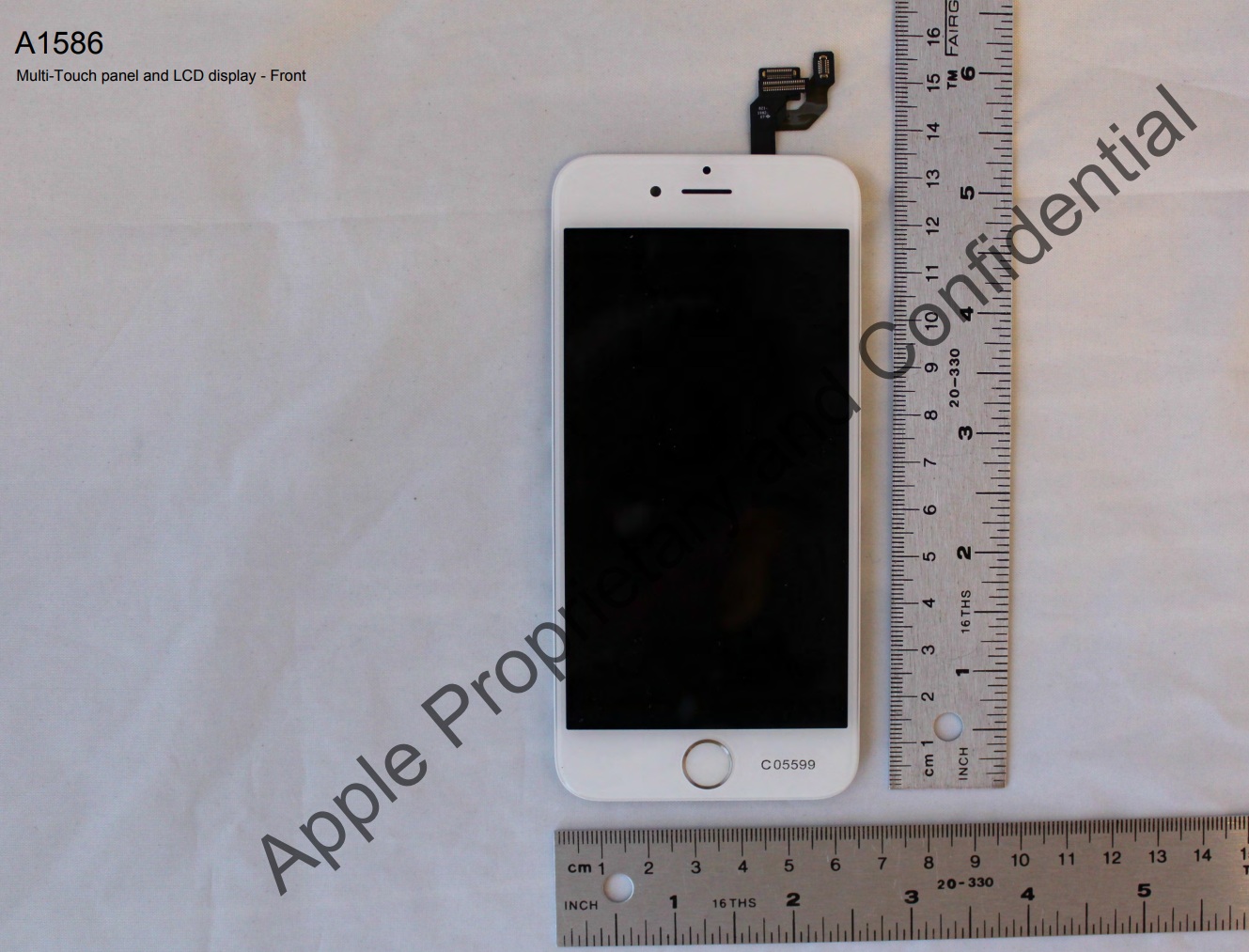
On the back cover we see the inscriptions FCC ID BCG-E2816A and Model A1586.
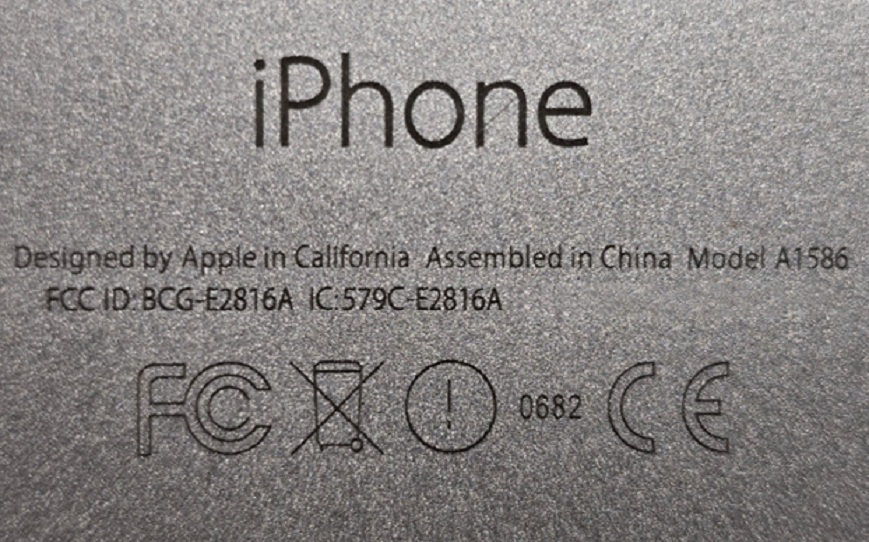
If you search by FCC ID, you will find some useful information. But not for our fake, but for the original. The screen and internals are somewhat different.
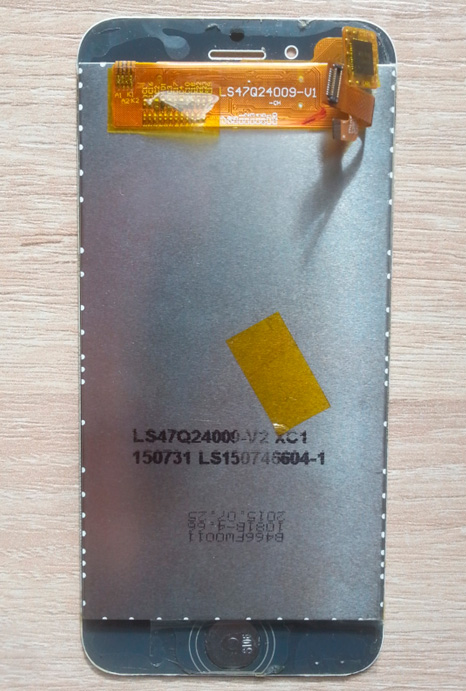
Our patient has a wheelbarrow controller on a cable.
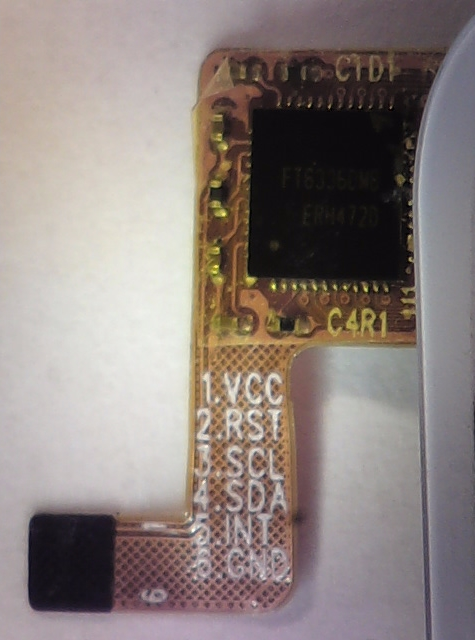
Focal Tech FT6336DMB. There are even contacts labeled on the cable. Comfortable!
There is, albeit incomplete, a datasheet for the controller. What luck!
FT6236 FT6336 FT6436L FT6436_Datasheet
❯ What's interesting about the datasheet?
FT6X36 – capacitive touch panel controllers with built-in 16-bit microcontroller. Support one touch point and gesture or two touch points simultaneously.
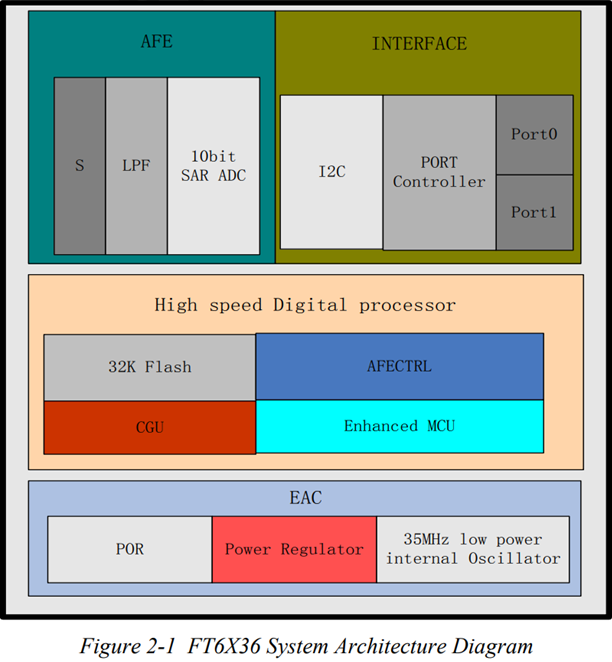
The connection is quite simple. Data is transmitted via a regular I2C interface.
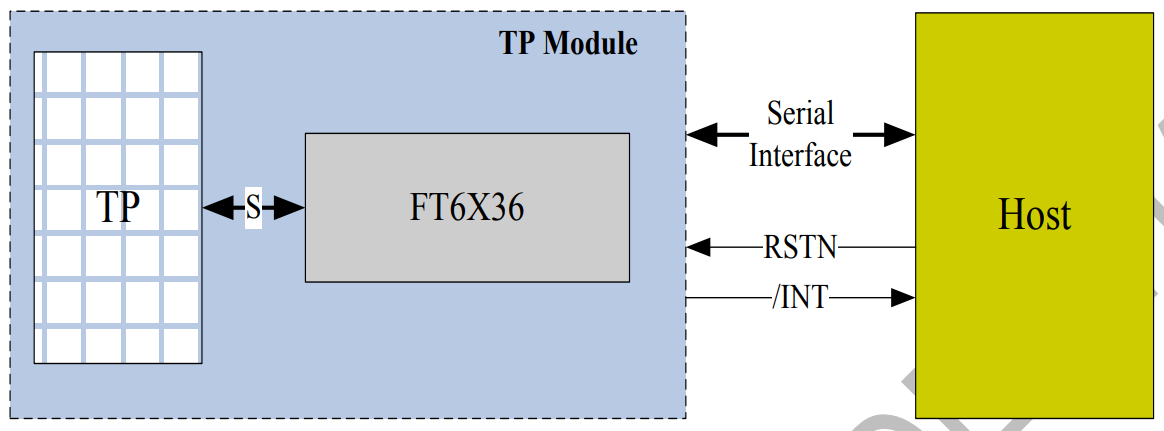
The sensor controller can operate in several modes:
- Active. In this mode, it actively scans the touchpad. Default is 60 fps. Can be adjusted faster or slower.
- Tracking (monitor mode). The panel is scanned at a reduced frequency (25 frames/s, configurable). In this mode, most algorithms are disabled. A simple detection of the presence of a touch to switch to the active mode works.
- Sleeping. Can be awakened by a Reset signal.
If the FT6X36 has useful touch data, it informs the control processor with an interrupt signal (/INT).
❯ Making a stand for work
Datasheet is good. But in this case, it does not describe everything we need. But we have a working device and a logic analyzer.
- Quack, call the installer! Let him solder the wires to the connector.
[After 20 minutes in the raccoon barn] ...
- Oh, I soldered it okay!
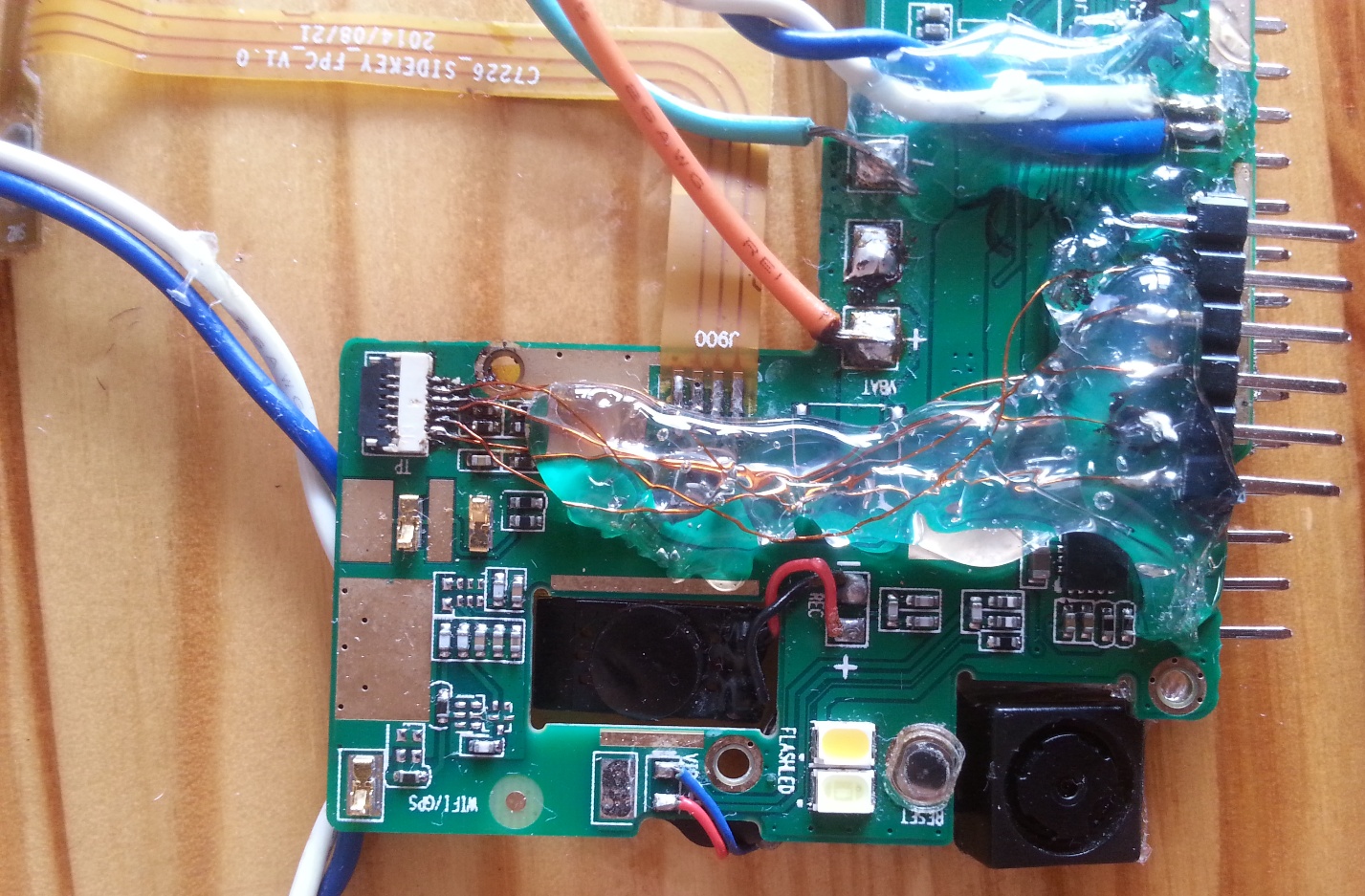
Meet me. This is our installer Kuzya. At school he was reprimanded about stealing bread from the canteen, but then the guy came to his senses and became an excellent specialist.

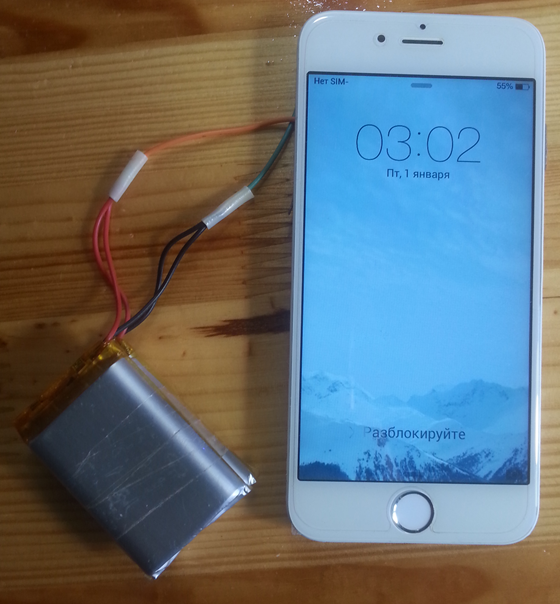
It turns out this is a convenient stand:
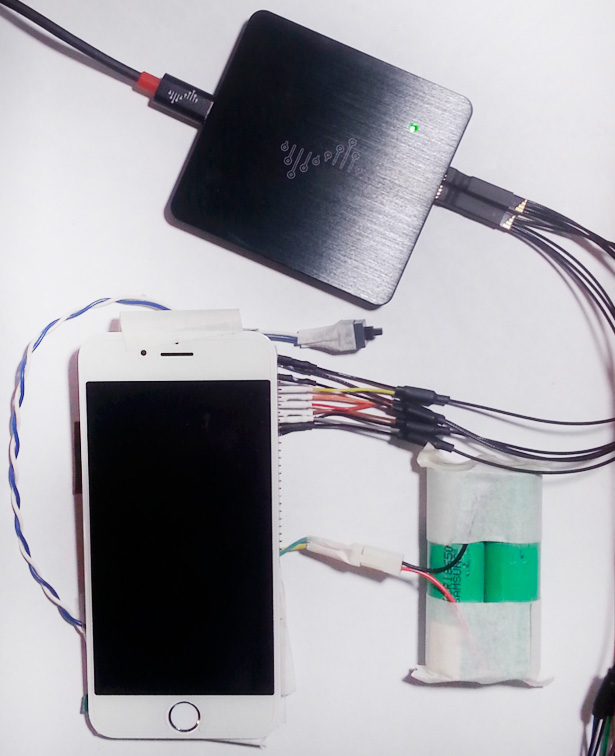
We connect the analyzer using a contact comb. The standard shutdown button is inconvenient, so we soldered our own. It is convenient to connect power using a connector with a key. To restart the phone, simply disconnect and connect back.
To prevent the wires from falling off, you can attach them with hot glue. If necessary, it can be easily removed. If there is such a goal, then you can do it even more carefully. In this case, you want to quickly make an interesting project without unnecessary complications.
❯ Recording and analyzing the exchange
Let's consider the exchange of the touchpad controller with the phone's processor when turned on, and then a little reaction to touches.
Files with recorded exchanges can be found Here.
Analysis of the big picture.
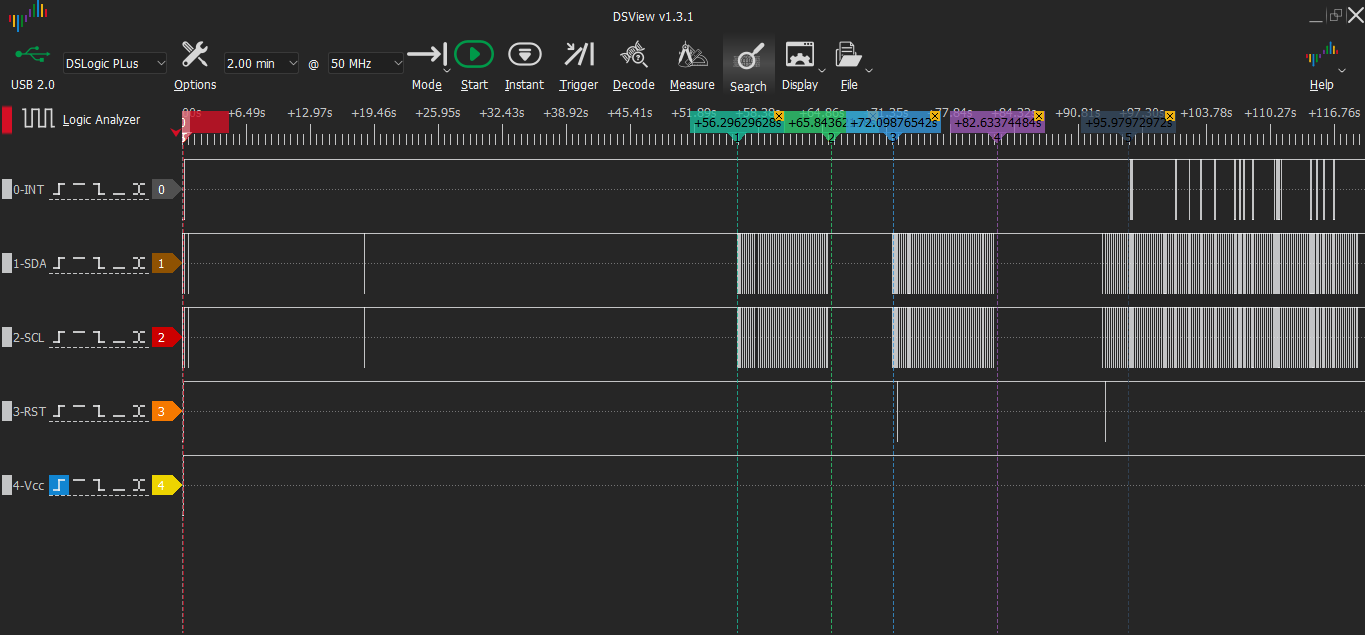
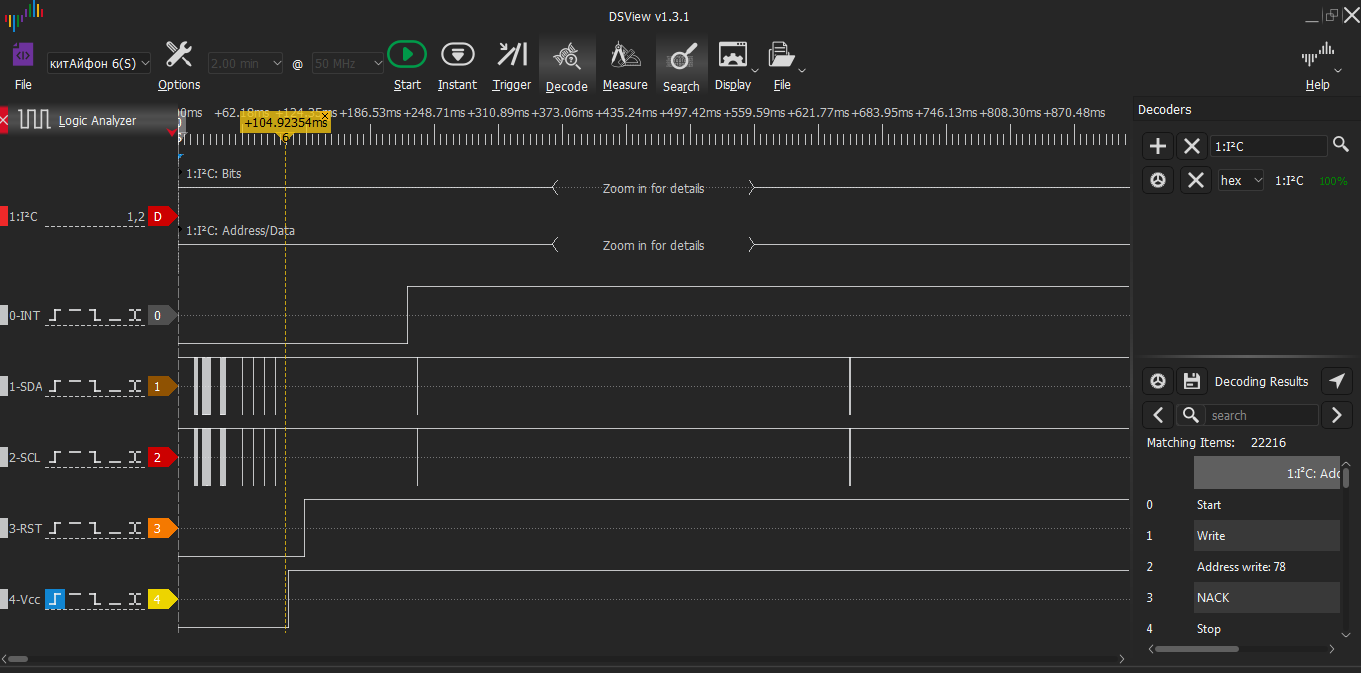
At the very beginning we see impulses. Then a long pause. This phone turns on. The start screen appears at cursor 1.
At cursor 2 the screen turns off. At cursor 3, turn on the screen with the lock button. At cursor 4 the screen turns off again. At cursor 5, some time after turning on the screen with the lock button, we try to touch the screen (at that moment, pulse activity begins on the SDA and SCL lines). We swipe the screensaver to the right, then try to enter the password.
When touching the INT line, activity is observed.
Let's connect the I2C decoder and see what is transmitted there.
Let's explore the area in more detail at the beginning of the recording.
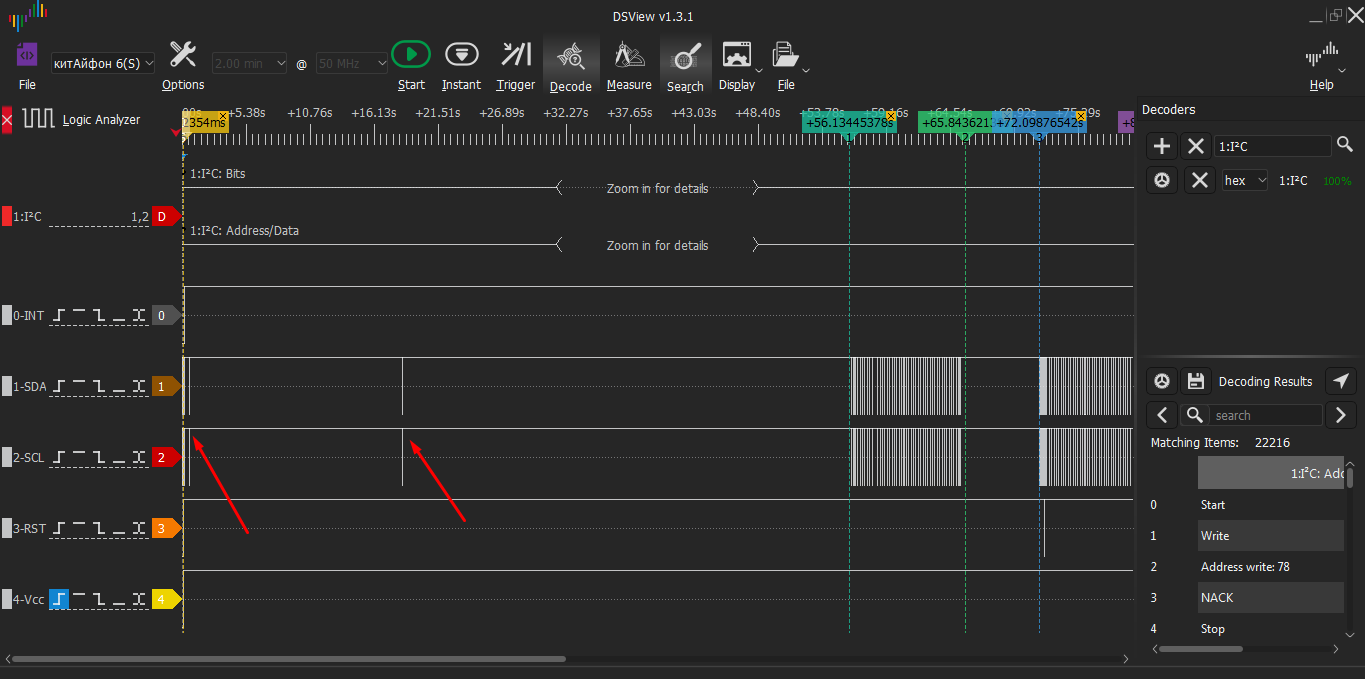
Before the sensor is powered on, there is activity on SCL and SDA. There are some other devices on this interface. This has nothing to do with the wheelbarrow.
Before the splash screen appears on the screen and there is a lot of activity on SCL and SDA, we have 3 places of low activity. They are marked with arrows in the picture. Due to scale, the left arrow points to 2 places at once.
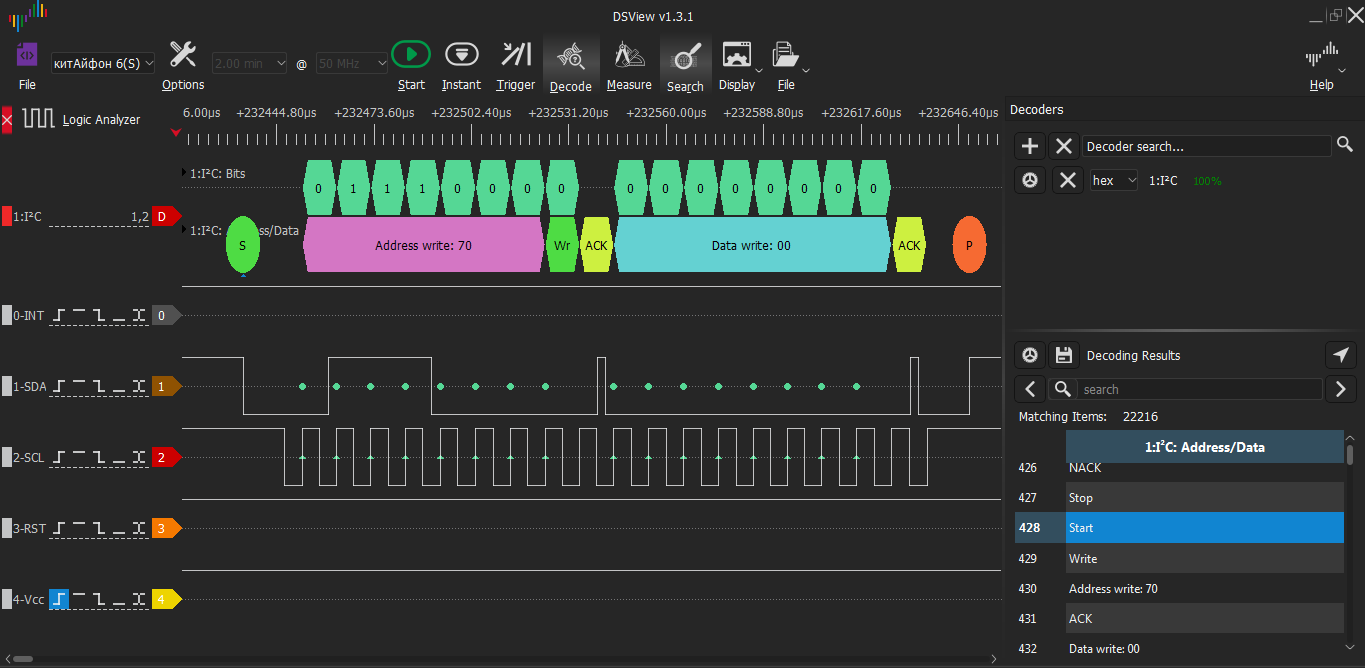
After reading the DS on the touchscreen controller, everything becomes clearer. What do we see here?
0b111000 is the I2C address of the touch controller
0x70 = 0b111000 and last bit 0 (write)
0x71 = 0b111000 and last bit 1 (read)
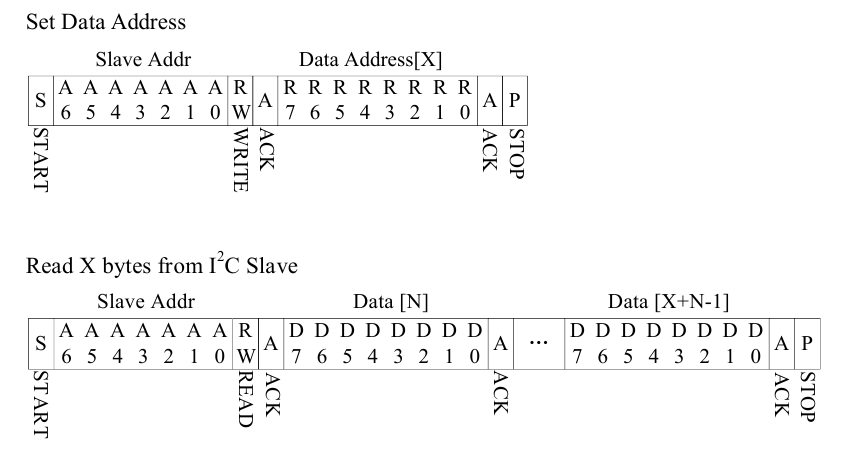
First we write down the address, we will read from the ktr - 0x00, then we read it.
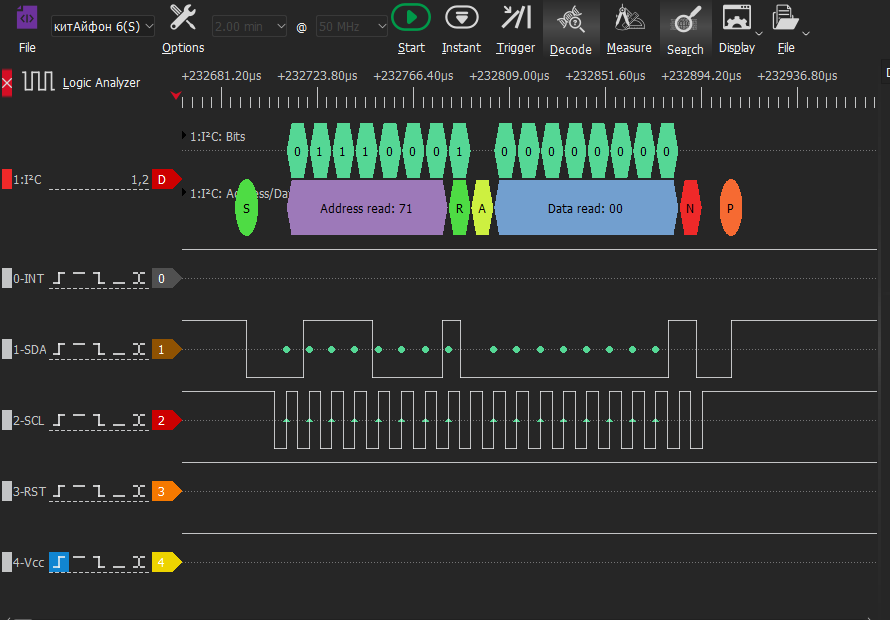
Code 0x00 is read from DEVICE_MODE - WORKING MODE.
Next, 0x11 is read from 0xA8 (FOCALTECH_ID).
From 0xA6 (Firmware Version) – 0x01.
After a long time, 00 is written to B0 (there is no description of such a register).
Next are the write/read addresses 4C/4D. This is some other device, the processor communicates with it before power is supplied to the touchscreen. There are several more devices there.
After this, a startup screen appears on the screen and a burst of pulses begins until the screen turns off.
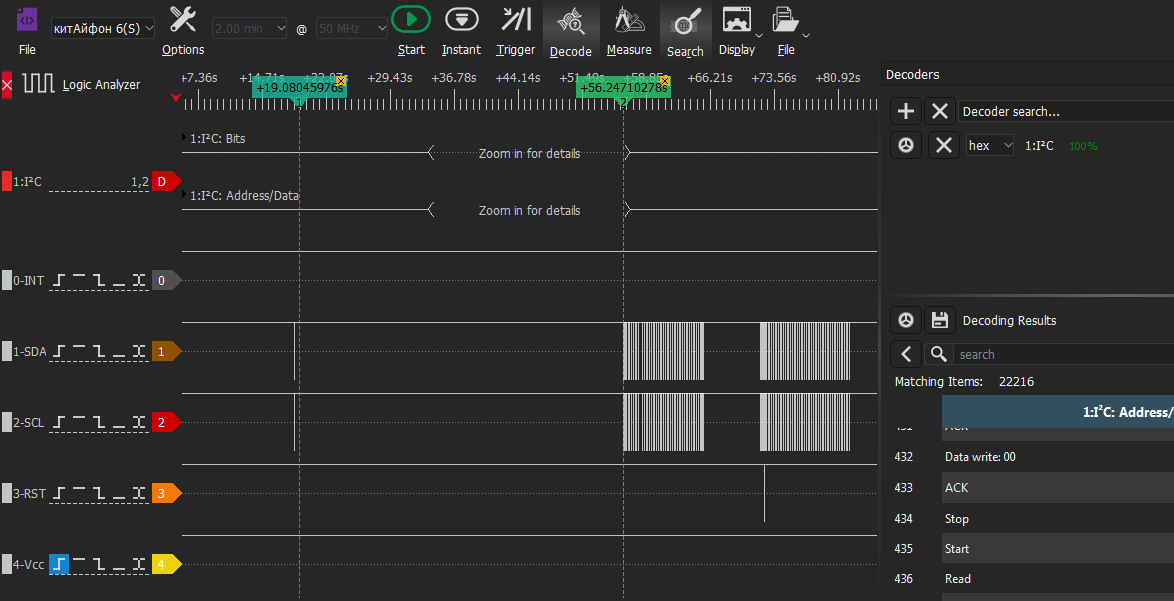
The package contains parcels for and from the device with the write/read address 4C/4D.
Periodically, something is read from register 02 of this device. There are other parcels, but there is nothing at addresses 70/71 for/from our car.
In order not to miss anything, we use the search for the string “Address write: 70” and switch according to the search results.
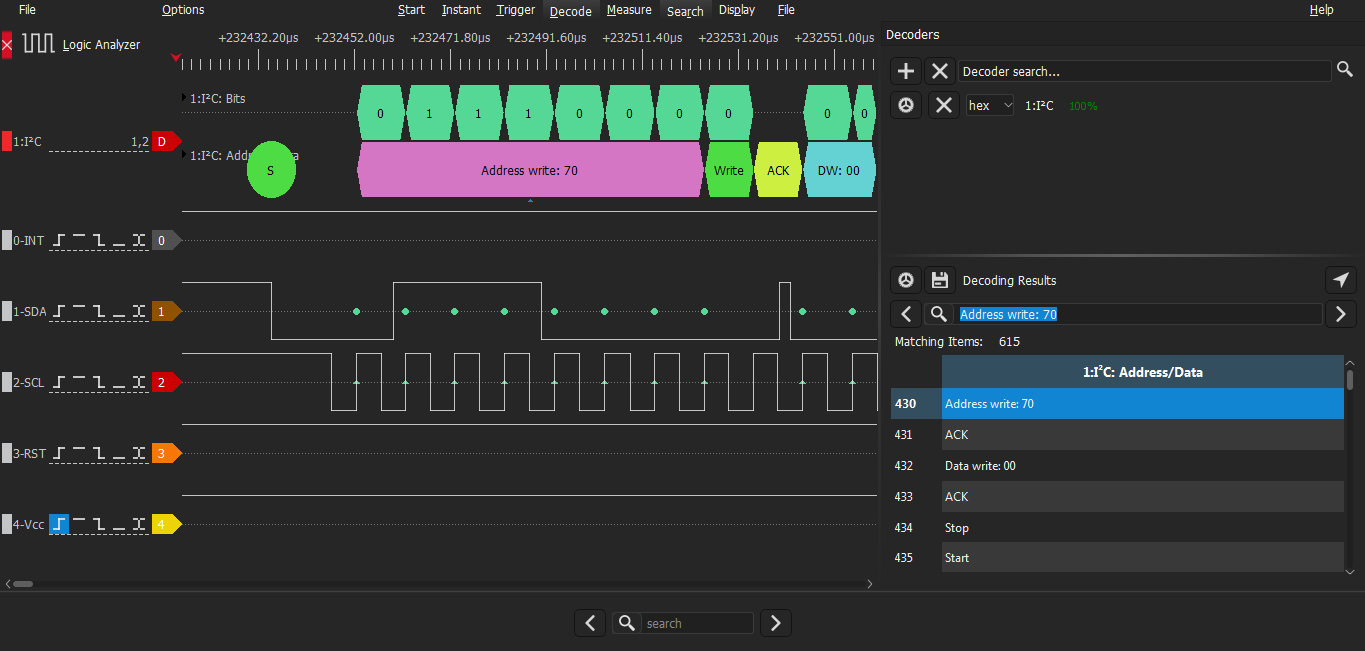
Oops! In the large pack, we didn’t immediately notice the package for the wheelbarrow (we looked quickly). And there it is.
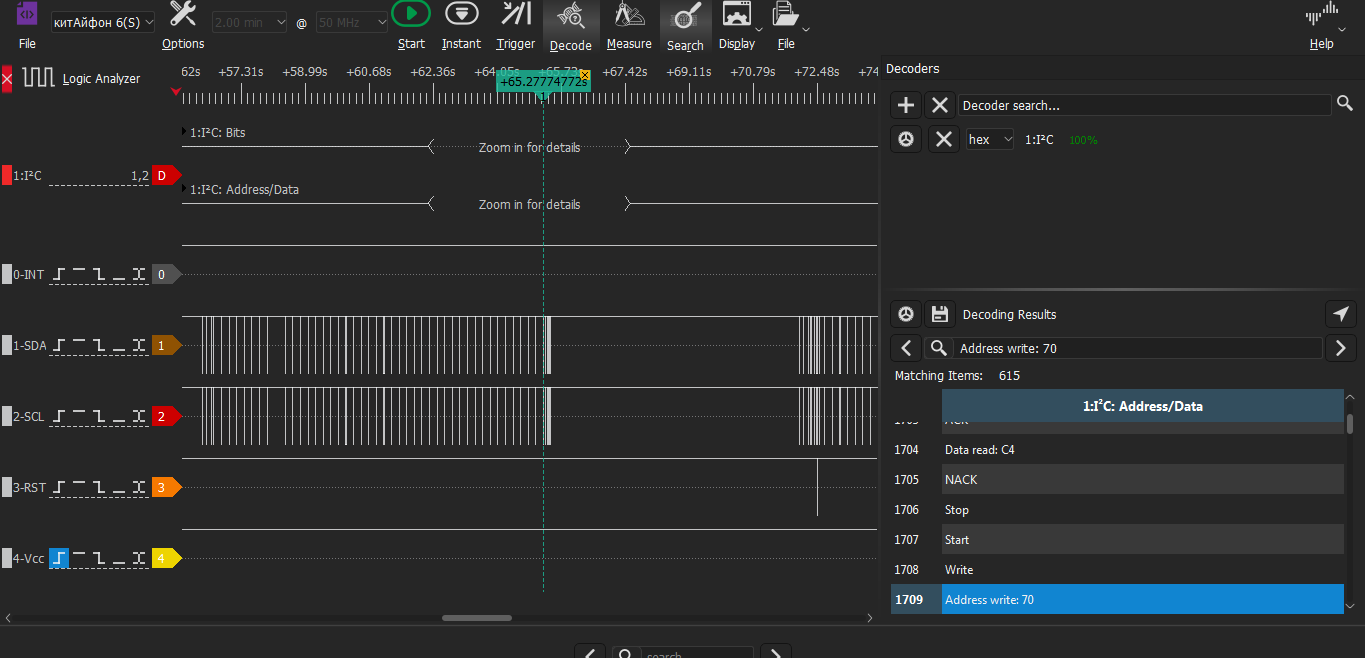
This position is shown by the cursor. Right at the end of the pack.
The processor writes the value 03 to register A5 (PWR_MODE) (no description, looks like sleep mode).
[7:0] Current power mode which system is in R/W
Then the end of the pack - the screen turned off.
Then a new pack - I pressed the lock button and the screen turned on.
At the beginning of this pack there is a Reset signal so that the wheelbarrow controller wakes up.
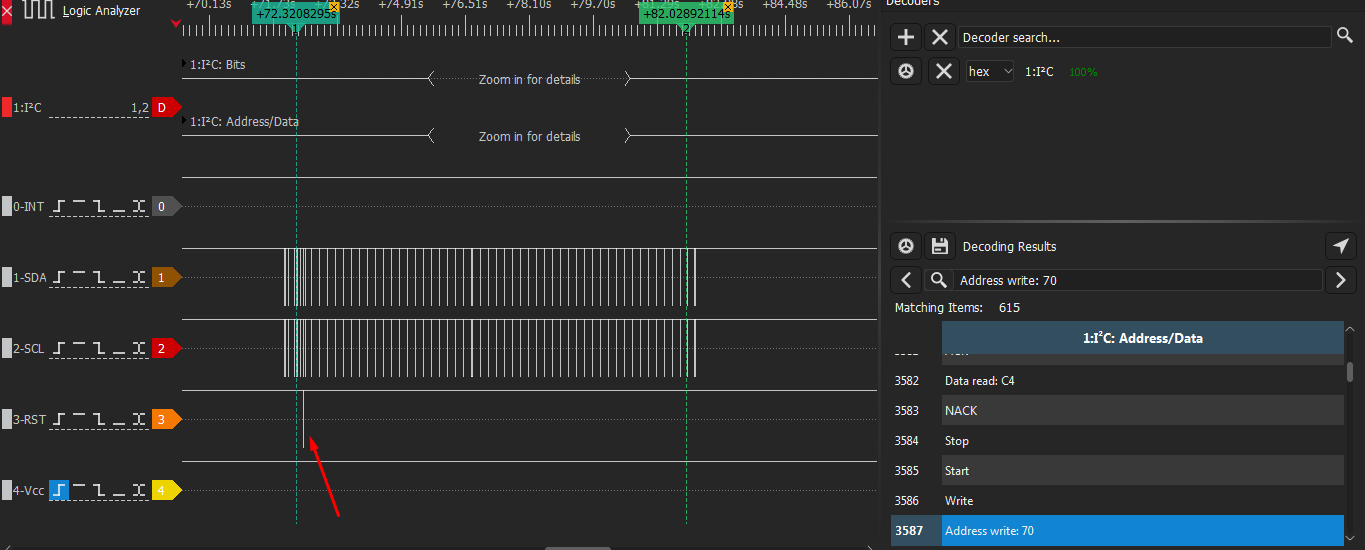
And at the end of the burst, the processor again writes the value 03 to register A5 (PWR_MODE) (no description, but apparently sleep mode).
Let's examine the area where we started touching the wheelbarrow.
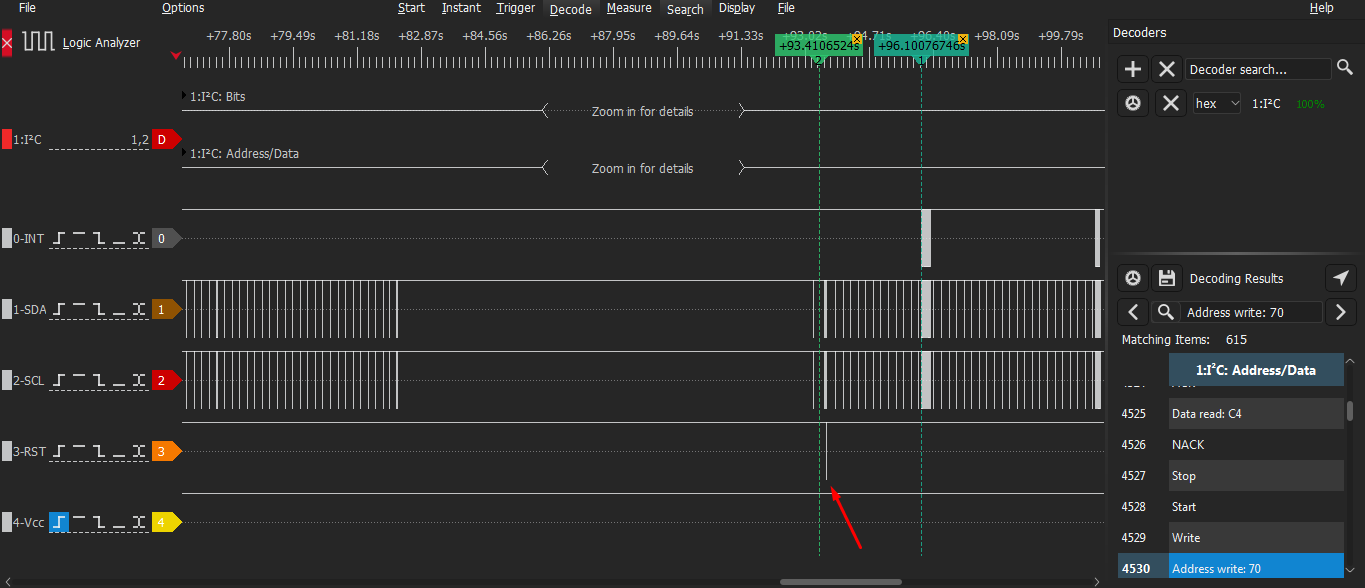
After turning on the screen with the lock button, the processor wakes up the touch controller with a Reset pulse. Then we touch the sensor and activity begins on the INT line.
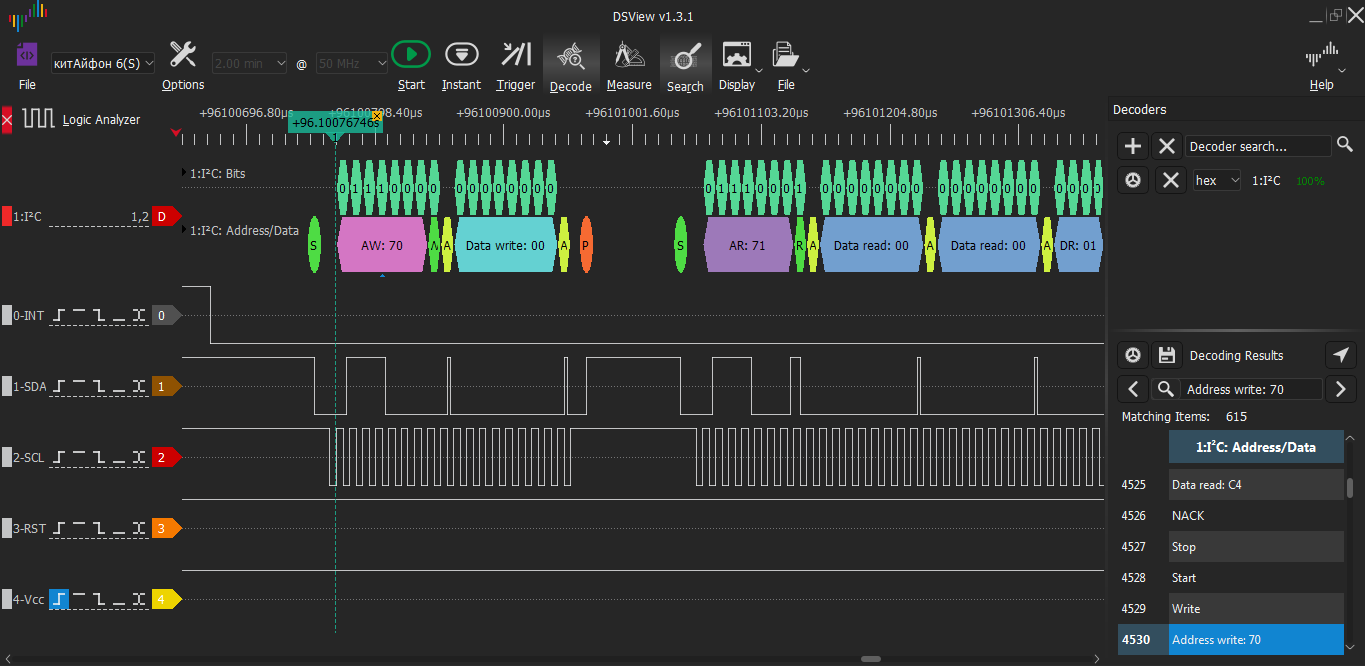
The processor writes the address of register 00 (Device Mode), from which it will read.
The sensor controller responds 00 00 01 00 52 03 65 00
The processor reads data from register 08 (P1_MISC 1st Touch Area)
Answer 00 FF FF FF FF FF FF FF
The processor reads from 10 (no description) Reply FF FF FF FF FF FF FF FF
The processor reads from A6 (Firmware Version) Answer 01.
Strange: why read the firmware version of the touch controller again when touching?
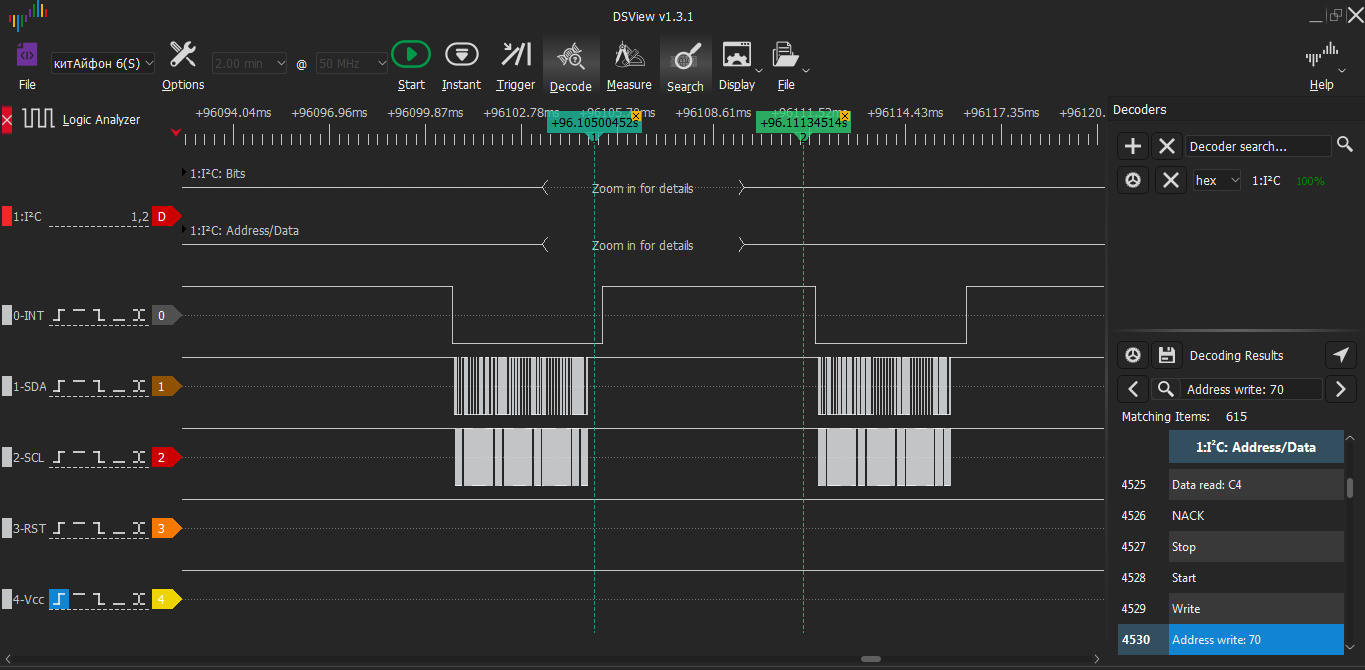
We examined the left pack after the first touch.
Now let's look at the right one (after cursor 2).
Request from the processor to read from 00 (Device Mode) Response 00 00 01 80 63 03 62 00
Request from the processor to read from 08 (P1_MISC 1st Touch Area) Response 00 FF FF FF FF FF FF FF
The processor reads from 10 (no description) Reply FF FF FF FF FF FF FF FF
The processor reads from A6 (Firmware Version) Answer 01.
Analysis of the big picture briefly.
After power is applied to the touch panel controller, 0x00 is read from DEVICE_MODE - WORKING MODE.
Next, 0x11 was counted from 0xA8 (FOCALTECH_ID).
From 0xA6 (Firmware Version) we counted 0x01.
After a long time, we write the value 00 in B0 (there is no description of such a register in the datasheet).
After this, a startup screen appears on the screen and a burst of pulses begins until the screen turns off. Almost all parcels in the pack are for other devices. At the end of the burst, the processor writes the value 03 to register A5 (PWR_MODE) of the wheelbarrow controller (no description, looks like sleep mode).
Then the end of the pack - the screen turned off.
After turning on the screen with the lock button, the processor wakes up the touch controller with a Reset pulse. Then we touch the sensor and activity begins on the INT line. With this signal, the sensor controller tells the processor that there is useful data.
Having received an INT interrupt from the wheelbarrow, the processor begins to read data. This always happens according to the same pattern:
- The processor writes the address of register 00 (Device Mode), from which it will read.
In response, the sensor controller sends 8 messages, for example, 00 00 01 00 52 03 65 00.
- The processor reads data from register 08 (P1_MISC 1st Touch Area)
Answer 00 FF FF FF FF FF FF FF - The processor reads from 10 (no description). Answer FF FF FF FF FF FF FF FF
- The processor reads from A6 (Firmware Version). Answer 01.
And with each touch, for some reason the processor reads the firmware version. Constantly forgetting or checking for updates? 😊
The processor sends one address for reading, and 8 messages are received in response. These are probably values from eight registers in a row.
The DS has a description of the registers, but not all of them.
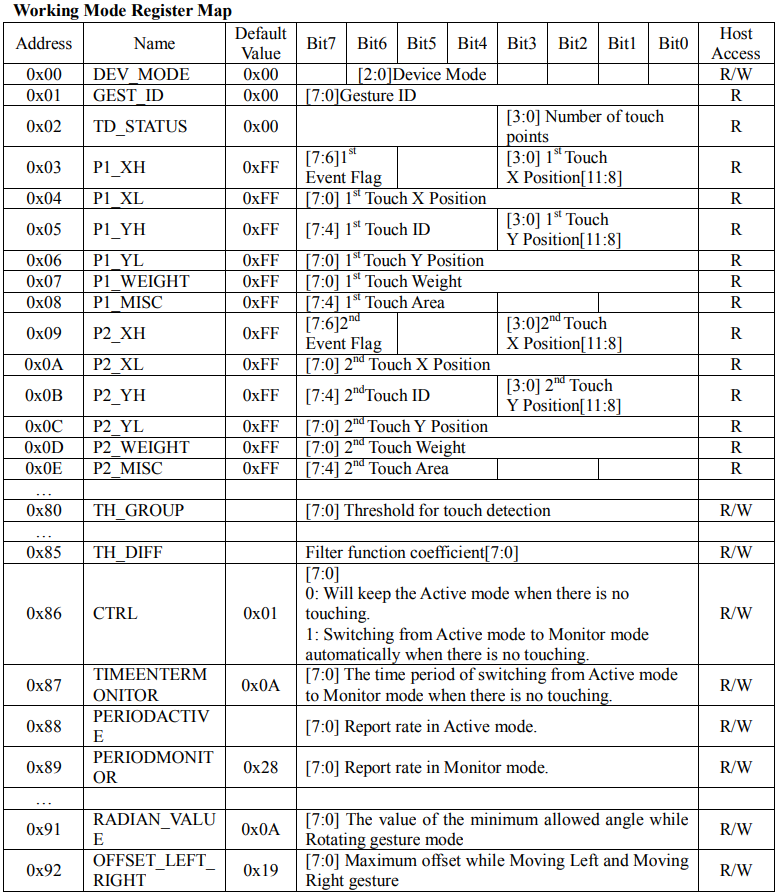
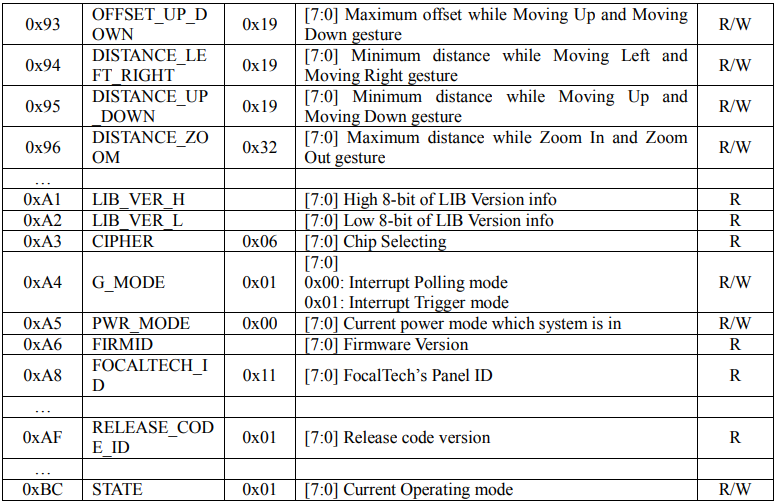
Not everything is clear yet. Let's record and analyze the exchange when touching different places on the screen in different ways (1 and 2 points, gesture, etc.) For convenience, it is better to write in different files. It is better to touch gently, with the tip of your finger.
We measure the frequency.
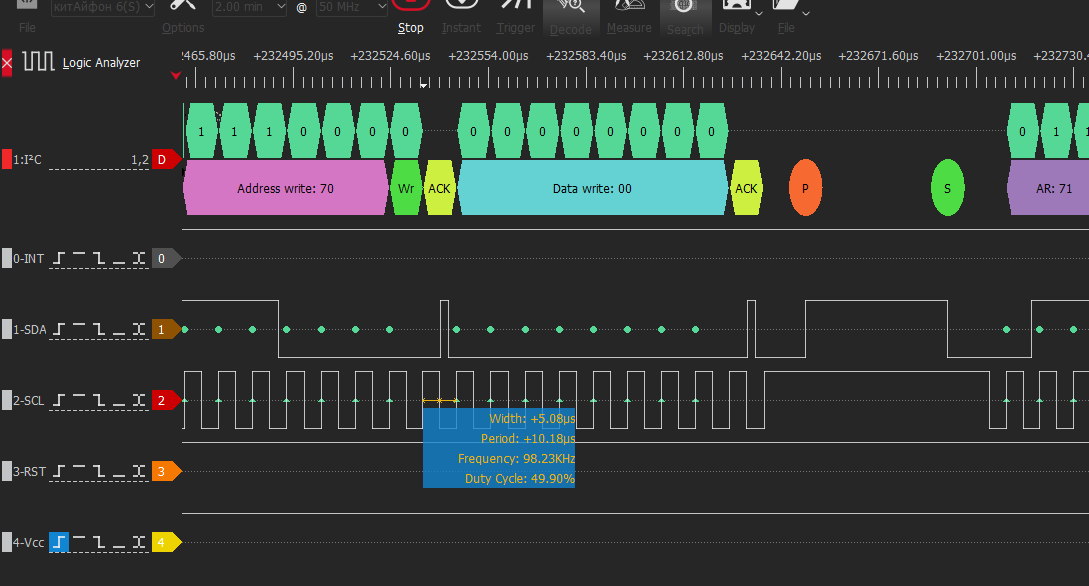
100 kHz. The sampling frequency must be selected at least 4 times the signal frequency. Let's make it 10 times larger - 1 MHz (it was 50 MHz). This way there will be fewer points and the program will work faster.
❯ Touching the upper left corner
When touched, the exchange looks like this:
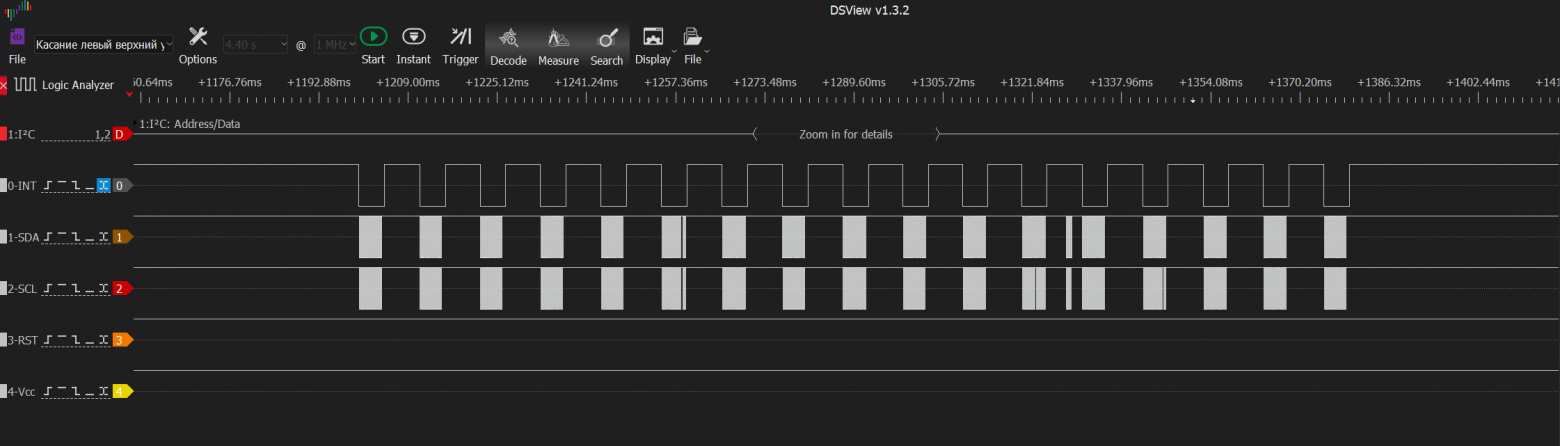
In a short period of time we see quite a few bursts of pulses. Touchpad polling rate is 91.6 Hz.
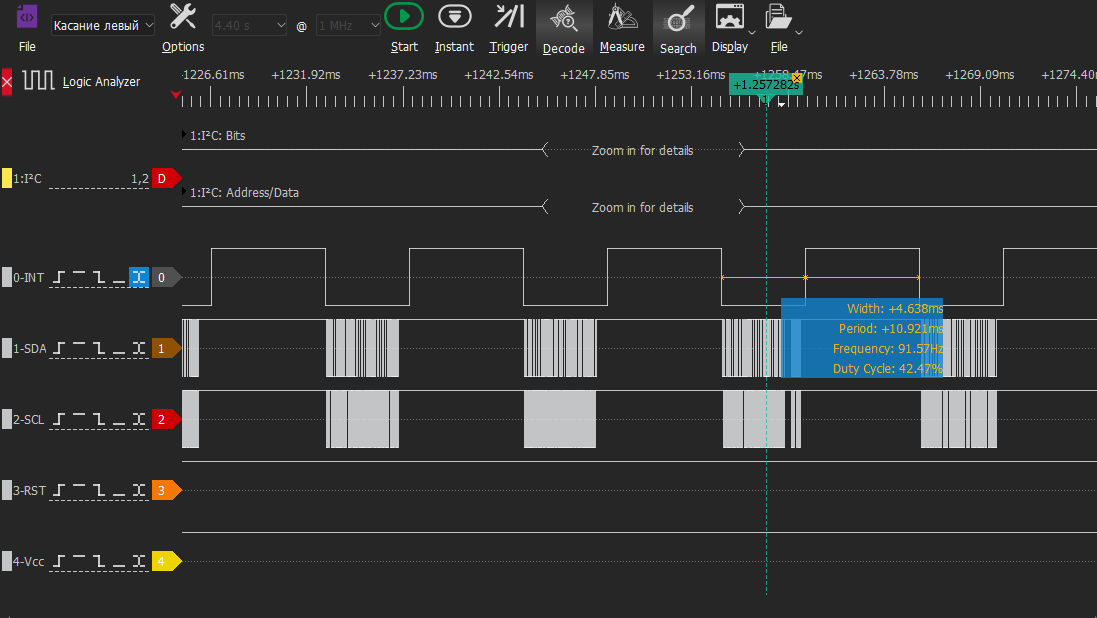
Pack 1
The processor reads from
00 Reply 00 00 01 00 82 00 4С 00
08 Answer 00 FF FF FF FF FF FF FF.
10 Answer FF FF FF FF FF FF FF FF
A6 Answer 01
Pack 2
The processor reads data from
00 Reply 00 00 01 80 82 00 4С 00
08 Answer 00 FF FF FF FF FF FF FF.
10 Answer FF FF FF FF FF FF FF FF
A6 Answer 01
Pack 3
The processor reads data from
00 Answer 00 00 01 80 86 00 4D 00
08 Answer 00 FF FF FF FF FF FF FF.
10 Answer FF FF FF FF FF FF FF FF
A6 Answer 01
Pack 4
The processor reads data from
00 Answer 00 00 01 80 89 00 4D 00
08 Answer 00 FF FF FF FF FF FF FF.
10 Answer FF FF FF FF FF FF FF FF
A6 Answer 01
It’s the same in the 5th-9th packs.
Pack 10
The processor reads data from
00 Answer 00 00 01 80 85 00 48 00
08 Answer 00 FF FF FF FF FF FF FF.
10 Answer FF FF FF FF FF FF FF FF
A6 Answer 01
Pack 11
The processor reads data from
00 Answer 00 00 01 80 80 00 44 00
The rest is the same.
Pack 12
The processor reads data from
00 Reply 00 00 00 40 80 00 44 00
The rest is the same.
Pack 13.
The processor reads data from
00 Reply 00 00 00 FF FF FF FF FF
08 Reply FF FF FF FF FF FF FF FF.
10 Answer FF FF FF FF FF FF FF FF
A6 Answer 01
14th...18th packs are the same
Only the answer from 00 changes. And then only slightly and not in every pack.
Apparently, when touching, the finger was not applied instantly or was slightly displaced. Therefore the values change a little. Otherwise they wouldn’t change.
Towards the end, the answer from 08 changes slightly (the first position from 00 to FF). Then it doesn't change again.
❯ Touching the upper right corner
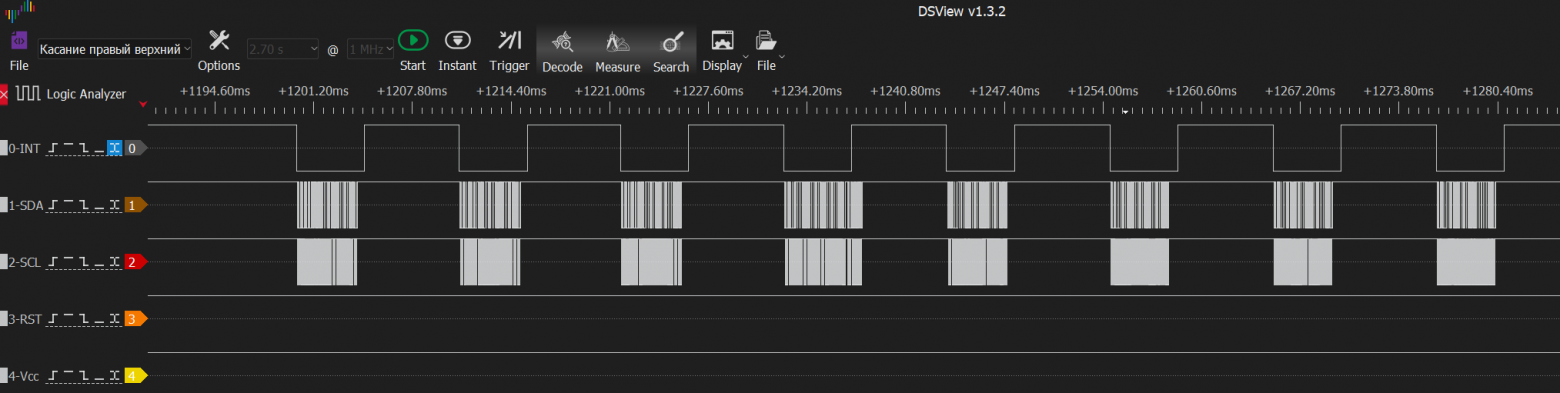
Pack 1. The processor reads from
00 Reply 00 00 01 01 E3 00 1D 00
08 Reply 00 FF FF FF FF FF FF FF
10 Answer FF FF FF FF FF FF FF FF
A6 Answer 01
Pack 2. The processor reads from
00 Reply 00 00 01 81 E3 00 1D 00
08 The answer is the same
10 The answer is the same
A6 The answer is the same
Pack 3. The processor reads from
00 Reply 00 00 00 41 E3 00 1D 00
08 The answer is the same
10 The answer is the same
A6 The answer is the same
Pack 4. The processor reads from
00 Reply 00 00 00 FF FF FF FF FF
08 Reply FF FF FF FF FF FF FF FF
10 The answer is the same
A6 The answer is the same
Packs 5-8. The processor reads from
00 The answer is the same
08 The answer is the same
10 The answer is the same
A6 The answer is the same
Here our touch was shorter. Therefore, there are 8 packs, and not 18, like last time.
I believe that after releasing the touch the following changes occur:
when touching 00 response 00 00 00 41 E3 00 1D 00
08 answer 00 FF FF FF FF FF FF FF,
after release
00 answer 00 00 00 FF FF FF FF FF
08 answer FF FF FF FF FF FF FF FF
Let's compare the answer from 00 for the left and right upper corners.
Top left 00 Reply 00 00 01 80 89 00 4D 00
Top right 00 Answer 00 00 01 81 E3 00 1D 00
❯ Touching the lower right corner
Pack 1. The processor reads from
00 Reply 00 00 01 01 CA 03 BE 00
08 Reply 00 FF FF FF FF FF FF FF
10 Answer FF FF FF FF FF FF FF FF
A6 Answer 01
Pack 2. The processor reads from
00 Reply 00 00 01 81 CA 03 BE 00
08 Reply 00 FF FF FF FF FF FF FF
10 Answer FF FF FF FF FF FF FF FF
A6 Answer 01
Packs 3,4,5,6,7 are the same
Pack 8. The processor reads from
00 Reply 00 00 00 41 CA 03 BE 00
08 Reply 00 FF FF FF FF FF FF FF
10 Answer FF FF FF FF FF FF FF FF
A6 Answer 01
Pack 9. The processor reads from
00 Reply 00 00 00 FF FF FF FF FF
08 Reply FF FF FF FF FF FF FF FF
10 Answer FF FF FF FF FF FF FF FF
A6 Answer 01
The remaining few packs are the same.
Let's compare the established values for the read request from 00.
Upper right corner 00 Answer 00 00 01 81 E3 00 1D 00
Bottom right corner 00 Answer 00 00 01 81 CA 03 BE 00
❯ 2 touches simultaneously (upper and lower left corners)
Pack 1. The processor reads from
00 Reply 00 00 02 00 08 03 72 00
08 Reply 00 00 58 10 2E 00 00 FF
10 Answer FF FF FF FF FF FF FF FF
A6 Answer 01
He held the touch for a long time, so there are a lot of packs. Let's see in 10: 1,11,21...
Pack 11. The processor reads from
00 Reply 00 00 02 80 08 03 72 00
08 Reply 00 80 58 10 2E 00 00 FF
10 Answer FF FF FF FF FF FF FF FF
A6 Answer 01
Pack 21. The processor reads from
00 Answer 00 00 02 80 08 03 72 00
08 Reply 00 80 58 10 2E 00 00 FF
10 Answer FF FF FF FF FF FF FF FF
A6 Answer 01
Pack 31. The processor reads from
00 Answer 00 00 02 80 08 03 74 00
08 Reply 00 80 58 10 2E 00 00 FF
10 Answer FF FF FF FF FF FF FF FF
A6 Answer 01
Pack 41 is the same.
Pack 61. The processor reads from
00 Reply 00 00 02 80 0WITH 03 76 00
08 Reply 00 80 58 10 2E 00 00 FF
10 Answer FF FF FF FF FF FF FF FF
A6 Answer 01
Pack 101. The processor reads from
00 Reply 00 00 02 80 10 03 78 00
08 Reply 00 80 58 10 2E 00 00 FF
10 Answer FF FF FF FF FF FF FF FF
A6 Answer 01
Pack 131. The processor reads from
00 Answer 00 00 02 80 10 03 79 00
08 Answer 00 80 55 10 2F 00 00 FF
10 Answer FF FF FF FF FF FF FF FF
A6 Answer 01
Pack 133. The processor reads from
00 Reply 00 00 01 80 52 10 2C 00
The number of touches in byte 2 became 1
08 Reply 00 FF FF FF FF FF FF FF
Apparently, touch number 2 was released here
10 Answer FF FF FF FF FF FF FF FF
A6 Answer 01
Last 4 packs. The processor reads from
00 Reply 00 00 00 FF FF FF FF FF
08 Reply FF FF FF FF FF FF FF FF
10 Answer FF FF FF FF FF FF FF FF
A6 Answer 01
Released both touches.
So far the understanding is this:
00 – touch parameters No. 1
08 – touch parameters No. 2
10 – Gesture or Touch Options #3? We'll check later.
There is also a suspicion that at the beginning of the touch the Touch Area and Touch Weight change. Touch coordinates may change slightly even when touching without moving, as the person may move the finger slightly.
❯ Swipe the screensaver right
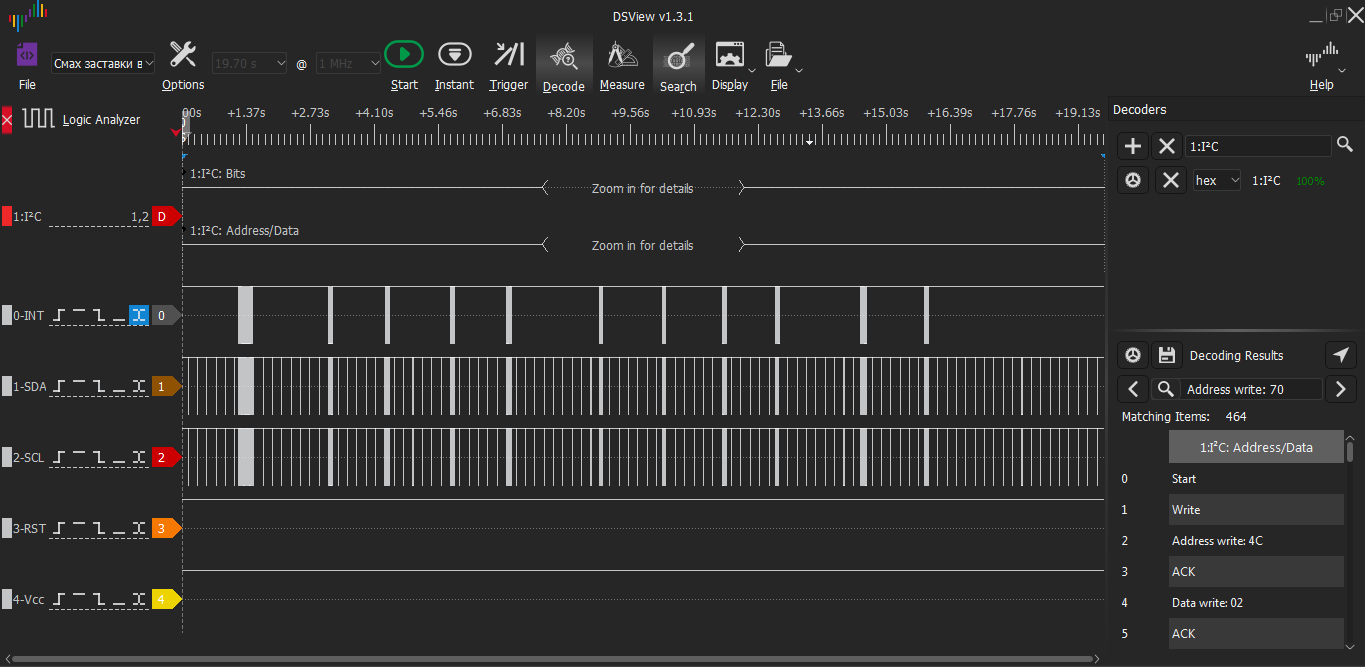
We write a file. The picture clearly shows pauses between swiping to the right and touching numbers 1-9, 0.
Perhaps swiping to the right is a gesture, so let’s try to find the code 0x14 for the “Move Right” gesture in the recorded messages.
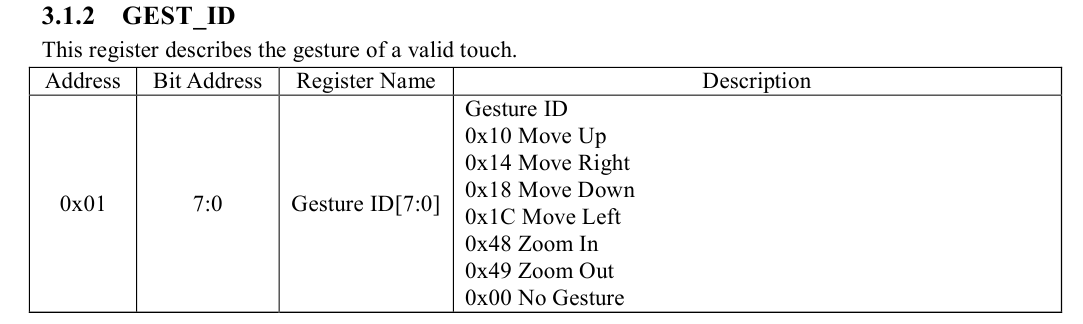
A search through the decoded codes has so far yielded nothing. We sort out the parcels.
Pack 1. Touch. The processor reads from
00 Reply 00 00 01 00 6F 03 5E 00
08 Reply 00 FF FF FF FF FF FF FF
10 Answer FF FF FF FF FF FF FF FF
A6 Answer 01
Pack 2. Hold. The processor reads from
00 Reply 00 00 01 80 6F 03 5E 00
08 Reply 00 FF FF FF FF FF FF FF
10 Answer FF FF FF FF FF FF FF FF
A6 Answer 01
Pack 3. Hold, deltaX=9. The processor reads from
00 Reply 00 00 01 80 78 03 5C 00
08 Reply 00 FF FF FF FF FF FF FF
10 Answer FF FF FF FF FF FF FF FF
A6 Answer 01
Pack 4. Hold, deltaX=10. The processor reads from
?? ?? ?? ?? XX?? YY??
00 Reply 00 00 01 80 82 03 5B 00
08 Reply 00 FF FF FF FF FF FF FF
10 Answer FF FF FF FF FF FF FF FF
A6 Answer 01
Pack 5. Hold, deltaX=7. The processor reads from
00 Answer 00 00 01 80 89 03 5B 00
08 Reply 00 FF FF FF FF FF FF FF
10 Answer FF FF FF FF FF FF FF FF
A6 Answer 01
Pack 6. Hold, deltaX=4. The processor reads from
00 Answer 00 00 01 80 8D 03 5B 00
08 Reply 00 FF FF FF FF FF FF FF
10 Answer FF FF FF FF FF FF FF FF
A6 Answer 01
Pack 7. Hold, deltaX=1. The processor reads from
00 Answer 00 00 01 80 8E 03 5A 00
08 Reply 00 FF FF FF FF FF FF FF
10 Answer FF FF FF FF FF FF FF FF
A6 Answer 01
Pack 8. Hold, deltaX=4. The processor reads from
00 Reply 00 00 01 80 92 03 5A 00
08 Reply 00 FF FF FF FF FF FF FF
10 Answer FF FF FF FF FF FF FF FF
A6 Answer 01
Pack 9. Hold, deltaX=8. The processor reads from
00 Answer 00 00 01 80 9A 03 59 00
08 Reply 00 FF FF FF FF FF FF FF
10 Answer FF FF FF FF FF FF FF FF
A6 Answer 01
Pack 10. Hold, deltaX=12. The processor reads from
00 Reply 00 00 01 80 A6 03 59 00
08 Reply 00 FF FF FF FF FF FF FF
10 Answer FF FF FF FF FF FF FF FF
A6 Answer 01
Pack 11. Hold, deltaX=15. The processor reads from
00 Reply 00 00 01 80 B5 03 58 00
08 Reply 00 FF FF FF FF FF FF FF
10 Answer FF FF FF FF FF FF FF FF
A6 Answer 01
Pack 12. Hold, deltaX=12. The processor reads from
00 Reply 00 00 01 80 C7 03 57 00
08 Reply 00 FF FF FF FF FF FF FF
10 Answer FF FF FF FF FF FF FF FF
A6 Answer 01
Pack 13. Hold, deltaX=13. The processor reads from
00 Reply 00 00 01 80 DA 03 56 00
08 Reply 00 FF FF FF FF FF FF FF
10 Answer FF FF FF FF FF FF FF FF
A6 Answer 01
Pack 14. Hold, deltaX=21. The processor reads from
00 Reply 00 00 01 80 EF 03 55 00
08 Reply 00 FF FF FF FF FF FF FF
10 Answer FF FF FF FF FF FF FF FF
A6 Answer 01
Pack 15. Hold, deltaX=23. The processor reads from
?? ?? ?? ?X XX ?? YY??
00 Reply 00 00 01 81 06 03 53 00
08 Reply 00 FF FF FF FF FF FF FF
10 Answer FF FF FF FF FF FF FF FF
A6 Answer 01
Pack 16. Hold, deltaX=24. The processor reads from
00 Reply 00 00 01 81 1E 03 52 00
08 Reply 00 FF FF FF FF FF FF FF
10 Answer FF FF FF FF FF FF FF FF
A6 Answer 01
Pack 20. Hold, deltaX=110. The processor reads from
00 Reply 00 00 01 81 8C 03 4D 00
08 Reply 00 FF FF FF FF FF FF FF
10 Answer FF FF FF FF FF FF FF FF
A6 Answer 01
Pack 22. Hold, deltaX=66 The processor reads from
00 Reply 00 00 01 81 CE 03 49 00
08 Reply 00 FF FF FF FF FF FF FF
10 Answer FF FF FF FF FF FF FF FF
A6 Answer 01
Pack 23. Hold, deltaX=24 The processor reads from
00 Reply 00 00 01 81 E6 03 48 00
08 Reply 00 FF FF FF FF FF FF FF
10 Answer FF FF FF FF FF FF FF FF
A6 Answer 01
Pack 24. Release The processor reads from
00 Reply 00 00 00 41 E6 03 48 00
08 Reply 00 FF FF FF FF FF FF FF
10 Answer FF FF FF FF FF FF FF FF
A6 Answer 01
Packs 25-28. The processor reads from
00 Reply 00 00 00 FF FF FF FF FF
08 Reply FF FF FF FF FF FF FF FF
10 Answer FF FF FF FF FF FF FF FF
A6 Answer 01
In a movement parallel to one of the axes, it is clearly visible which coordinates are which. One of the coordinates changes slightly (although we try to keep it straight, slightly crooked), and the second changes greatly.
Having observed how the bytes change from burst to burst, we can assume the following structure of the response to reading from 00:
?? ?? ?? ?X XX ?? YY??
❯ Parcel structure
Let's look at the register table again.
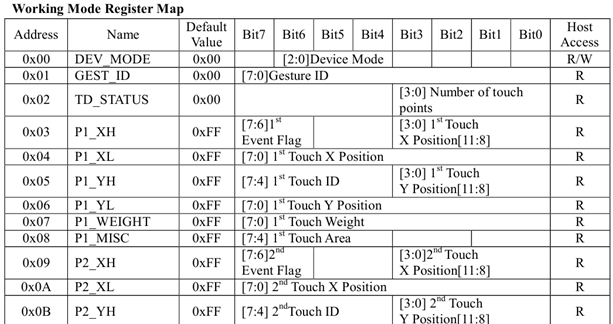
When there is one touch, in the second (counting from zero) the byte is 01, when there is 2, then 02.
00 00 01 00 6F 03 5E 00
00 00 02 80 08 03 72 00
Let's note. NT – number of touch points. The registers are simply read in order, 8 at a time. Apparently, this was done to reduce the number of parcels with the address and save traffic.
Reply to 00: ?? ?? NT XH XL YH YL ??
The zero byte is generally always 00. It looks like Device Mode. 00 is working mode.
The first byte in all the touches and swipes to the right tested so far is 00. To be honest, I expected that the swipe to the right would be recognized as a “move right” gesture, then code 14 would appear in this register. But for some reason this did not happen.
Reply to 00
DEV_MODE GEST_ID? NT P1_XH P1_ XL P1_YH P1_YL P1_WEIGHT?
Reply to 08
P1_MISC? P2_XH P2_XL P2_YH P2_YL P2_WEIGHT P2_MISC ??
You can notice that when touch #1 is released, P1_MISC becomes FF. Before release P1_MISC = 00.
When releasing P1_XH P1_ XL P1_YH P1_YL P1_WEIGHT changes to FF FF FF FF FF.
Before release P1_WEIGHT=00
Answer to 10
?? ?? ?? ?? ?? ?? ?? ??
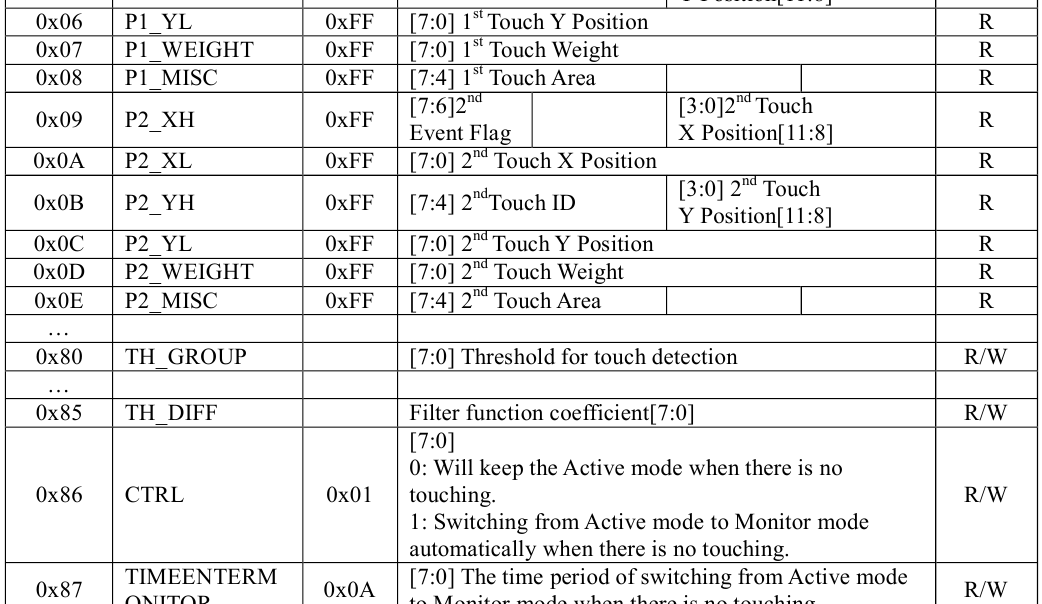
There is no description of registers 0E to 80. I wonder if these are the parameters of point No. 3, gesture parameters, or simply registers reserved for modernization?
❯ Briefly about the main thing
There are touch panels with their own controller on the cable. Typically, such a controller communicates with the phone processor via I2C. Additionally, a reset line (Reset) and an interrupt line (INT) are used.
The experiments were carried out on some Chinese iPhone 6(S). There are probably many different copies.
The touch panel controller is on the cable here, Focal Tech FT6336DMB.
Using a logic analyzer, we recorded and analyzed more than ten files with different touch options (different coordinates, gestures, number of touch points, etc.) It was possible to find out the structure of the messages.
This controller detects a maximum of two touches at a time.
I can't make gestures yet. I tried moving two points immediately from left to right, then the edge of the palm in the same way. I tried increasing or decreasing the scale. But I can't trigger the gesture. Perhaps gestures still need to be enabled.
To be continued.)
I express my gratitude to Dr. Shtrikh for the cute raccoon!
I liked the project and the article – share your impressions!
Feel free to write comments, your opinion is important to us 😊.
News, product reviews and competitions from the Timeweb.Cloud team - in our Telegram channel ↩

Read also:
- ➤ It's complicated about simple things. The most popular tunneling protocols, dynamic routing and principles of their operation
- ➤ To the stars on the domestic BIS 1537ХМ2: we look at the module of the integrated inertial-astrosatellite system
- ➤ JavaScript: Data Structures and Algorithms
- ➤ How the Chinese made an “iPhone on Windows”: look at the Meizu M8
- ➤ Flashback Runner
Why This Matters In Practice
Beyond the original publication, Touch simulator. Ch1 We explore capacitive touch screen matters because teams need reusable decision patterns, not one-off anecdotes. He deftly held the tools and soldered the last wires. All so fluffy and beautiful. The smoke rose floridly, and the pleasant smell of rosin...
Operational Takeaways
- Separate core principles from context-specific details before implementation.
- Define measurable success criteria before adopting the approach.
- Validate assumptions on a small scope, then scale based on evidence.
Quick Applicability Checklist
- Can this be reproduced with your current team and constraints?
- Do you have observable signals to confirm improvement?
- What trade-off (speed, cost, complexity, risk) are you accepting?
FAQ
What is this article about in one sentence?
This article explains the core idea in practical terms and focuses on what you can apply in real work.
Who is this article for?
It is written for engineers, technical leaders, and curious readers who want a clear, implementation-focused explanation.
What should I read next?
Use the related articles below to continue with closely connected topics and concrete examples.





